For accounting firms ready to move on — without starting over
If you’ve been running your firm on Practice CS, you already know the feeling.
The software still works. It just works the way it did fifteen years ago. The interface hasn’t changed. Seeing where work stands means running a report, because there’s no dashboard that shows you. And somewhere along the way, your team started working around it: spreadsheets for workflow tracking, sticky notes for follow-ups, manual exports for billing.
One Practice CS user put it plainly during a recent sales conversation with Firm360:
“They haven’t made one damn change in 20 years. It’s too complicated and so my team just made Excel spreadsheets with all of their clients.”
If this sounds familiar, this guide is for you.
Why firms are leaving Practice CS now
In more than 500 conversations we have had with CPA firms over the past six months, replacing outdated Thomson Reuters products — Practice CS and FileCabinet CS in particular — was the #1 reason firms began evaluating new practice management software.
For most firms there’s no single tipping point. The frustrations pile up, and they pile up in predictable places:
Project visibility is a guessing game. There’s no easy way to see at a glance where every client’s work stands without running detailed reports. Partners and managers end up chasing status updates instead of getting them automatically.
“It was becoming unmanageable. Frankly, I don’t know if I’d still be in this role if we hadn’t made a change.” — Fancher Sargent, CRS CPAs
It doesn’t talk to anything else. Practice CS sits in its own world. Your team logs time somewhere else, tracks documents somewhere else, communicates with clients somewhere else, and bills somewhere else.
“Onboarding a new client meant setting them up in five different places.” — Fancher Sargent, Managing Partner, CRS CPAs
The client experience is dated. NetClient CS was built for a different era. Clients find it difficult to use. Staff find it difficult to manage. And without automated reminders, your team spends hours chasing clients for documents they should be uploading on their own.
Multi-service firms lose visibility across departments. For firms running both tax and bookkeeping, Practice CS creates a blind spot: it runs the tax side and nothing else, so the rest of the firm lives somewhere the software can’t see
“We didn’t even know from a software standpoint with one client who was the bookkeeper and who was the tax manager. We just had to go talk.” — Brian Moyer Moyer & Company
Support has gotten harder. As Thomson Reuters has concentrated resources on newer products, firms running Practice CS have noticed. Getting help takes longer. Updates are infrequent. And with FileCabinet CS now officially sunsetting in 2027, the writing is on the wall for the broader CS Professional Suite stack.
The conversation is already happening at industry conferences.
“When I go to conferences that are Thomson Reuters shop based, the side conversations are: what are y’all using to run the firm? Firm360 is not only gushing out of my mouth, but I’m starting to hear ‘me too, me too.’ Nobody loves Practice CS or Onvio.” — Brian Moyer, Managing Partner, Moyer & Company
Is Practice CS being discontinued?
Thomson Reuters has not announced a sunset date for Practice CS. But FileCabinet CS — its companion document management product — officially sunsets on December 31, 2027, and Thomson Reuters has been steering firms toward its cloud products for years.
For most firms the real question isn’t whether Practice CS eventually gets discontinued. It’s whether it makes sense to keep building on a platform that’s no longer the center of its vendor’s roadmap. The FileCabinet CS sunset forces a document management decision by the end of 2027 anyway. Firms that treat that deadline as an opportunity to consolidate the whole stack only have to migrate once.
What Firm360 replaces (and what it doesn’t)
This is the part that matters most for firms running the full CS Professional Suite.
Firm360 is a complete practice management platform. It replaces the tools you use to run your firm — not the tools you use to do tax work.
| What you’re replacing | What it becomes in Firm360 |
| Practice CS | Project management, time tracking, reporting |
| FileCabinet CS | Document management |
| NetClient CS | Client portal |
| GoFileRoom | Document management |
UltraTax stays. Firm360 integrates directly with UltraTax. You keep the tax software your team knows. Firm360 replaces everything around it.
This distinction matters because the most common concern firms have when evaluating a Practice CS replacement is whether they’ll be forced to retrain staff on tax software at the same time they’re learning a new practice management system. The answer is no. UltraTax is not part of the switch.
Built by someone who ran your stack
Firm360’s co-founder Brandon Gray, CPA ran Practice CS, FileCabinet CS, and UltraTax at his own accounting firm for more than 20 years.
When the limitations caught up, he went looking for a practice management platform that could replace the fragmented stack without touching UltraTax. He couldn’t find what he needed.
So he built Firm360.
Hear it from Brandon directly (3 minutes):
That origin matters for one practical reason: the platform was designed by someone who intimately understood what Practice CS does well and where it falls short. He kept the logic accountants already use and cut the windows.
Other firms have noticed the same thing.
“You can tell this was built by someone with accounting experience because everything makes sense. This has been the best decision we’ve ever made.” — Alessandro Cacciani Saranto P. Calamas CPA
For Brian Moyer, Managing Partner at Moyer & Company — a firm that ran Practice CS for years before switching — that story was part of what made Firm360 worth a serious look.
“Firm360’s founder was seemingly solving the problem we had: a Thomson Reuters shop that knew Practice CS’s limitations. We thought, man, there’s already a solution in place specific to our pain points.” — Brian Moyer, Managing Partner, Moyer & Company
What’s actually different about Firm360
One place for everything. Projects, documents, time, billing, client communication, and reporting all live in the same system. Your team stops switching between windows and starts working from one screen.
Real-time visibility. Partners and managers can see where every project stands without running a report. Work in progress, upcoming deadlines, staff workload: it’s all on the dashboard before anyone asks.
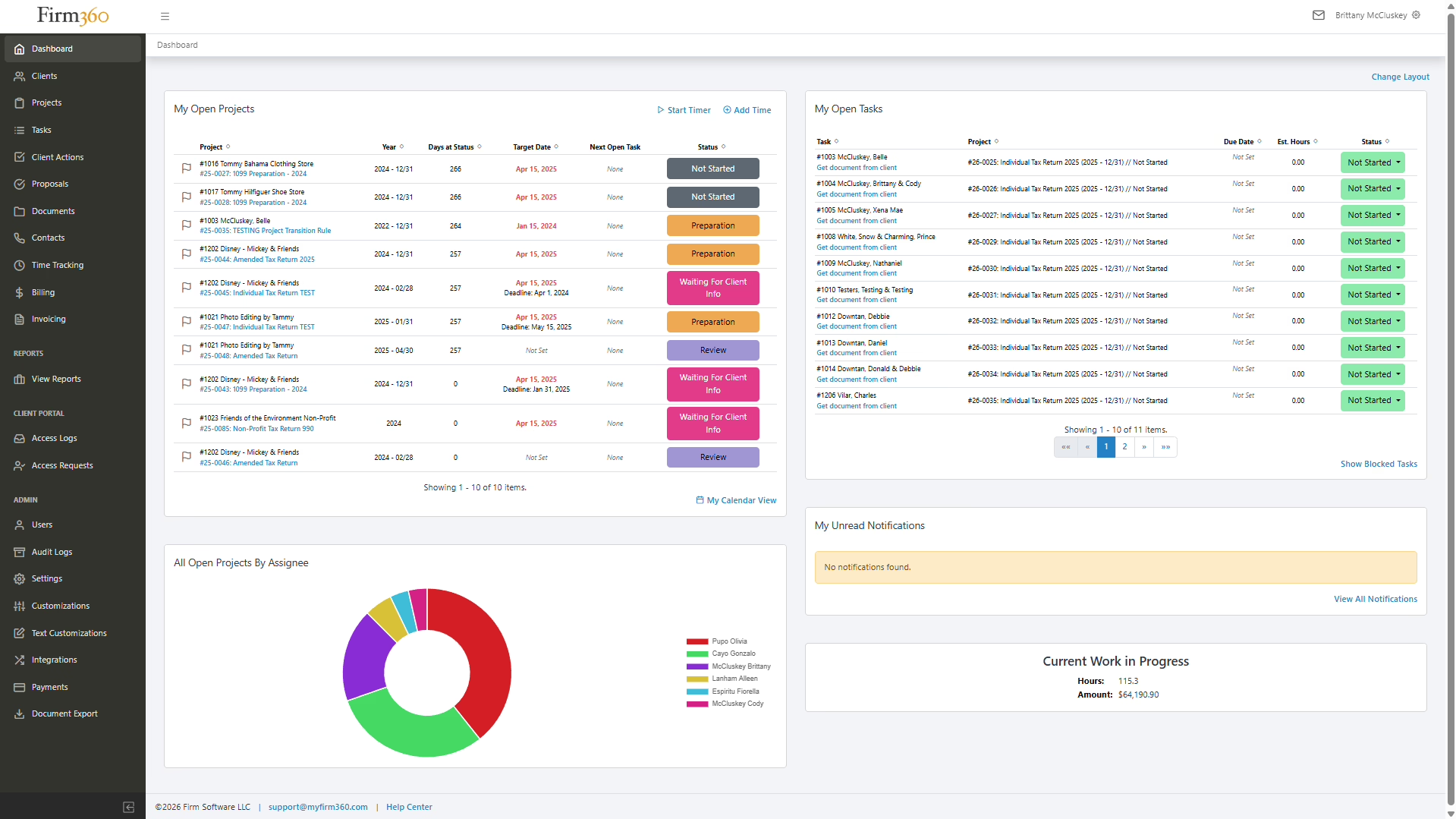
A client portal your clients will actually use. Firm360’s client portal is designed for the client experience first. Automated reminders, document requests, e-signatures, and secure messaging, without requiring your clients to figure out a clunky interface.
“Clients love the portal. Even my 80-year-old clients log in, upload documents, and pay bills with no issue. They don’t have to drive to the office anymore.” — Josh Stats Foresight CPA Group
Firm360 replaces the inbox as the primary channel for client communication.
Billing that runs itself. Time entries flow directly into invoices. Invoices go out on your schedule. Clients can pay online. No more printing, scanning, or manually entering hours into QuickBooks.
“I remember my staff printing billing reports that were pages and pages and pages and pages, and they would grab a pen and mark it all up. PracticeCS was inefficient and old school.” — Brian Moyer, Managing Partner, Moyer & Company
A short learning curve. New staff get up to speed quickly because the system is laid out the way accountants already think.
“We just hired three new teammates this month. Our operations person did a two-hour training with them. It actually took one — they were out in an hour. I’ve heard them compare it to where they came from and how much easier it is to use.” — Brian Moyer, Managing Partner, Moyer & Company
Workflow automation that actually works. Build your firm’s workflows once. Assign them in bulk by entity type. Let the system move work through statuses automatically, notify the right people, and flag anything that’s sitting still too long.
“The automated client reminders have probably saved us two seasonal employees.” — Rebecca Skager, Regional Account Director, CB Accounting
UltraTax integration. Firm360’s Filesync Tool connects directly with UltraTax. Tax returns saved in UltraTax automatically appear in the right client folder in Firm360. No manual uploading, no drag-and-drop.
What switching actually looks like
The two questions every firm asks before switching: How hard is the data migration? And how long does it take?
Here’s the honest answer to both.
How do you migrate data from Practice CS?
Your Practice CS client data comes with you. Firm360 provides a custom export format specifically for Practice CS. You run the report, format the spreadsheet using the import template, and Firm360’s support team handles the import.
Before you export, make sure:
- Practice CS is up to date
- All clients have Entity Types assigned
- Primary contacts on business clients are set to a person, not a business name
Once your data is exported and formatted, Firm360 imports it for you. You’re not doing this alone.
For firms using UltraTax, client names and client IDs need to match exactly in both systems for the Filesync Tool to work automatically. Firm360’s onboarding team walks you through this during setup.
You can find the full step-by-step instructions in the Onboarding Process Overview and the Practice CS data export guide.
What does Firm360 onboarding look like?
Firm360’s onboarding is structured around four workshops, each with a specific focus:

Kickoff Call (15 minutes) Review the onboarding plan, schedule workshops, get your logo submitted and client data import started.
Workshop 1 (1-1.5 hours) User profiles and roles, dashboard overview, adding clients and contacts, client portal and messaging, document management.
Workshop 2 (45 min-1 hour) Document and messaging templates, project statuses and tasks.
Workshop 3 (1.5 hours) Workflow and task management, client actions, bulk assigning projects by entity type.
One thing firms switching from Practice CS consistently find: the project setup transition is less painful than expected. Firm360’s onboarding team will ask for examples of your existing Practice CS workflows and translate them directly into Firm360 terminology during the project discovery and template-building workshops. The logic you’ve already built carries over.
Workshop 4 (1-1.5 hours) Time tracking, billing and invoicing, payments, admin settings.
There’s also a dedicated client data import specialist and a post-onboarding check-in call. Most of the timeline is driven by how quickly your team completes the homework between sessions, so firms that stay on top of the setup move faster.
“Honestly, it was the best onboarding we’ve had with any software. I was expecting a time-intensive process, but it was really, really easy.” — Josh Stats, Partner, Foresight CPA Group
How long does switching from Practice CS take?
Most firms complete implementation in roughly 8-12 weeks. The workshops themselves total 5-6 hours across four sessions; the rest of the timeline is driven by your pace on the between-session work — client data collection, project template setup, and workflow customization. CRS CPAs, a 50-person firm with five offices, went from kickoff in August to fully live by November 1, with 100% staff adoption within three months.
Most firms plan their implementation during a lower-volume period so they’re fully live before the next busy season.
What firms say after switching
Henssler CPAs & Advisers ran the full CS Professional Suite — UltraTax, Practice CS, FileCabinet CS, Accounting CS, and fixed assets — before switching to Firm360.
After switching:
- 22% increase in submitted tax returns
- Up to 36 admin hours saved per month across three administrators
- 350+ engagement letters processed in under six weeks
Henriette Nielsen, Operations Coordinator at Henssler CPAs & Advisers:
“With Thomson Reuters products, you get an onboarding team, but then they kind of dissolve. With Firm360, you’re never on your own.”
Moyer & Company — a 15-year-old firm with three partners, roughly 20 employees, nearly 700 tax returns, and 100+ monthly accounting clients across Franklin, TN and Chattanooga — ran Practice CS for tax, Google Docs for bookkeeping project management, Dropbox for documents, and a separate time tracking tool before switching to Firm360.
After switching:
- 4 disconnected systems consolidated into one platform
- New hires operational in about an hour of training
- Firm-wide move to subscription billing — a model they couldn’t have executed in Practice CS or Google Docs
Brian Moyer, Managing Partner at Moyer & Company:
“I would do it all over again. The value is so deep for us. We operate better, we operate faster, we operate more accurately. Our teammates are happier, clients are happy, and I don’t know that we’ll be able to outgrow it.”
Common concerns — answered directly
“We’re worried about losing data from Practice CS.” You won’t. Firm360 provides a custom export format built specifically for Practice CS. Your client data, entity types, partner assignments, and contact information all transfer over. The support team handles the import.
“Our team is already stretched thin. We can’t take on a big implementation.” Most firms schedule implementation during a lighter period — summer is the most common choice. The workshops are structured so you’re building the system as you learn it, not sitting through hours of training before you can touch anything. And once you’re live, the ramp-up for new staff is faster than most firms expect. Moyer & Company got three new hires fully oriented in under an hour.
“We don’t want to replace UltraTax.” You don’t have to. Firm360 integrates with UltraTax directly. The switch is about replacing Practice CS, FileCabinet CS, and NetClient CS — not your tax software.

“We’ve tried to leave Practice CS before and couldn’t find anything good enough.” This comes up more than you’d expect. Firms stay on Practice CS years past the frustration point because they assume every alternative means an operational overhaul. Firm360 is designed to feel familiar to accountants because it was built by one.
“What happens if we need support after onboarding?” Firm360’s support team is US-based, full-time employees — not a contractor network or offshore team. Post-onboarding support is part of the subscription.
“With other software, getting support was a nightmare. With Firm360, I usually get an answer within an hour.” — Josh Stats, Partner, Foresight CPA Group
How does Firm360 compare to Canopy, Karbon, and TaxDome?
If you’re evaluating Practice CS alternatives, you’ll likely also look at Canopy, Karbon, TaxDome, and Financial Cents. All are credible platforms, and the right fit depends on your firm’s size and service mix.
Firm360’s difference for Thomson Reuters firms comes down to two things. First, it was built by a CPA who ran Practice CS, FileCabinet CS, and UltraTax for more than 20 years, so the workflows map naturally to how CS Professional Suite firms already operate. Second, the UltraTax integration means your tax software stays put; the switch touches everything around it, not the returns themselves.
For detailed comparisons, see Firm360 vs Canopy, Firm360 vs Karbon, and Firm360 vs TaxDome.
Ready to see it?
Firm360 offers personalized demos for firms evaluating Practice CS alternatives. The demo is built around your firm’s specific setup: entity types, workflow structure, team size.