If you’ve made it through a few tax seasons, you already know what a bottlenecked workflow feels like. Every tax season, firms face the same wall: a surge of returns, a flood of client follow-ups, and a creeping sense that work is falling through the cracks. Staff stay late chasing missing documents. Reviewers get backed up. Partners lose visibility into where anything stands until someone asks a question no one can answer confidently.
The good news? A well-defined process map and the right automation tools can change all of that — not by replacing the judgment that makes your firm valuable, but by removing the friction that gets in the way of it.
This article walks through a seven-step tax workflow designed for CPA firms who want to standardize their operations and eventually automate the process. The key principle: standardize first, then automate. Automation layered on top of a chaotic process just produces chaos faster. But automation built on a clear, repeatable workflow? That’s where firms start gaining real ground.
For a practitioner’s perspective on how firms can standardize and automate their tax workflows, we spoke with Joshua Stats, CPA, and Partner at Foresight CPA Group, who has spent years refining tax processes across multiple practice management platforms.
What Is Tax Workflow Automation for a CPA Firm?
Tax workflow automation is the use of software and defined rules to systematically route a tax return through every stage of preparation — from intake and document collection through preparation, review, delivery, and e-file — while triggering reminders, standardizing communications, and giving everyone on your team clear visibility into what’s happening, without requiring a manager to manually check in at every step.
This isn’t a replacement for professional judgement. A tax preparer still needs to interpret and process the information they receive. A reviewer still needs to catch nuances or errors. Automation handles the coordination layer: who has the ball, what’s missing, what’s next, and whether deadlines are being met.
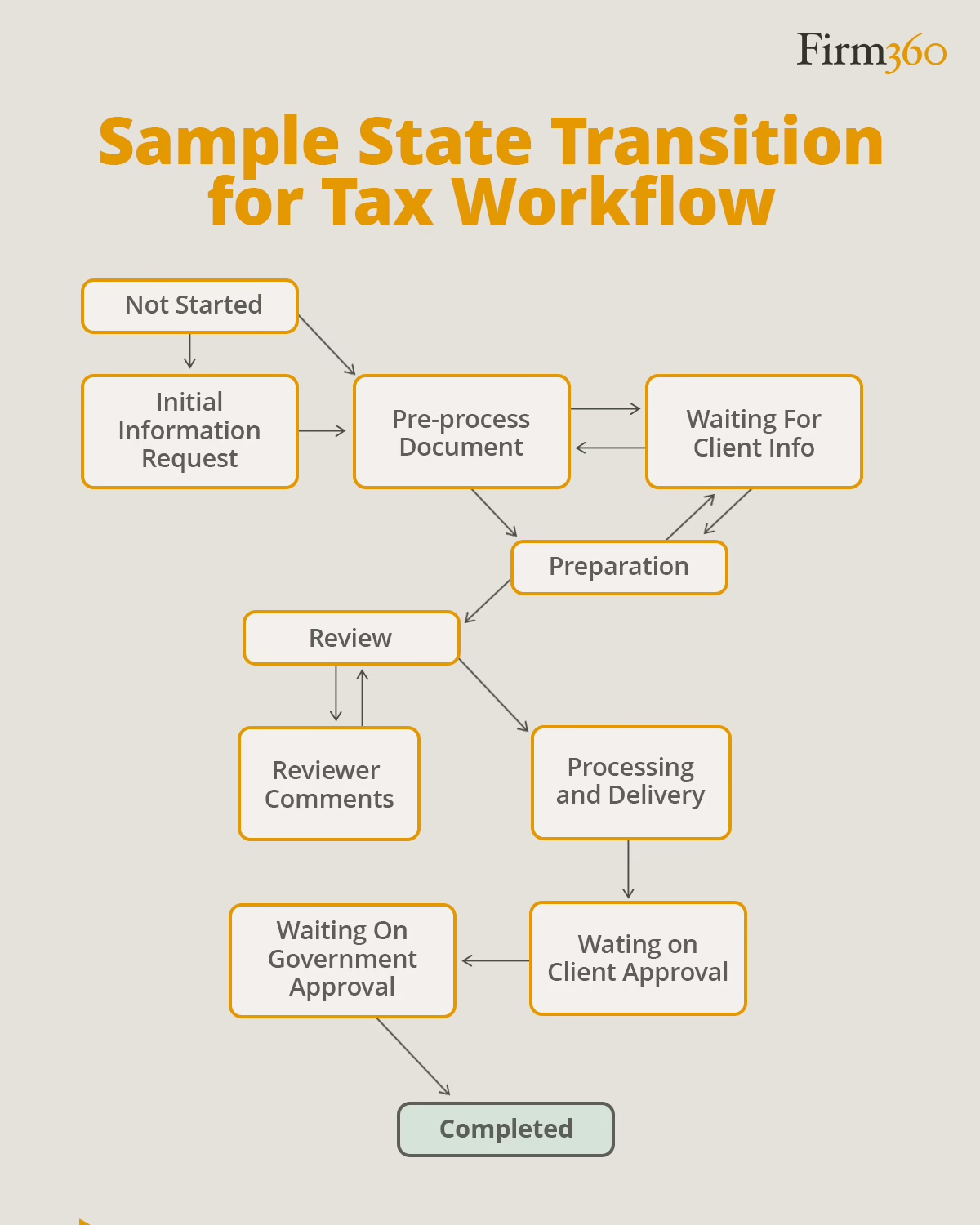
Step-by-Step Tax Workflow Process Map
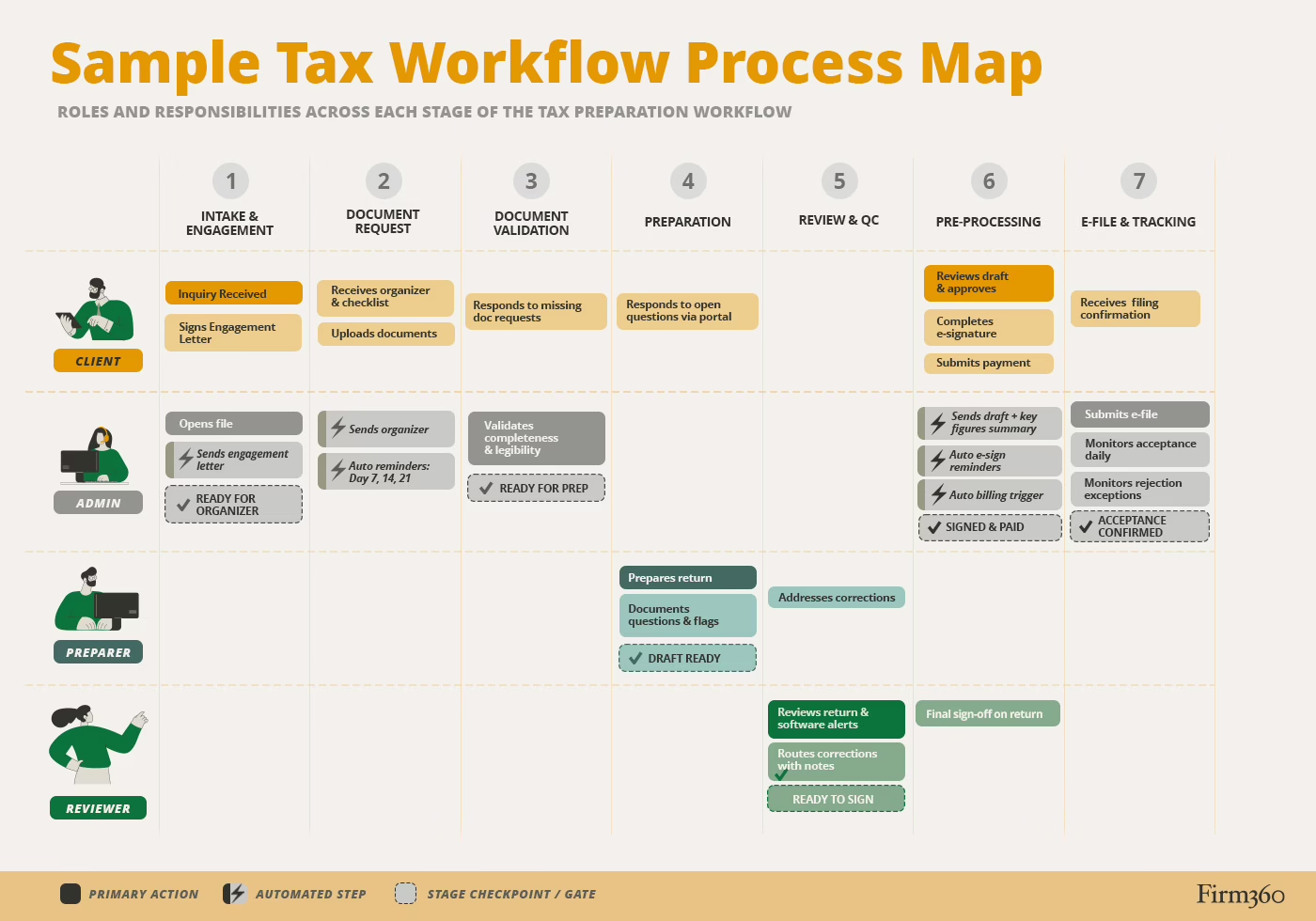
The seven steps below represent a complete, repeatable workflow for individual tax returns. Not every firm will need every step in exactly this form, but the structure is intentional — each stage has a defined input, a defined output, and clear criteria for moving forward.
Step 1: Intake and Engagement Confirmation
A tax return shouldn’t enter your production pipeline until you’ve confirmed the engagement. Intake begins with defining exactly what information is required before a return is considered “ready to start.” This typically includes a signed engagement letter, confirmation of the return type and filing year, and any known changes from the prior year (new business, marriage, sale of property, etc.). Build a short intake checklist (ideally one that can be executed through your practice management system) that every client passes through before their file is opened.
The engagement letter itself should be written strategically. It sets expectations for the client — turnaround time, what they need to provide, and your policy on extensions — and protects the firm. Once the engagement is confirmed and the intake checklist is complete, the return earns a “ready for organizer” status and moves to the next stage.
Step 2: Document Request
Once an engagement is confirmed, the organizer goes out. This is your formal request for the information and documents you need to prepare the return. A strong organizer is specific, client-friendly, and paired with a clear deadline. Of course some clients don’t respond well to organizers, so it’s smart to have standardized alternate guidance to keep those clients on track.
Stats has developed a practical solution.
“Many clients don’t like the organizers. I created a form that I send out to clients automatically through Firm360. It asks basic questions about things like changes in marital status, address, etc. I also include a checklist of the documents we’ve received from them in the past.”
A simple client communication script can make a real difference at this stage. Something like:
“We’ve opened your file for the [year] tax season. Attached is your organizer and document checklist. To hit our target completion date of [date], we need your materials no later than [date]. If you have questions about what’s needed, reply here and we’ll help.”
This sets a tone that is professional, clear, and helpful — without creating an open invitation for scope creep.
Automated reminders are your best friend at this stage. If you are missing documents from clients, set a cadence — day 7, day 14, day 21 after the organizer is sent — that triggers follow-up messages to clients with outstanding documents. These reminders should go out automatically, require no staff intervention, and link directly to the client portal. The goal is to eliminate the “chasing” that consumes so much staff time during busy season.
As documents come in, store them in a single secure location (your practice management software, a secure client portal, or a dedicated folder structure), and enforce naming conventions so files are identifiable at a glance.
Step 3: Document Validation
Collecting documents is half the battle. Validating them is the other half. Not paying attention at this step leads to prep errors and rework later.
Before a return moves to preparation, run it through a validation checklist:
- Completeness: Are all documents on the organizer checklist accounted for?
- Legibility: Are scans readable? Are PDFs complete (not cut off or rotated)?
- Version control: Is this the final version? Have any documents been re-uploaded or corrected?
Step 4: Preparation
Once documents are validated and the return is assigned, preparation begins. This is the core professional work of the firm, and workflow automation’s job here is to support it — not get in the way of it.
Establish a preparation template or checklist for each major return type. This doesn’t need to be prescriptive about tax judgment, but it should cover the structural basics: prior year comparison, carryforward items, estimated payment reconciliation, and any items flagged during intake. Standardizing note-taking conventions — where questions are documented, how findings are flagged for reviewers — reduces the back-and-forth that slows review.
One of the most common time-wasters in preparation is digging through a pile of email threads for client responses to questions that arise during preparation. Solve this by designating a client portal as the single channel for communication during preparation. Questions asked outside that channel get redirected. This sounds small, but it saves significant time at scale.
Step 5: Review and Quality Control
The review stage is where your firm’s quality gets tested. In addition to checking against documents used by preparation staff, be sure to review and address alerts generated by the tax software.
When corrections are needed, route them back to the preparer with specific notes (not just “fix this”), and track correction cycles. If the same preparer is generating rework consistently, that’s a training signal. If corrections are always on the same item type, that’s a template or training gap.
Define “ready to sign” clearly. A return is ready to sign when all reviewer checklist items are marked complete, all preparer questions are resolved, and the file is assembled correctly. Ambiguity here leads to returns sitting in limbo — technically done but not officially approved — which creates phantom bottlenecks that are hard to see and easy to prevent.
Step 6: Pre-Processing
Before a return is filed, it needs to clear three things: client approval, signature, and payment. Handling all three within a defined stage — rather than letting them happen informally — keeps the return moving and prevents it from stalling at the finish line.
Start with client approval. Provide a draft copy of the return along with a summary of key figures. The summary doesn’t need to be long — a one-page recap of what was filed, what the client owes or receives, and anything they should be aware of before next year is enough to give clients the context they need to approve with confidence.
If the client has no questions, they move directly to e-signature. Automated reminders for unsigned documents are essential here. Set expiration rules and let your practice management software handle the follow-up rather than managing it manually. If clients do have questions before signing, route them to a dedicated channel — a client portal messaging feature, not individual staff email — so responses are trackable and the workload stays visible.
Billing should be triggered by a workflow event, not by memory. Most firms invoice when the draft return is shared for client approval, which is a natural and defensible trigger point. Whatever you choose, define it in advance and build it into the workflow. Pair that with consistent payment follow-up using the same systematic cadence you use for document collection — because payment collection is part of the workflow, not an afterthought.
Step 7: E-File and Acceptance Tracking
After signatures and payment are obtained, the return is submitted. For most firms, this step feels like the finish line — and it mostly is. But a rejection or missed confirmation can unravel a timeline that was otherwise on track, so it’s worth treating submission and acceptance as their own defined process rather than an afterthought.
That starts with documenting the basics: who submits, what system they use, and what proof of submission is retained in the file. From there, build a process for tracking acceptance status daily during peak season. When a return is rejected, the questions that matter are simple but need to be answered in advance — who gets notified, within what timeframe, and who is responsible for resolution. Define those rules before the season starts so that rejections get handled quickly rather than quietly stalling while an extension deadline closes in.
Tax Workflow Automation Quick Wins
Automating the entire tax workflow can take some time — especially if you’re doing it for the first time. But you don’t need to automate everything to get meaningful results before busy season. Here’s where to start.
Document requests and reminders are the highest-leverage automation target. Replacing manual follow-ups with automated reminders alone can reclaim significant staff hours over the course of a season. Start here.
E-signature collection is another win. Automating signature requests and follow-up reminders eliminates one of the most common late-stage stalls in the workflow. A return that’s ready to file shouldn’t sit waiting because no one remembered to nudge the client. Set your reminders, define your expiration rules, and let the system handle the follow-up.
Billing triggers close a loop that many firms leave open. Automating the invoice at the point of delivery means billing doesn’t depend on someone remembering to send it.
Software built specifically for accounting firms can make all of this significantly easier. Platforms like Firm360 are designed with these exact workflows in mind — connecting intake, document collection, preparation, review, and billing in one place so nothing moves manually unless it needs to.
Common Failure Points and How to Prevent Them
Missing documents stall the pipeline. This is a common cause of cycle time inflation. The fix is a combination of clear checklists, defined “missing docs” rules, and automated reminders. Don’t rely on staff to remember to follow up when a system can remember for them.
Email as a communication channel. Relying on email to collect documents, answer client questions, and track approvals is one of the most common — and most preventable — failure points in a tax workflow. Threads get buried, responses go to the wrong person, and there’s low visibility into what’s been asked or answered. The fix is to route all client communication through a dedicated client portal and replace manual follow-ups with automated document requests and reminders.
Too many exceptions with no rules. Every firm has clients who need special handling. But when every client becomes a special case, the workflow breaks down. Audit your exceptions periodically. If you’re making the same exception repeatedly, it should become a rule — or a return type with its own template.
These aren’t hypothetical risks — they’re patterns that practitioners see play out every season. Stats is direct about the most common ones:
“The most common breakdowns I see in the tax workflow are missing documents, and slow client responses.”
The good news, he notes, is that practice management software can help reduce these breakdowns by automating reminders and keeping communication in one place. For Stats, the stakes are clear.
“Everything falls apart without practice management software.” — Joshua Stats, Partner at Foresight CPA Group
Metrics to Track During Busy Season
Data doesn’t have to be complicated to be useful. These metrics give you a clear operational picture during peak season — and if you’re using Firm360, several of these are available directly from the reports module.
- Project status aging. How long has each return been sitting at its current stage? The Client Project Status report gives you a global view of this across all active projects. If returns are stacking up at preparation or review, you’ll see it here before it becomes a crisis.
- Staff workload distribution. Are certain preparers or reviewers carrying a disproportionate share of the load? The User Workload report shows currently assigned projects by staff member, making it easier to redistribute work before a bottleneck forms.
- Budget vs. actual hours. Are returns taking significantly longer than planned? The Project Budget to Actual report tracks budgeted hours against hours worked, flagging engagements that are running over before they derail your schedule.
- Document pipeline activity. During the document collection phase, the Client Uploads report gives staff a real-time view of what’s come in and what still needs attention. Monitoring this daily keeps intake moving and prevents validation delays from backing up the whole pipeline.
- Work in progress and billing lag. The WIP report surfaces all unbilled completed work. If finished returns are sitting without an invoice, this catches it — keeping your billing triggers honest and your cash flow predictable.
Conclusion
Tax season doesn’t have to feel like a frenzy. The firms that run the smoothest busy seasons aren’t necessarily the biggest — they’re the ones with a clear, repeatable process that doesn’t depend on heroic individual effort to hold together. That’s something any firm can build. It doesn’t require a full overhaul before April — it requires picking the right place to start and building from there.
For a broader look at running an efficient accounting firm, explore our comprehensive accounting practice management software guide.
Frequently Asked Questions
What is tax workflow automation for CPA firms? Tax workflow automation uses software rules, templates, and routing logic to move work through your tax preparation process systematically — reducing manual follow-up, improving visibility, and ensuring nothing falls through the cracks. It handles coordination and communication so your team can focus on professional work.
What should I automate first in a tax preparation workflow? Start with document requests and reminders. Automating the follow-up cadence for missing client documents is the single highest-leverage improvement most firms can make. It’s visible, measurable, and immediately reduces staff time spent on manual outreach.
How do you reduce document follow-ups during tax season? Use a defined organizer with a specific document checklist, send it with a clear deadline, and build an automated reminder cadence after the organizer is sent. The reminders should go out without requiring staff intervention and should link directly to the client portal.
How do you manage extensions in a standardized workflow? The need for extensions may come up at virtually any stage of the process before the final return is filed. In fact, many firms file them proactively for any return not completed 1-2 weeks before the initial deadline. Treat them as an optional additional step that some returns will go through prior to completion. Use reminders to ensure that they are filed by the relevant extension deadline.
What is the best way to track tax return status across a firm? Use a centralized practice management platform with a real-time status view. Every return should have a current stage (e.g. intake, preparation, review, etc.) that’s visible to anyone who needs it. This eliminates the need for status meetings and reduces inbound questions from both staff and clients.
How do you reduce rework between prep and review? Standardize preparation checklists, establish clear note-taking conventions, and document all open questions in a designated location. When reviewers know where to look for preparer notes and questions are fully resolved before handoff, the rework rate drops significantly.
How long does it take to improve a tax workflow before busy season? Some quick wins — such as standardized organizers, or review checklists — can be implemented in days. A fuller workflow overhaul — particularly one that involves new software — typically takes several weeks, depending on how standardized your existing processes are and how much staff training is involved. At Firm360, onboarding averages 30 days. Either way, the best time to start is well before the season.
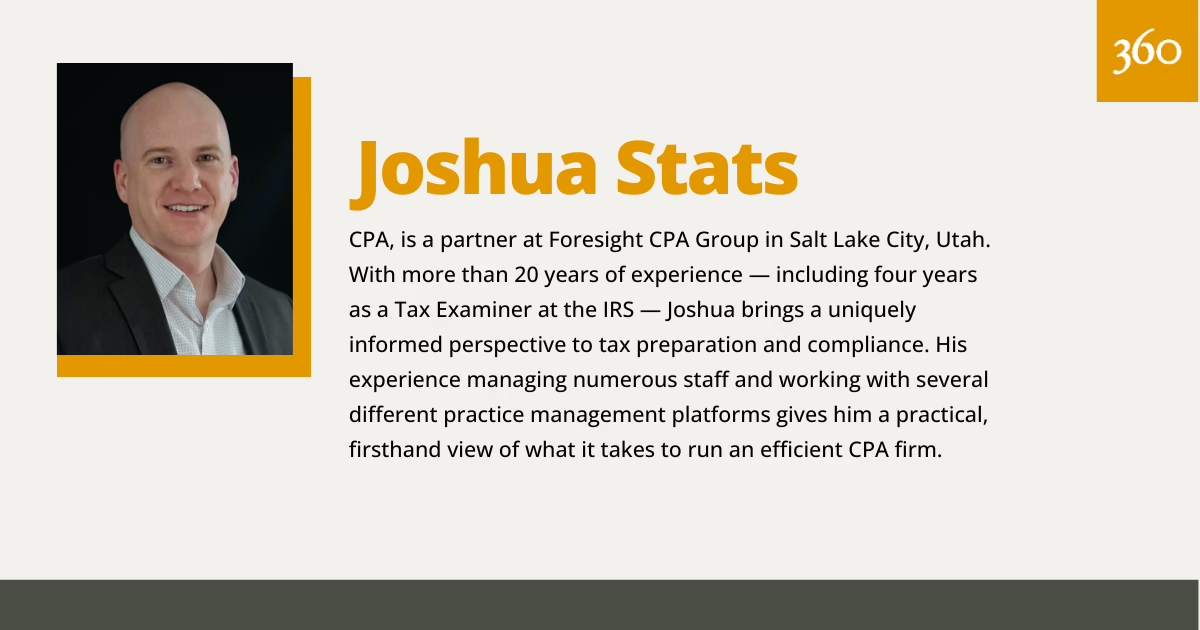
Expert Bio:
Joshua Stats is a partner at Foresight CPA Group in Salt Lake City, Utah. With more than 20 years of experience — including four years as a Tax Examiner at the IRS — Joshua brings a uniquely informed perspective to tax preparation and compliance. His experience managing numerous staff and working with several different practice management platforms gives him a practical, firsthand view of what it takes to run an efficient CPA firm.