Originally published January 2025. Updated June 2026 to reflect current platform capabilities and market options.
We all know the daily challenges of keeping an accounting practice running smoothly. From tax preparation and auditing to advisory services and client communication, the complexity of managing our work demands sophisticated tools for organization and oversight.
While Microsoft 365 and Google Workspace serve essential functions for email and calendar management, and platforms like SharePoint or Google Drive help with file storage, we know from our own experience that your team needs specialized tools with unique workflows that reflect your service offerings — whether that includes tax preparation, audit management, bookkeeping, advisory services, or other specialized work.
This is where purpose-built accounting practice management software becomes essential.
What You’ll Learn in This Guide
- A KPI framework covering four areas of firm health
- What accounting practice management software is and how it differs from generic tools
- Who it’s for — from solo practitioners to mid-sized firms with 50+ staff
- The must-have features checklist every firm should evaluate
- A practical implementation plan overview (30/60/90 days)
- A security and permissions checklist built for accounting firms
What Is Accounting Practice Management Software?
Accounting practice management software is specialized software designed specifically to manage accounting firm operations. Unlike general business software, these platforms integrate accounting-specific workflows, secure client portals, document management, and other industry-standard processes into a comprehensive system.
Having experienced the limitations of generic tools firsthand, we’ve seen the transformative impact that purpose-built solutions can have on firm efficiency.
Practice Management vs. Your Current Stack
It’s helpful to think of practice management software as the operating system for your firm’s work — not simply another storage layer. Google Drive and SharePoint are file repositories. Microsoft 365 and Gmail are communication tools. What they can’t do is track whether a tax return has been reviewed, flag that a client hasn’t responded to a document request, or surface who on your team is overloaded heading into a deadline.
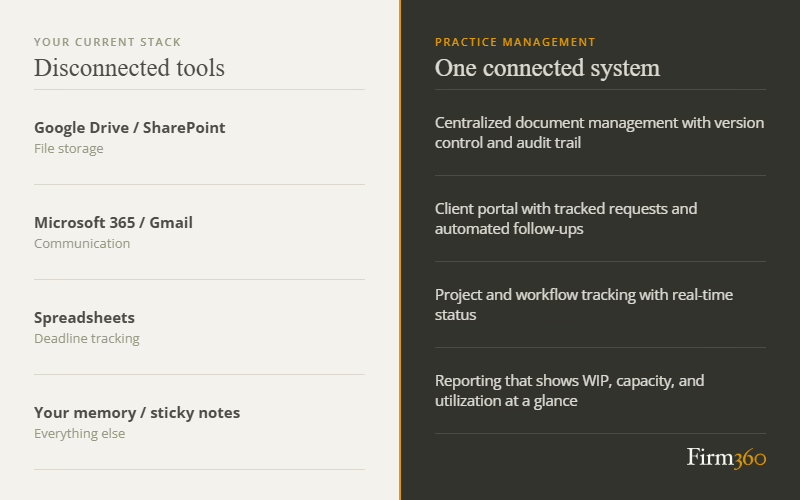
Practice management software connects those dots. It sits at the center of how work moves — from project creation to client delivery to invoice — and gives leadership the visibility to manage the firm, not just react to it.
Why Do Accounting Firms Need Purpose-Built Practice Management Software?
As firms grow, so does the complexity of managing operations. More team members, expanding client relationships, and increasingly intricate workflows all demand careful coordination.
Signs You’ve Outgrown Spreadsheets and Disconnected Tools
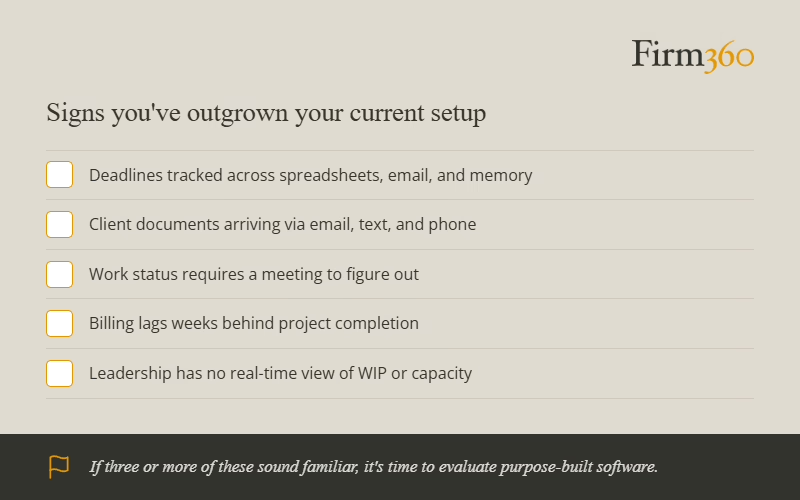
Most firms don’t recognize the problem until something breaks — a missed deadline, a dropped client follow-up, a partner who can’t get a straight answer on where a return stands. Here are the signals to watch for:
- Deadlines are tracked in too many places — spreadsheets, email, sticky notes, and memory
- Client documents arrive via email, text, and phone call instead of a centralized system
- Understanding work status requires a meeting rather than a quick dashboard check
- Billing lags weeks behind project completion because time hasn’t been captured consistently
- Leadership has no real-time visibility into WIP, capacity, or utilization
In our experience, using dedicated practice management software to manage projects, client relationships, and firm operations significantly improves profitability and client retention, while also reducing the administrative burden on our teams.
Key Benefits of Accounting Practice Management Software
Accounting practice management software transformed our work lives. These benefits have been invaluable:
1. Streamlined Workflow Management
Practice management software automates routine tasks and standardizes workflows, ensuring consistency across all client engagements. This systematization helps maintain quality control while reducing the time spent on administrative tasks.
2. Advanced Client Communication
Firms and clients benefit from secure client portals and communication tools that facilitate protected document sharing, real-time updates, and efficient collaboration between our teams and clients.
3. Enhanced Client Experience
Having been on both sides of client relationships, we understand the value of automated notifications, secure document sharing, e-signatures, and online payment options. These features give clients the professional experience they expect from a modern accounting firm.
4. Improved Time Tracking and Billing Accuracy
These systems provide precise time tracking and billing capabilities, ensuring all billable hours are captured and accurately invoiced. We’ve seen this lead to improved revenue recognition and better profitability tracking across multiple firms.
5. Better Resource Allocation
With comprehensive visibility into staff availability and project requirements, we can optimize resource allocation, ensuring the right professionals are assigned to appropriate tasks.
6. Regulatory Compliance Management
We understand the critical importance of maintaining compliance with professional standards and regulations. Practice management software helps through built-in checks, automated documentation, and standardized procedures.
7. Industry-Specific Analytics and Reporting
These systems provide detailed insights into firm performance, including metrics on productivity, profitability, and staff utilization that are specifically relevant to accounting practices.
8. Secure Document Management
Having experienced the challenges of document management firsthand, we appreciate how practice management software offers secure, centralized document storage with version control, audit trails, and easy retrieval capabilities.
Benefits in Practice: What Changes Day to Day
Here’s how the core capabilities translate into measurable outcomes for your firm:
| Capability | Practical Outcome |
| Workflow automation | Faster engagement cycle time; fewer internal follow-ups and dropped handoffs |
| Advanced reporting | Better capacity planning; partners can see utilization and WIP in real time |
| Time tracking and billing | Fewer write-offs; faster invoicing; improved realization rates |
| Document management | Reduced rework; stronger security posture; no more hunting for files |
| Client portal | Less email back-and-forth; faster document turnaround; better client satisfaction |
Generic Project Management Software Simply Isn’t Enough
We often hear colleagues ask: “Why should I invest in an accounting practice management solution when there are less expensive project management tools available?”
We tried that approach ourselves. While general project management platforms may seem cost-effective initially, they lack the specialized capabilities and support that accounting and CPA firms need. These generic tools are designed for broad applicability across industries, whereas accounting practice management software is purpose-built for accountants.
We discovered that attempting to adapt a general project management solution required significant customization and integration work, ultimately costing more in time and resources than implementing a specialized accounting solution.
If You Insist on Using Generic Tools, Here’s What You’ll Still Need to Solve For:
- A client portal with secure document exchange and access controls
- Document software with version control and a clear audit trail
- Billing triggers tied directly to project completion and time logged
- Role-based reporting on WIP, utilization, and realization
Be Prepared to Address 3 Common Implementation Challenges
Having guided numerous firms through technology transitions, we’ve identified these common challenges and their solutions:
Challenge #1: User Adoption Resistance
We’ve seen how staff members may resist adopting new software due to comfort with existing systems or fear of change.
Solution: Implement comprehensive training programs and highlight the benefits of the new system through practical demonstrations. We’ve found that identifying internal champions who can support their peers makes a significant difference in adoption rates.
Challenge #2: Data Migration Complexity
We know that transferring existing client data and historical records can be complex and time-consuming.
Solution: Develop a detailed migration plan and work with software vendors who offer migration support services. Breaking the process into manageable phases helps maintain operations during transition.
Challenge #3: Integration Issues
Having experienced integration headaches ourselves, we know that ensuring smooth integration with existing accounting and tax software can be challenging.
Solution: Choose software with proven integration capabilities and conduct thorough testing before full implementation. Begin with the most critical integrations, and phase in additional integrations once the previous ones have been validated as successful.
The firms that navigate these challenges best aren’t the ones that avoid them — they’re the ones that plan for them. A structured rollout makes all the difference.
What Are the Must-Have Features in a Practice Management Platform?
As you evaluate different software options, understanding both core and advanced features will help you make an informed decision for your firm. We’ve compiled this list based on our own implementation experiences and feedback from firms of various sizes.
Core Practice Management Features
These foundational features form the backbone of any reliable accounting practice management solution:
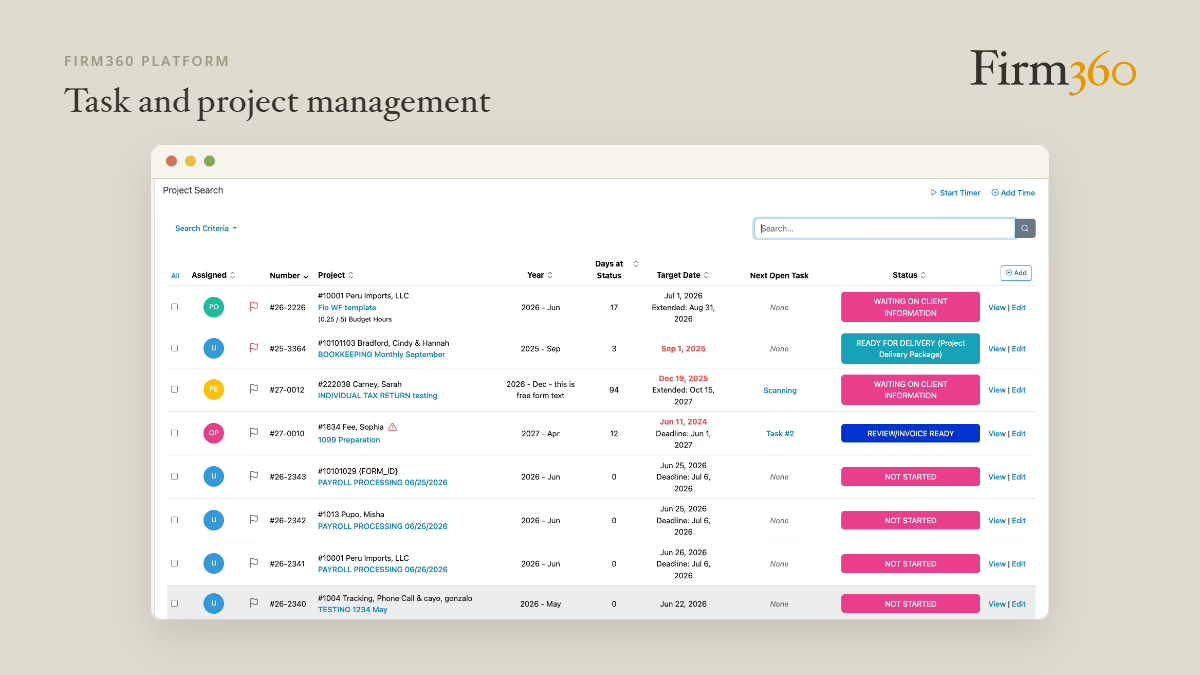
Task/project management
Missing tax deadlines or audit milestones isn’t an option. Robust tracking tools help you monitor every project’s status and ensure nothing falls through the cracks, especially during busy season when your team is managing hundreds of deadlines.
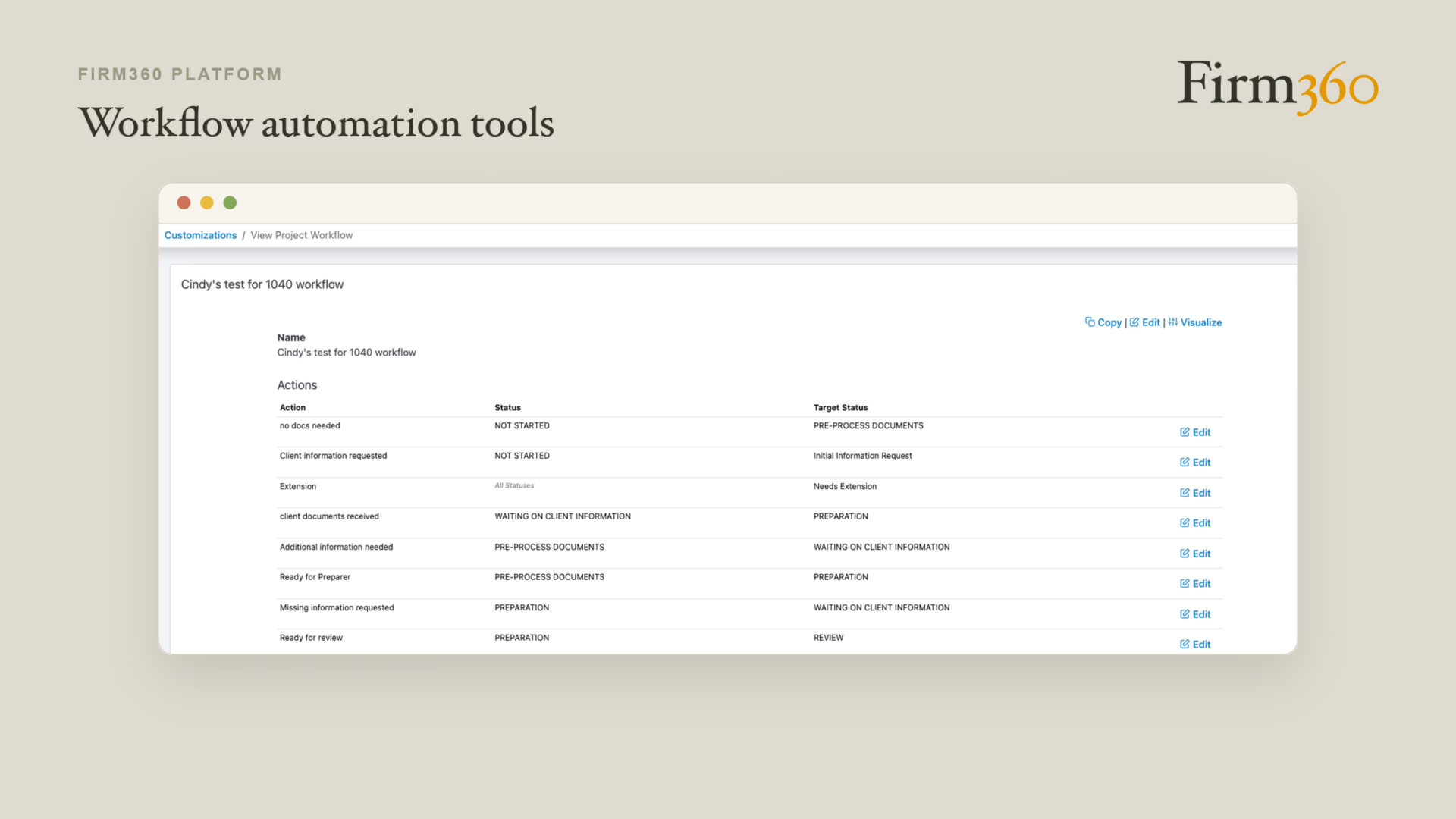
Workflow automation tools
Standardizing recurring tasks ensures consistency and reduces errors. Automation handles routine handoffs — assigning the next task when the previous one completes, generating recurring projects on schedule, and triggering reminders without manual input — so your team can focus on higher-value work rather than administrative overhead.
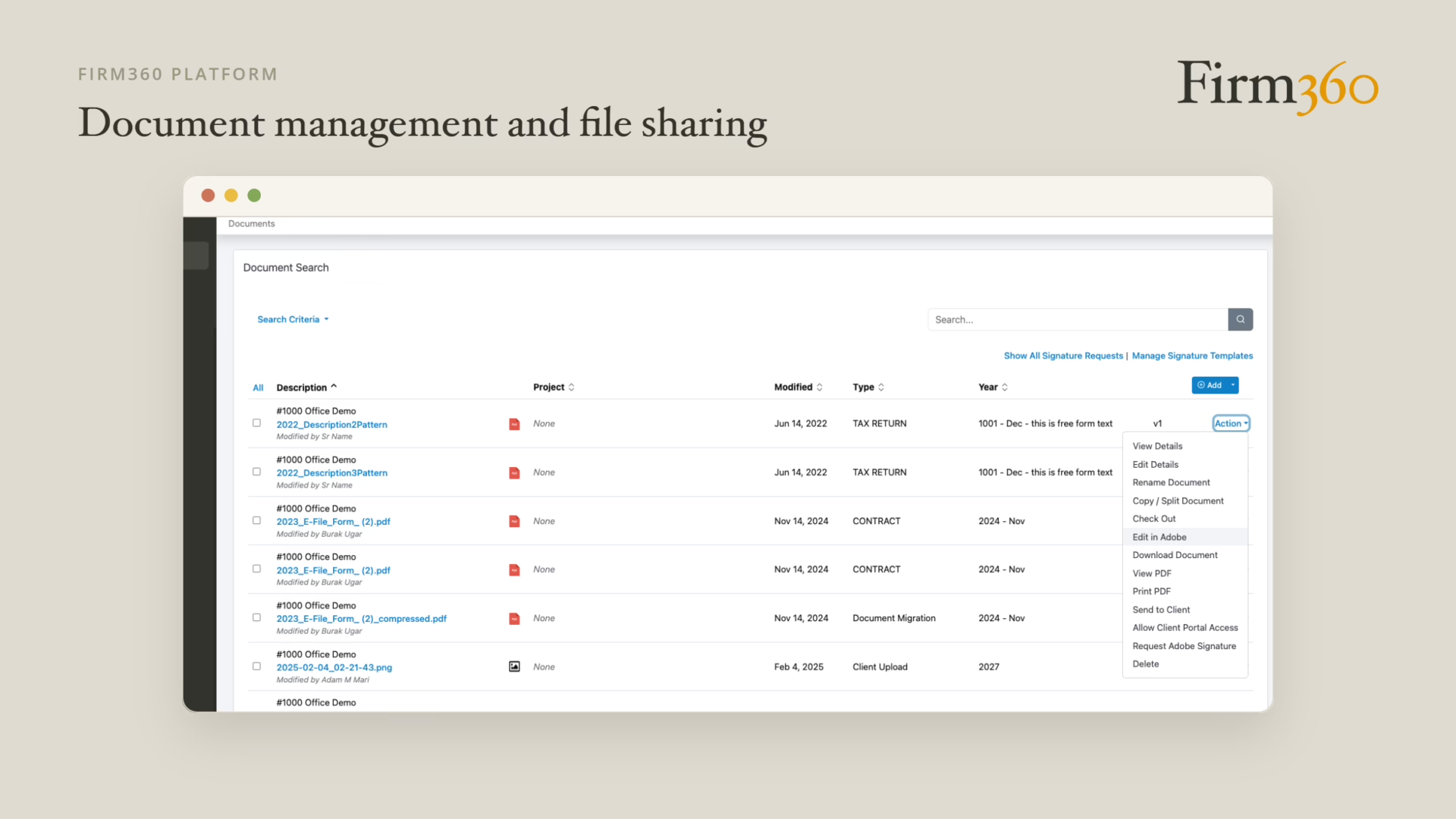
Document management and file sharing
A centralized document management system eliminates the endless email thread hunt. Version control ensures teams are always working from the most current file, and a clear audit trail supports compliance requirements. When a partner needs to find a client’s prior-year return, the answer should be seconds away — not a search across three systems.
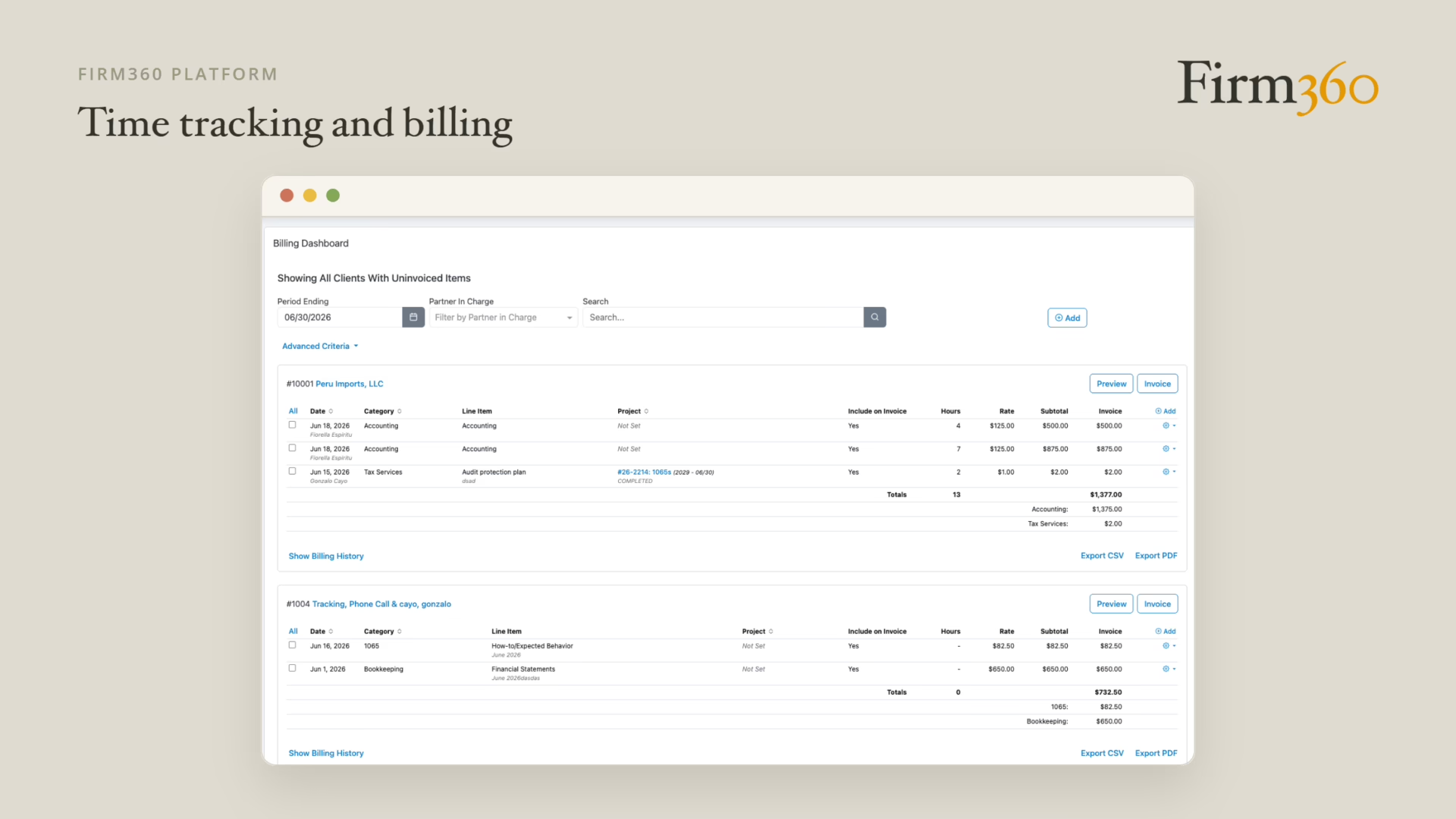
Time tracking and billing management
Accurate time tracking directly impacts your firm’s profitability. The right system makes it easy for staff to capture time as they work, for managers to review and approve, and for billing to generate invoices and collect payment — all without leaving the platform. Every hour that goes uncaptured is revenue written off before it’s even considered.
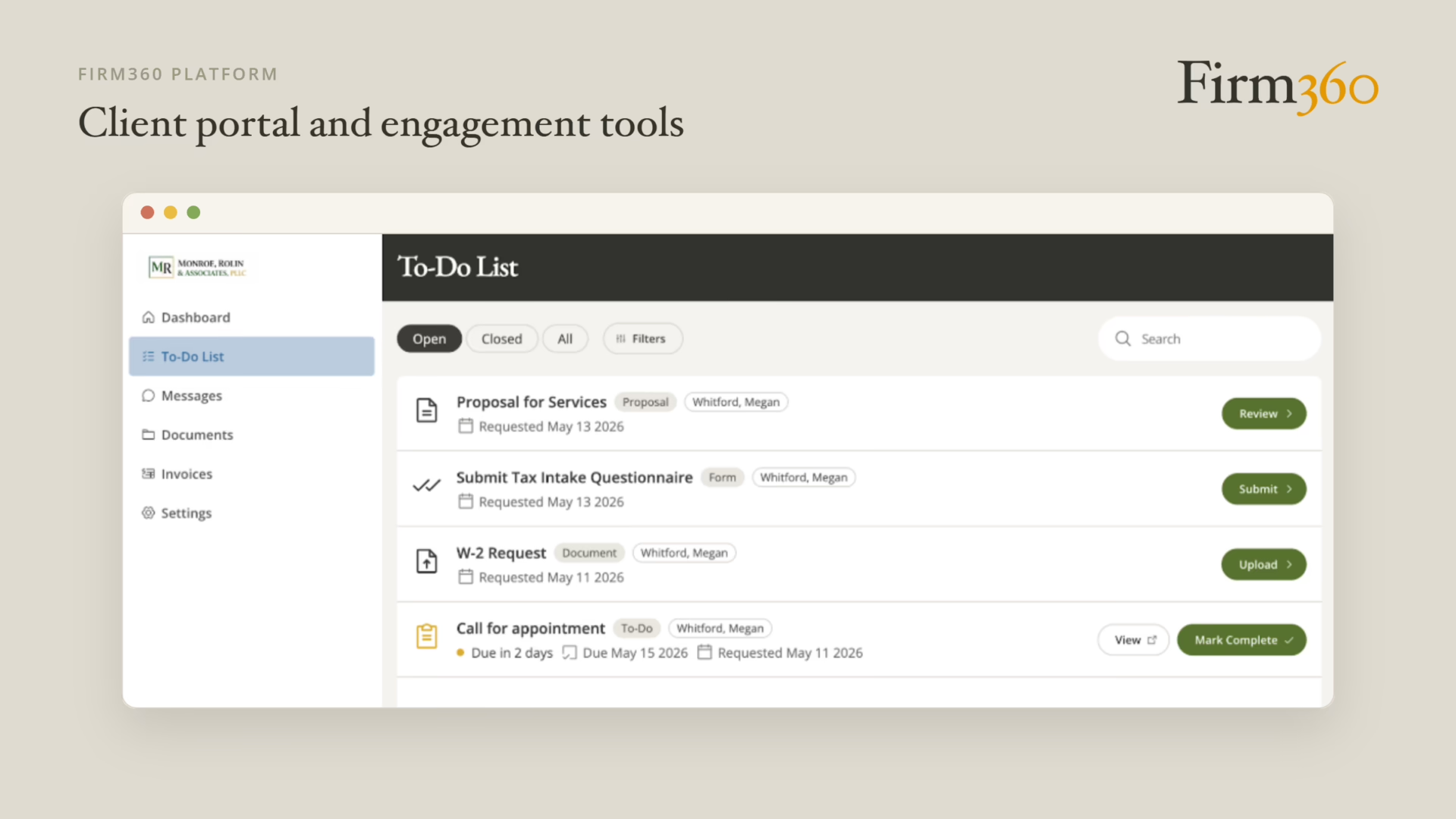
Client portal and engagement tools
A secure client portal is now a baseline expectation. It reduces email back-and-forth, creates a single place for clients to access billing, documents, and communications, and removes the need for staff to chase document submissions. For firms that want to elevate the client experience without adding administrative overhead, a well-designed portal is essential.
Operational reporting
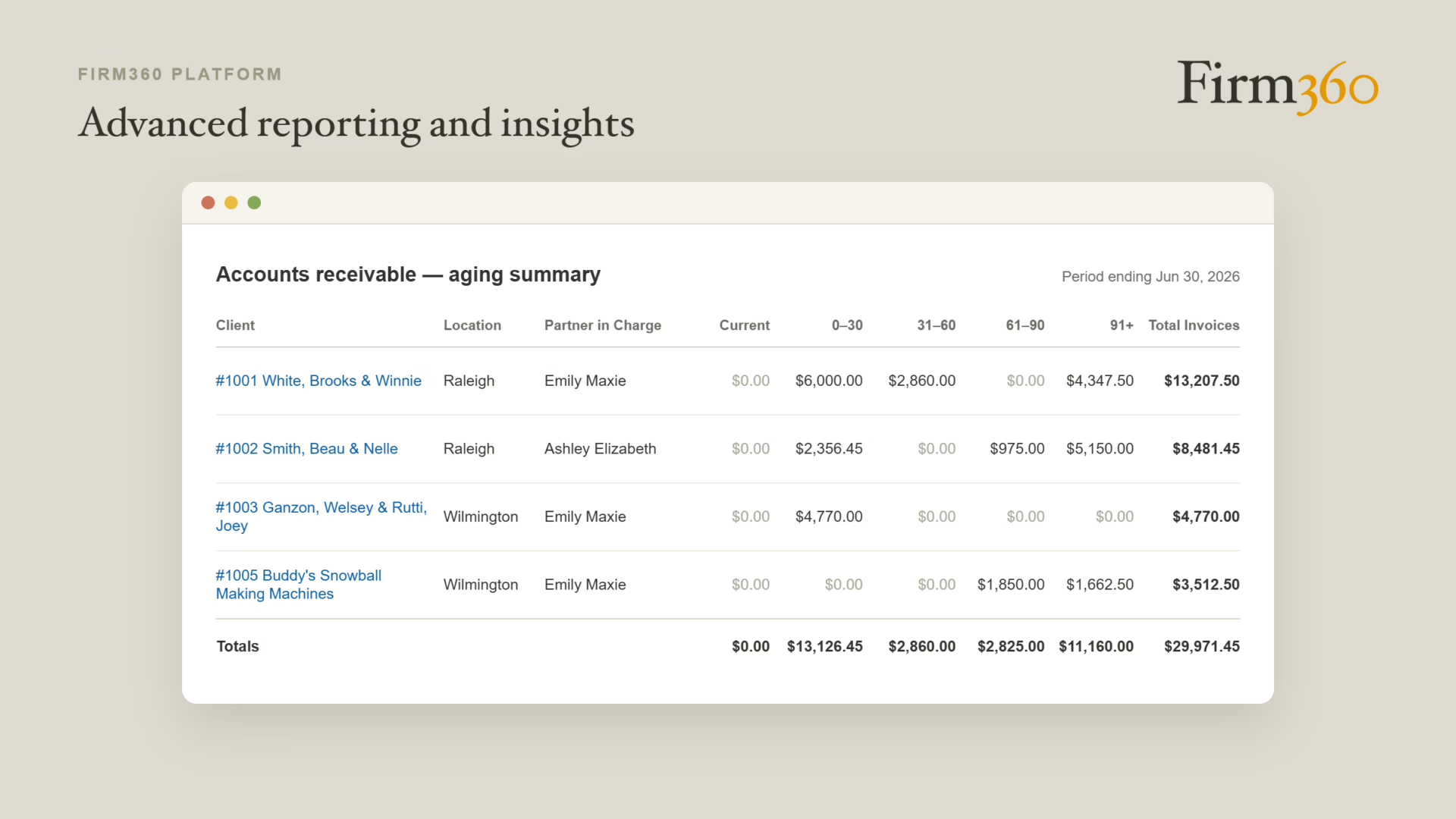
Having managed teams through busy seasons, we know that balancing workloads becomes significantly easier with real data. Operational reporting should show who’s overloaded, who has capacity, where billing is lagging, and how the firm is tracking against its realization targets — without requiring a manual export from multiple systems.
Advanced Features
While core features keep operations running smoothly, these advanced capabilities can give your firm an extra edge:
Integration with third-party software
Practice management software shouldn’t operate in a silo. Connections to your tax software, general ledger, e-signature tool, and payment processor eliminate double data entry and reduce error risk. The best platforms offer pre-built integrations.
Mobile access
Your team needs to access critical information whether they’re at a client site, working remotely, or between meetings. Cloud-based mobile access ensures that project updates, document requests, and time entry don’t have to wait until someone is back at a desk.
Electronic signature capabilities
Built-in or integrated e-signature tools speed up document processing dramatically and improve the client experience — especially at tax season when engagement letters and authorization forms move in high volume.
Automated client communications
Automated reminders for document requests, outstanding signatures, and overdue invoices keep clients engaged without creating additional work for your staff. Consistent communication reduces the “where do things stand?” calls and builds client confidence in your firm’s organization.
From our experience, not every firm needs every advanced feature immediately. Consider which capabilities align with your current needs and growth plans when evaluating software options.
How to Evaluate Practice Management Software
Choosing a platform is easier when you have a structured framework. Here’s a five-step evaluation process we recommend for accounting firms comparing options:
Step 1: Define the Workflows You Must Support
Before you open a demo, list your top three to five engagement types. For each one, know what the workflow looks like end-to-end: how work is assigned, how it moves through review, how it reaches the client, and how it gets billed. The platform you choose must support your actual workflows, not a generic template you’ll need to work around.
Step 2: Identify Must-Have Integrations
Make a short list of the tools your team uses daily — tax software, e-signature, your general ledger, payment processing. Any platform you seriously consider should integrate with most, if not all, of these. Gaps here become manual workarounds that cost time and introduce errors.
Step 3: Build a Demo Scorecard
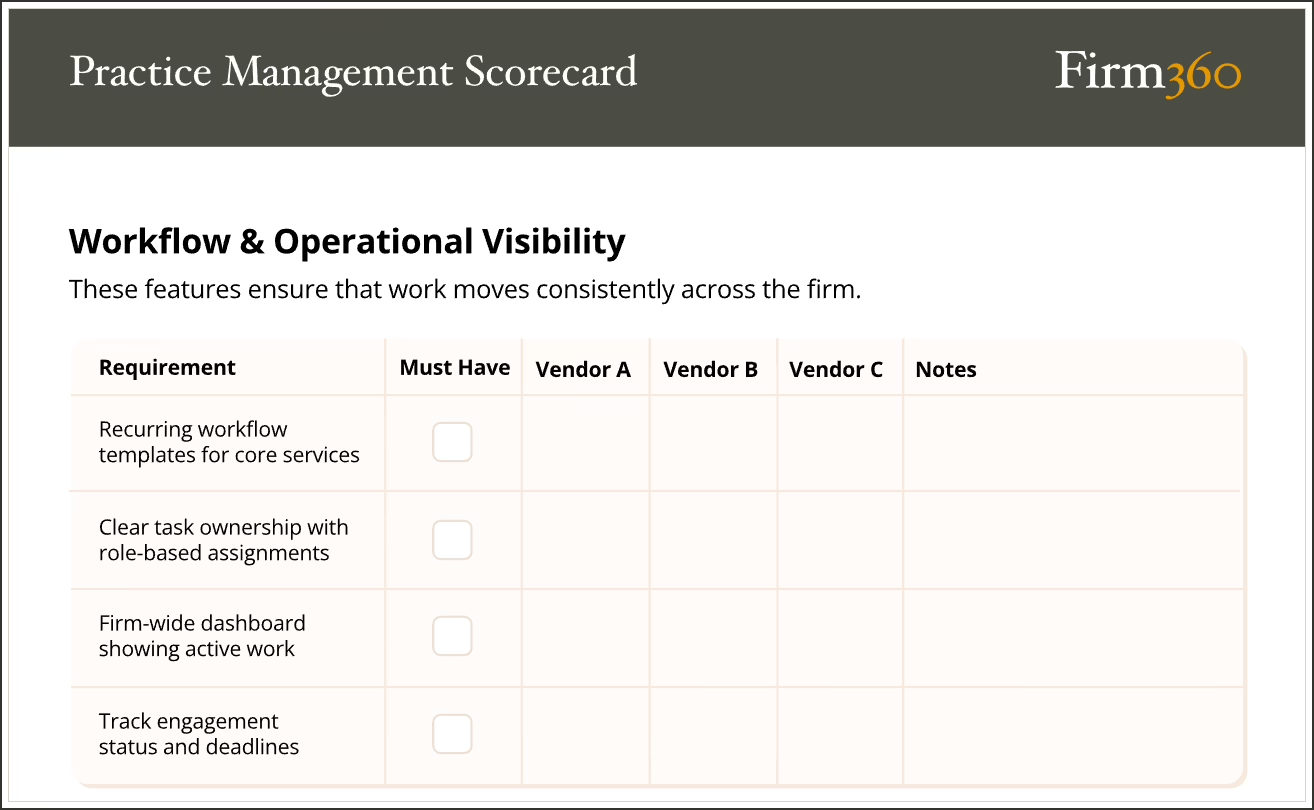
Watching a live demo reveals gaps that a feature list never will. After the demo, score each vendor on the dimensions that matter most to your firm, such as workflow fit, reporting depth, billing functionality, client portal experience, and integration breadth.
Step 4: Ask About Onboarding and Support
Implementation handled poorly can take significantly longer than necessary. Ask specifically: How many onboarding sessions are included? Who leads them? Is support US-based? What does the handoff look like after go-live? A vendor’s answers here tell you as much about the relationship as the software itself.
Step 5: Validate Security, Permissions, and Audit Trails
Accounting firms hold some of the most sensitive data that exists. Before committing, confirm the platform offers role-based access control, multi-factor authentication, and data encryption at rest and in transit. For more on what non-negotiable security requirements look like, read our security and permissions article.
Best Accounting Firm Management Software
There is no solution that can realistically claim to do everything for everyone. Our solution, Firm360, has its sweet spots, as do other solutions in this market, such as Canopy, TaxDome, and Karbon.
We’ve heard positive feedback about all of the solutions mentioned above, but determining which solution is best for your firm depends on your specific needs.
How We Compared These Platforms
Our comparison is based on publicly available information and published pricing. Because features and business models are subject to change, we recommend confirming current capabilities and pricing directly with each vendor’s sales team before making a decision.
Common Features Across Platforms
All solutions in our comparison offer:
- Document management
- Client portal capabilities
- Time tracking and billing features
- Payment collection capabilities
- Practice insights/reporting
- Automated workflows
- Third-party integration capabilities
Key Points of Differentiation
We’ve identified four critical areas where these solutions diverge — areas that can make the difference between a good fit and a frustrating implementation.
Approach to Product Development
Firm360 is the only solution built by and for accountants. With a strong history of engaging customers to guide feature developments and improvements, if you’re looking for a solution that matches the way most accounting firms operate, Firm360 should be on your shortlist.
U.S.-Based Customer Service vs Global Customer Service
To our knowledge, only Firm360 relies solely on U.S.-based customer service representatives. Given that onboarding and customization is typically a high-touch process that requires excellent communication, this may be a crucial factor in your decision-making.
Straightforward Pricing vs Complex Pricing with Add-Ons
We’ve all experienced the frustration when companies make it difficult to ascertain pricing. Both Firm360 and TaxDome provide straightforward pricing with few, if any, add-ons.
Tax Resolution Specialty
If tax resolution services are your primary focus, then Canopy or TaxDome may be your best options. These two vendors currently include IRS transcript retrieval built into their solutions. You’ll find several standalone solutions for this feature, however, so it doesn’t have to be a deal-breaker in your decision.
Who Each Platform May Be Best For
No platform is right for every firm. Here’s a quick summary of where each seems to shine.
| Platform | May Be the Best Fit If… |
| Firm360 | You want a purpose-built accounting platform with US-based support, straightforward pricing, and a strong track record with small to mid-sized firms across multiple service lines |
| Canopy | Tax resolution is your primary service focus and IRS transcript retrieval is a must-have feature built into the platform |
| Karbon | Your firm operates globally, has a distributed team, and considers AI-assisted workflow a high priority |
| TaxDome | You need multi-language support, want a heavily branded client experience, and work with a high volume of individual tax clients |
For a more comprehensive comparison, review the Accounting Practice Management Software Comparison Chart section below.
Accounting Practice Management Software Comparison Chart
| Firm360 | Canopy | Karbon | TaxDome | |
|---|---|---|---|---|
| Best For Firms That: | Need an expert-driven, robust solution with U.S. support | Focus on tax resolution services, but also need project management | Firms operating globally & consider AI a necessity | Require support for multiple languages & desire a heavily branded client experience |
| Document Management | ||||
| Client Portal | ||||
| Integrated Time & Billing | ||||
| Basic Reporting Options | ||||
| Advanced Reporting Options | At some plan levels | |||
| Payment Collection via Credit Card & ACH | ||||
| E-signature | Via integration | Additional fee | Piloting as of November 2024 | |
| Project Management | At some plan levels | Additional fee | ||
| Automated Workflows | Additional fee | |||
| Advanced Integration Options | At some plan levels | |||
| Dedicated Customer Success Manager | At some plan levels | Unclear | Additional fee | At some plan levels |
| Strong Customer Service Reputation | ||||
| U.S. Based Customer Support | Unclear | Unclear | ||
| Built by Accountants, for Accountants | ||||
| IRS-integrated Transcript Retrieval Tool | Additional fee | |||
| AI Integration | ||||
| Straightforward Pricing | ||||
| Monthly Pricing Based on annual billing and listed prices in Nov. 2024. *Denotes “per user” |
$49 – $99*
Custom pricing for 20+ users.
3-user minimum for Standard & Premium plans. |
$150 – $175
base price for client engagement platform only.
PLUS $89 – $107 for remainder of modules for first user. Small-firm pricing available with limited capabilities. |
$59 – $89*
Enterprise pricing available.
Add-ons for implementation, training, customer support & more. |
$58 – $66*
depending on subscription length.
Seasonal users: $85. |
3-user minimum for Standard & Premium plans.
Accounting Firm Management: Security and Permissions Checklist
The comparison chart gives you a starting framework for comparison. But security and permissions warrant a closer look than a score of 1 to 5 can capture, because in accounting, the consequences of getting it wrong aren’t just operational.
Accounting firms manage some of the most sensitive data that exists — tax returns, banking records, Social Security numbers, business financials. The security requirements for any platform you adopt should be non-negotiable. Here’s what to look for and how to configure it correctly.
Must-Have Security Requirements
- Multi-factor authentication (MFA) — required for all users, not just administrators
- Role-based access control (RBAC) — staff see only what they need to do their job; clients see only their own data
- Data encryption in transit (SSL/TLS) and at rest (AES-256 or equivalent)
- SOC 2 Type II certification — independently verified security controls
“Least Privilege” Setup Basics
Platforms that make it to your shortlist should allow you to configure access by role. A staff accountant should not have access to partner-level reporting. A client should not be able to see another client’s documents.
For a deeper look at security and permissions best practices — including common configuration mistakes and a full checklist — see our complete guide.
Accounting Firm KPIs To Monitor
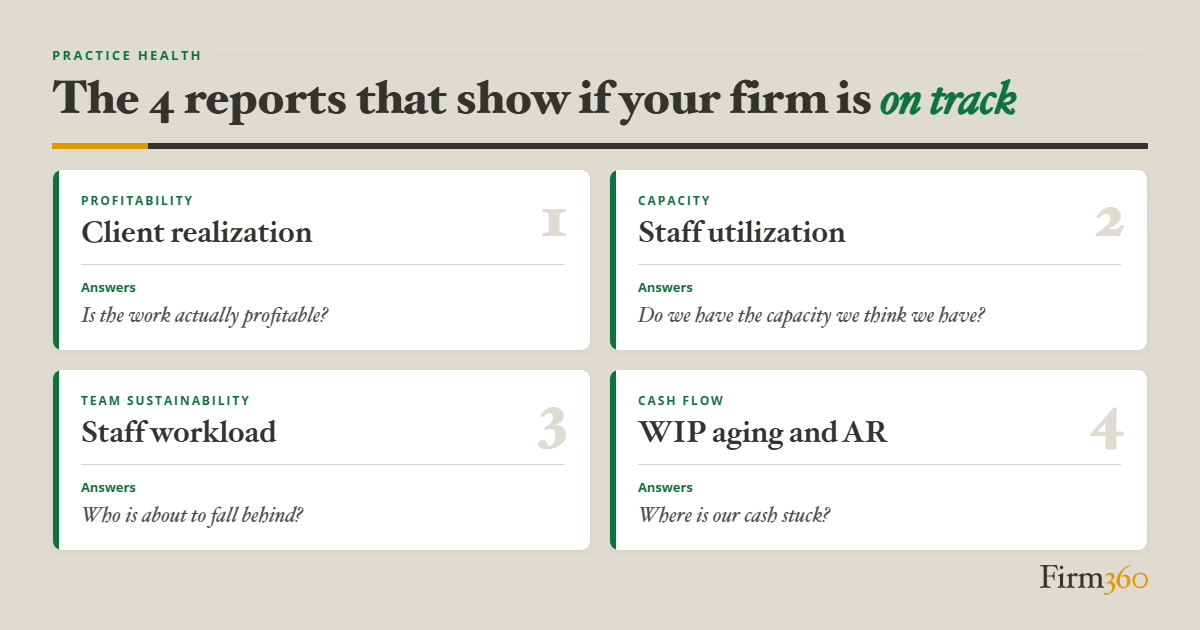
Running a firm without a consistent view of performance data is manageable — until it isn’t. When a billing gap, an overloaded staff member, or a realization problem surfaces, the issue typically started weeks earlier. The four KPIs below give firm leadership a reliable read on firm health before small problems become expensive ones.
Client Realization measures the ratio of time billed to time spent, across clients and service lines. A realization rate below 100% means the firm is writing off revenue it has already earned — often without anyone naming it as a problem.
Staff Utilization is the most direct read a firm has on capacity. It measures billable hours against total available hours by employee or date range — a backward-looking view of how the team’s time was actually spent.
Staff Workload answers a different question than utilization: not how time was spent, but what is on each person’s plate right now. It is a current-state view — useful for catching an overloaded staff member before a deadline slips, and for identifying who has room to take on more.
WIP and Accounts Receivable track two checkpoints in the same revenue cycle. WIP is pre-invoice: work completed but not yet billed. AR is post-invoice: invoices sent but not yet collected. Aging reports for both reveal where cash is stuck and whether the problem is a billing cadence issue, a collections issue, or both.
For a closer look at how Firm360 surfaces these reports, visit the Advanced Reporting page. For more on building the management habits around them, the data-driven firm management page covers the framework in practice. For a deeper treatment of all four — including benchmarks, review cadence, and the action each metric should trigger — see the full guide to accounting firm KPIs.
Recommended Reading
Looking for more on a specific topic? These guides and resources cover the major practice management decisions in more detail:
- 7 Key Steps to Automate Your Accounting Workflows
- Tax Workflow Automation: A Step-by-Step Process Map for CPA Firms
- Client Portal Software for Accountants: An Adoption Playbook Clients Will Actually Use
- How to Build a Document Management Process for Your Accounting Firm
- Time Tracking and Billing in Accounting Firms: Where Revenue Leaks and How to Fix It
- How to Implement Practice Management Software: A 30/60/90 Day Rollout Plan for Accounting Firms
- Accounting Firm KPIs: The Reports That Show Whether Your Firm Is On Track
- Security and Permissions in Accounting Practice Management Software: What to Require and How to Set It Up
FAQs
What is accounting practice management software?
Accounting practice management software is a platform that centralizes the daily operations of a CPA firm, including client management, project tracking, time and billing, document management, and reporting. It replaces the disconnected spreadsheets and single-purpose tools most firms accumulate over time with a single, integrated system.
How much does accounting practice management software cost?
Pricing varies widely, from about $50 per user per month at the low end to $150 or more per user per month for enterprise platforms. Total cost depends on firm size, the modules included (workflow, portal, billing, reporting), and whether implementation support is priced separately.
What’s the difference between accounting software and practice management software?
Accounting software (QuickBooks, Xero) manages a client’s books. Practice management software manages the firm doing the work. A CPA firm uses both: accounting software to serve clients, practice management software to run its own operations, workflows, and billing.
What is the difference between accounting practice management software and project management software?
Accounting practice management software is designed specifically for accounting and CPA firms. It typically includes a suite of industry-specific features such as workflow automation, client portals, accounting-specific integrations, and secure document sharing tools. General project management tools are meant to be applicable to a wider range of industries and disciplines, and require significant customization to work for the accounting industry.
What features matter most in accounting practice management software?
The features that matter most for firm operations are workflow automation, project management, time tracking and billing, document management, and integrated client communication. Advanced reporting and AI-assisted features add value once the operational foundation is running.
What security features are non-negotiable for accounting firms?
For any platform worth serious consideration, these are the table stakes: SOC 2 Type II compliance, multi-factor authentication, role-based access control, encryption in transit and at rest, an audit trail, and a hosting environment that is itself SOC 2 attested.
How do I choose the best practice management software for my firm?
Start by evaluating your firm’s size, workflow needs, and integration requirements. Consider which features and what level of support are most important to you, and compare pricing models. Request detailed demos to ensure the solution will meet your needs.
Can a small accounting firm benefit from practice management software?
Yes. For most accounting practices, the threshold where the firm benefits from practice management software is the addition of a fifth staff member. At this point, communication, workload, and client volume have outgrown the fragmented tool set that got them to this point.
Does accounting practice management software improve profitability?
Yes. By streamlining workflows, automating administrative tasks, capturing more billable hours, and allocating resources more effectively, firms can increase revenue while reducing operational inefficiencies.
What is a client portal in practice management software?
A client portal is a secure online space where clients can upload and download documents, respond to requests, sign forms electronically, view invoices, and make payments — without emailing your staff directly. A well-implemented portal reduces back-and-forth communication, speeds up document turnaround, and gives clients a professional, consistent experience every time they interact with your firm.
How do accounting firms standardize workflows before implementing new software?
Start by documenting the most typical version of each high-volume engagement type. For each, identify every step, who owns it, what triggers the handoff, and what “done” means. Settle naming conventions and status definitions across the team before you configure anything. Software amplifies whatever process you feed it, so the standardization work should happen before — not during — implementation.
What KPIs should firm owners and partners track?
The four views that matter most each answer a distinct question. Realization tells you whether work is generating the revenue it should. Utilization shows you the capacity the firm actually has, not the capacity it assumes it has. Workload surfaces who is at risk of burnout and who has room for more — before a deadline slips. A/R and WIP aging show where the firm’s money is stuck and whether the problem is collections or billing discipline, which require very different responses. Together, they give partners the information needed to run the firm rather than react to it.
How long does implementation typically take?
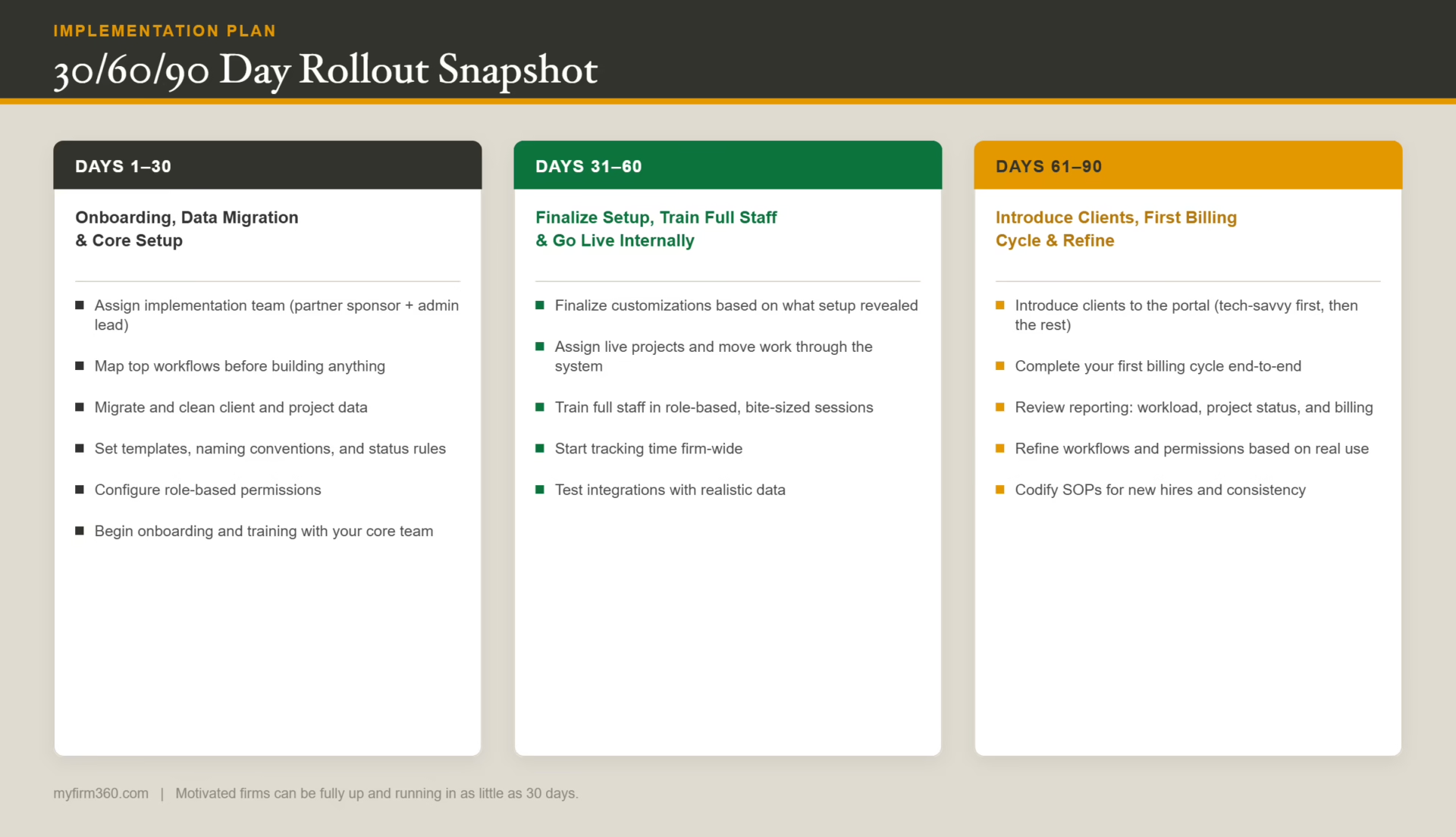
For motivated firms with leadership buy-in, the core system can be up and running in as little as 4 weeks. A 60- to 90-day rollout is not uncommon, particularly for small to mid-sized firms: Days 1–30 cover onboarding, data migration, and core configuration; Days 31–60 focus on finalizing setup, training full staff, and going live internally; Days 61–90 introduce clients to the portal, complete the first billing cycle, and lock in refined processes. Firms that dedicate a project owner internally and follow the vendor’s implementation methodology complete the process faster and see value sooner.
Can practice management software support fixed-fee billing?
Yes. Most platforms support both hourly and fixed-fee billing models, as well as retainer arrangements. The key is making sure the system still captures time against fixed-fee engagements — not for invoicing purposes, but for realization tracking. Knowing how much time a fixed-fee engagement actually consumes is essential for pricing future work correctly and identifying engagements that are quietly unprofitable.
How do you reduce document follow-ups during tax season?
The most effective approach combines a client portal with automated reminders. When a document request is sent through the portal, automated follow-ups can be triggered at set intervals — without requiring staff to manually track who has and hasn’t responded. Firms that move clients off email and onto a portal typically see faster document turnaround and significantly less staff time spent on follow-up during peak season.
Conclusion
Selecting the right accounting practice management software is an important step for maintaining operational excellence in your firm. We recommend focusing on options that directly address your team’s daily challenges.
Remember to consider both immediate needs and long-term scalability when evaluating options. The most effective solution will be one that not only streamlines current operations but also supports your firm’s growth trajectory.
Take time to thoroughly assess each platform’s features against your specific requirements, and don’t hesitate to request detailed demonstrations focusing on your most critical workflows. The right solution will transform your firm’s operations, improve team productivity, and enhance client satisfaction — we’ve seen it happen time and again with the right implementation approach.
What to Do Next
See Firm360 in action. Request a demo or explore pricing to see how Firm360 handles workflow, time tracking, document management, and client communication in a single platform built for accounting firms.
Go deeper on a specific topic. The recommended reading section above links to detailed guides on implementation, security, client portal adoption, and more.