Accounting practice management software security tends to get attention at the worst possible moment — during a breach, a client complaint, or an insurance renewal that asks hard questions the firm isn’t ready to answer. The more useful time to think about it is before signing with a vendor, during implementation, or at an annual review when there’s still room to tighten things up before something goes wrong.
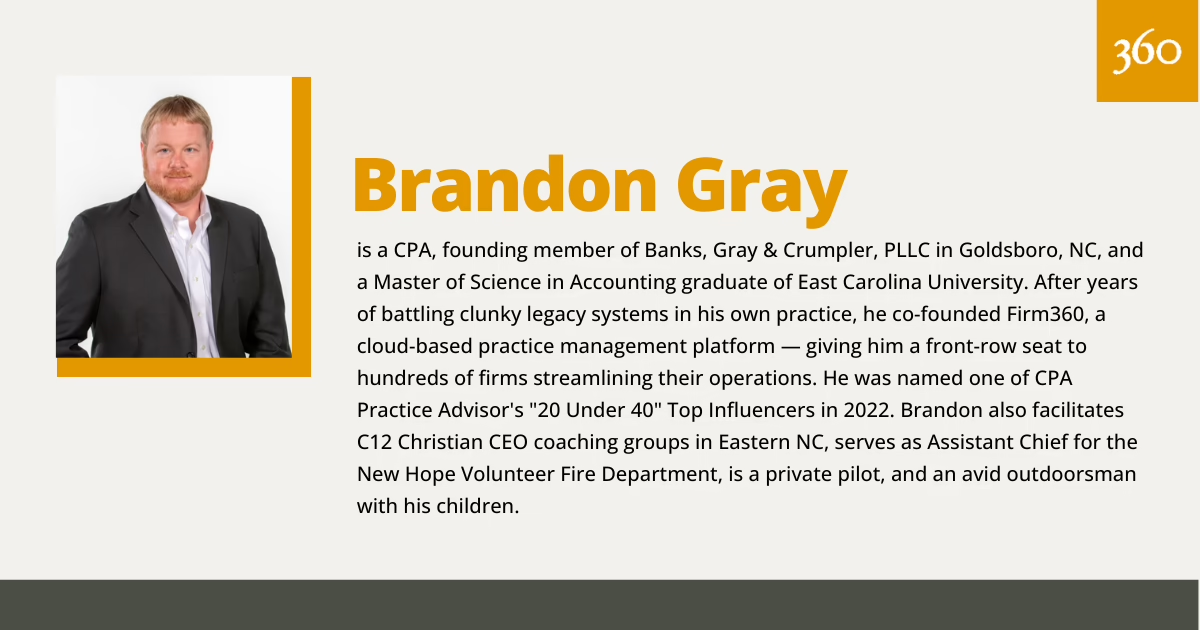
To help guide the recommendations in this article, we turned to Brandon Gray, CPA, co-founder of Firm360 and founding member of Banks, Gray & Crumpler, PLLC — who has spent years navigating these exact decisions in his own practice.
This guide covers what to require from any platform before committing, how to configure permissions so they actually hold up under real operating conditions, and a practical checklist to use whenever the question comes up — whether that’s a first evaluation or a refresh of a system the firm has been running for years.
Non-negotiables at a glance: For any platform worth serious consideration, these are the table stakes: SOC 2 Type II compliance, multi-factor authentication, role-based access control, encryption in transit and at rest, a complete audit trail, and a hosting environment that is itself SOC 2 attested. From there, it comes down to configuration and consistency.
Accounting practice management software security basics
A well-configured practice management platform addresses three things at once: confidentiality (only the right people can access client data), integrity (data remains accurate and tamper-evident), and availability (the firm can reach what it needs, whenever it needs it — including the last week of filing season). A high-performing platform handles the technical side of all three. A high-performing firm configures it purposefully.
Two principles do most of the operational work — “least privilege” and “audit trails.”
Least privilege means each user receives only the access their role actually requires. This keeps permissions clean and manageable as the firm grows, and it means a single compromised login or an honest mistake has a limited reach.
Audit trails log who accessed which client record, when, and what they did — giving the firm a reliable record it can point to in any client conversation, insurance review, or regulatory inquiry.
The regulatory landscape has aligned around these same principles. The IRS requires tax professionals with an electronic filing identification number (EFIN) to maintain a written information security plan under IRS Publication 4557. The FTC Safeguards Rule (16 CFR Part 314) extends similar requirements to most firms preparing tax returns or financial plans for individuals. A well-configured practice management platform supports both — and a firm with documented policies is well ahead of most of its peers.
What to require when evaluating accounting practice management software security
The six categories below work as a vendor evaluation checklist. A confident, well-run vendor will answer each one directly — with documentation to back it up, not just talking points.
Authentication and access
Look for multi-factor authentication (MFA) available for every user, with the option to enforce it firm-wide rather than simply recommend it. Single sign-on (SSO) integration with a business identity provider — Microsoft Entra ID, Google Workspace, Okta — is worth prioritizing for larger firms: it centralizes credential management and allows the firm to adjust access in one place when someone’s role changes or they move on.
Role-based permissions and least privilege
The security principle of least privilege access holds that users should have access only to what their role requires — nothing more.
Least privilege doesn’t mean building a permission toggle for every conceivable action. That approach would require a manual to configure and a significant time investment to maintain. The goal is practical granularity — and that’s exactly what role-based permissions make possible.
Role-based access control (RBAC) lets a firm define a small number of named roles — e.g. partner, manager, preparer, admin, billing — and assign users accordingly. Rather than managing permissions person by person, the firm sets a role once and applies it consistently. Onboarding a new team member is a single step. Adjusting access when someone’s responsibilities shift is equally straightforward. The result is a firm that’s both secure and easy to manage — without the overhead of building permission structures from scratch every time something changes.
Audit logs and reporting
A good audit log is one of the most useful tools a firm can have — for client conversations, insurance reviews, and internal quality checks alike. Ask the vendor to walk you through what it captures.
CPA (and Firm360 founder) Brandon Gray describes how Firm360’s check-in/check-out model gives the audit trail real operational value:
“For documents, track everyone who has viewed, downloaded, or edited the item. In Firm360 the platform helps with that — you have to ‘check it out’ or ‘in’ to view or edit it. There’s a full audit trail of that with the before and after versions.”
Data protection: encryption, backups, and retention
Encryption should be in place in two locations: in transit (between the user and the platform’s servers) and at rest (on those servers). Current standards are TLS 1.2 or higher in transit and AES-256 at rest.
Automated backups stored across geographically separate data centers — with point-in-time recovery going back at least 30 days — give the firm a reliable safety net. Retention policies should be configurable to match IRS, state, and engagement-letter requirements.
Client portal security and sharing controls
The client portal is where the firm and its clients meet — and where thoughtful configuration pays off most directly. An important detail worth checking: whether the platform allows automatic file ingestion from email syncs. Gray offers a cautionary note:
“To avoid ingesting a virus through the portal, the platform should also ensure there are no automatic attachments allowed during uploads — particularly through email syncs. Or if files are automatically uploaded, there should at least be a virus-scanning step.”
Vendor security documentation and incident response posture
A reputable vendor will share a current SOC 2 Type II report under a nondisclosure agreement, a written security overview, and a clear incident response process — not just on request, but as part of a standard conversation with prospects. Gray’s baseline:
“A SOC-2 rating is the bare minimum you should expect for any practice management software, and for any hosting service that the platform uses.”
Major cloud infrastructure providers — AWS, Azure, Google Cloud — meet that standard at the infrastructure layer. The vendor’s own application needs its own attestation on top. Ask for incident response timelines and customer notification procedures in writing.
How to set up accounting software permissions safely
Choosing the right platform is the first half of the work — configuring it properly is what converts capability into real firm security. Part of that equation is understanding how much help you’ll get from your provider. Some platforms offer white-glove onboarding, handling setup entirely or walking your team through it one-on-one. Others put that responsibility on the firm. If you’re in the latter camp, here’s a practical seven-step process for getting your permissions structure right from the start.
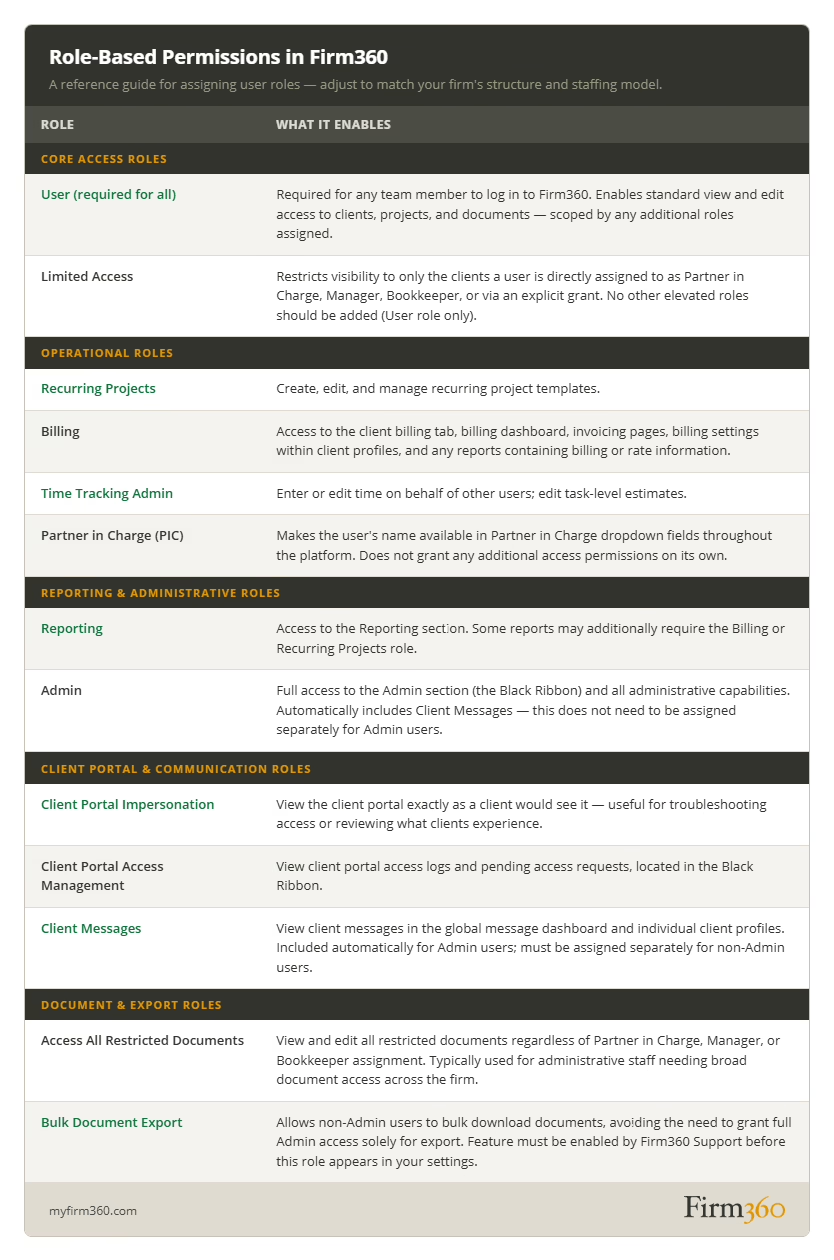
Step 1: Define roles and responsibilities in your firm
The best configurations start on paper, not in the admin panel. Before touching any settings, write down the roles in the firm and what each one actually does.
An example structure:
- The partner approves engagements, owns final review, and generally has full visibility.
- The practice manager oversees client engagement, intake, and scheduling. This role will often have full visibility as well.
- The staff accountant owns day-to-day professional services.
- The billing manager owns time-tracking reviews, invoicing, write-offs, and accounts receivable.
- The software administrator owns system configuration and audit trails.
One important distinction for firms that are using contractors or offshore resources. Anyone accessing systems outside a firm-managed device or network warrant a closer look at permissions.
Step 2: Start with least privilege defaults
Configure each role with the minimum permissions the job requires, then add access as real operational needs surface. A few defaults that tend to pay for themselves quickly:
- Restrict document deletion to the admin role.
- Restrict firm-wide reports to the partner, office manager, or admin.
- Restrict staff from being able to see each other’s personal information.
Step 3: Build your client access model
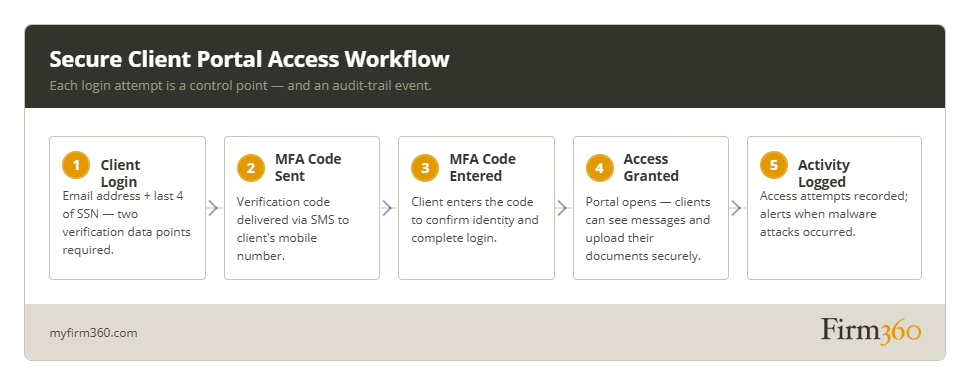
For client-facing portals, access should be stricter than a username and password.
“The portal should have two to three data points to validate a client’s login. For example, Firm360 requires the email address, the last 4 of their social security number, and multifactor authentication.”
For example, after the client enters their email address and the last 4 digits of their social security number, send a verification code via SMS/text message that they are required to enter.
It’s also important to remember that family or business clients may involve multiple users. In these cases, clients should be advised to think carefully about who is given access.
Gray cautions his firm’s clients:
“Generally don’t give people access to the portal who shouldn’t be able to see everything. For exceptions, you can protect the PDF with a password before uploading it.”
Step 4: Configure document permissions
Most staff need rights to upload and view documents; very few should hold delete. Clients should have rights to upload and view documents within their portal. Default approved third-party shares to expiring links, with PDF password protection applied.
Step 5: Turn on audit trails and review them
Most platforms enable logging by default. The real work is building a review rhythm. A monthly scan by the office manager — covering portal access and document activity — catches most anomalies early. A quarterly review by a partner or administrator covers role changes and admin actions. Any suspected incident gets an immediate look.
Gray’s view on the portal access log:
“An access log is key for the client portal component of any platform. You need to know who’s accessed it, who tried but couldn’t, and whether there are malware attacks happening.”
Invoices deserve particular attention — confirm clients are receiving and viewing them, and watch for any internal cancellation-and-recreation patterns. Time entries should be locked once linked to an invoice, with edit access at that point limited to administrators.
Step 6: Plan for offboarding and access removal
Getting offboarding right is one of the highest-value security habits a firm can build. Gray sets a clear standard:
“Accountants work with sensitive client data. We cut off access immediately if a team member gives notice.”
Make sure the admin responsible for offboarding can act quickly when access needs to be revoked — and designate a backup who can step in when the primary admin is unavailable.
Step 7: Reinforce with firm policies
Configuration works best when it is backed by written policies that staff can reference and that the firm can show an insurer or auditor. The most important ones:
- A written information security plan (required by IRS Publication 4557 for firms with an EFIN, and by the FTC Safeguards Rule for most others)
- MFA on every account
- A password policy that prohibits reuse and provides staff with a password manager
- A device and remote-access policy
- An approved-channels policy that designates the portal for client documents
- Annual cybersecurity training
Gray on training:
“At a bare minimum, staff should attend certified cybersecurity training annually. It’s easy to find virtually, and often free.”
Common security mistakes
Emailing client documents instead of using the client portal. Gray puts this at the top of the list: “Emailing client information is the #1 security issue. It’s so easy to hack. There are firms emailing all kinds of things without encryption — and clients doing it too.” The shift to the portal is the single highest-impact change most firms can make — and it is easier to sustain when the portal is simple enough that clients actually use it.
Using overly broad permissions. Firms that grow quickly often end up with access settings that made sense at five people but no longer fit at twenty. A quarterly walk through the user list — checking each role against the person’s actual responsibilities — keeps this from drifting.
Treating offboarding casually. Staff departures — especially during busy season or when the exit is complicated — create pressure to handle access cleanup later. A written, assigned offboarding process that includes an explicit step for revoking system access ensures it happens consistently, regardless of timing or circumstance.
Sharing credentials. Shared credentials for billing, admin, or any other role make the audit trail hard to use. Individual logins make it possible to see exactly what happened and when — which matters both for quality control and for any external review.
Neglecting administrative system reviews. Even a well-configured permissions structure drifts over time. Staff get promoted, roles shift, people leave — and without a recurring review, access rights accumulate in ways that no longer reflect how the firm operates. A quarterly or semi-annual admin review catches dormant accounts, identifies staff carrying access they’ve outgrown, and keeps permissions aligned with current reality.
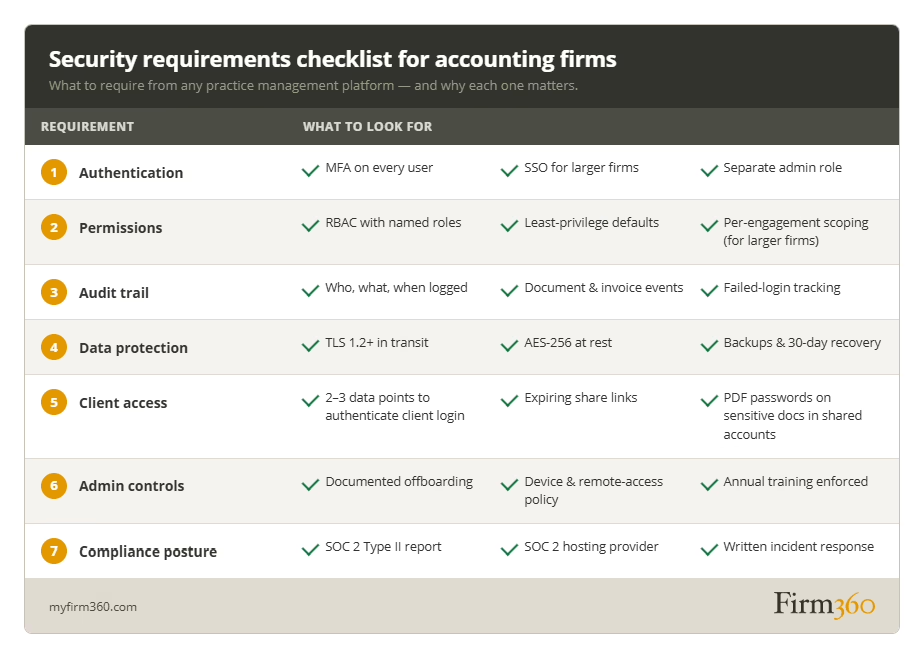
A simple security checklist you can use now
Use the working checklist below during a vendor evaluation, a platform implementation, or an annual review with the partner group and office manager.
Conclusion
Firms that build robust security for their practice tend to do three things consistently: they require the right platform foundations before signing, configure permissions around how the firm actually works rather than around the path of least resistance, and reinforce that configuration with written policies and a regular review cadence.
The checklist above is a practical starting point — bring it into your next vendor conversation or annual review. For a broader view of practice operations, the Firm360 practice management guide is a useful next read, and Firm360’s security documentation covers the specific controls on our platform.
Frequently asked questions
Is practice management software secure enough for tax documents?
A platform with SOC 2 Type II attestation, MFA, AES-256 encryption at rest, and a complete audit trail is generally well-suited for tax documents — and a significant step up from email or a shared network drive. The firm’s configuration matters as much as the platform’s certifications. The IRS expects firms with an EFIN to maintain a written information security plan per IRS Publication 4557.
What permissions should staff have in an accounting firm system?
Least privilege: each role gets only the access it actually needs. Partners and practice managers typically have full access. Managers see the engagements they oversee. Preparers in smaller firms often have access to all clients for responsiveness; in larger firms, they’re generally limited to their assigned clients or projects. The billing role covers billing and invoicing. The office manager has what’s needed for intake, scheduling, and client offboarding. Staff visibility into each other’s documents and returns should be off by default.
What is role-based access control and why does it matter?
Role-based access control (RBAC) attaches permissions to named roles rather than to individual users. When a preparer joins the firm, they receive the preparer role — one step, consistent permissions. When they leave, removing the role is sufficient. RBAC makes least privilege scalable without adding administrative overhead as the firm grows.
How do you securely share documents with clients?
Use the client portal rather than email. Require MFA on portal logins — multiple verification factors, not just a password. Set permissions at the document level. Use expiring links for external shares. Apply PDF password protection to any document with tax IDs, account numbers, or compensation data. Review the portal access log regularly.
What should an audit trail include in accounting software?
At minimum: every document view, download, edit, and deletion, with before-and-after versions where the platform supports it; every invoice action including creation, modification, and client view; every login attempt, successful or otherwise; and every change to user roles or platform settings. Logs should be searchable, exportable, and retained long enough to support any reasonable review.
How do you remove access when an employee leaves?
Offboard on the day of notice. Deactivate the user account, revoke MFA tokens, remove SSO group membership, rotate any shared credentials the person knew, retrieve firm devices, and document the cutoff.
Should accounting firms allow clients to email documents?
The portal is the better path for everyone — it is more secure, it produces an audit trail, and it keeps documents organized in one place. Directing clients there and making the process easy is the most straightforward way to make the secure option the default one. If a client does send a document by email, moving it into the portal promptly — and using the interaction to walk them through direct upload — tends to shift the habit over time. If they don’t have access to a mobile device for the authentication required to enter the portal, use a password protected PDF with an expiring link before sending the document through email.
Expert Bio
Brandon Gray is a CPA, founding member of Banks, Gray & Crumpler, PLLC in Goldsboro, NC, and a Master of Science in Accounting graduate of East Carolina University. After years of battling clunky legacy systems in his own practice, he co-founded Firm360, a cloud-based practice management platform — giving him a front-row seat to hundreds of firms streamlining their operations. He was named one of CPA Practice Advisor’s “20 Under 40” Top Influencers in 2022. Brandon also facilitates C12 Christian CEO coaching groups in Eastern NC, serves as Assistant Chief for the New Hope Volunteer Fire Department, is a private pilot, and an avid outdoorsman with his children.