Choosing accounting practice management software — whether for the first time or as a replacement for an existing system — is a meaningful decision with substantial upside. Implementing the software, though — cleaning data, configuring workflows, training staff, and onboarding clients without breaking the work in flight — is where firms either compound their gains or stall out before they see any.
The most common reasons an implementation fails have little to do with the platform itself. A thin understanding of how the new system actually works is one — misunderstanding the underlying model creates rework, frustration, and unexpected delays. But undocumented workflows, poor data hygiene going into migration, and a change management approach that issues directives instead of building buy-in are just as likely to derail a rollout. The platform rarely fails. The preparation around it often does.
This article lays out a practical 90-day rollout plan for accounting professionals: how to prepare, what to standardize first, what to do in each 30-day phase, what to migrate (and what to leave behind), and the pitfalls to design around. For the broader picture of how practice management fits into your firm’s stack, see our complete accounting practice management guide.
To ground this plan in real-world experience, we spoke with Joshua Stats, partner at Foresight CPA Group in Salt Lake City, Utah. With more than 20 years in public accounting — including four years as a Tax Examiner at the IRS — Joshua has navigated multiple practice management implementations firsthand and brings a practitioner’s view of what works, what stalls, and why.

How to Prepare for Accounting Practice Management Software
Before you compare vendors or schedule a demo, get clarity on what you are actually trying to fix. A practice management implementation is not only a software project; it is an operational change. The clearer your problem definition, the easier every later decision becomes.
Ask the team what is breaking down right now. Most firms find their answers cluster around one or two of these:
- Visibility: managers cannot see in real time what is in progress, what is stuck, or what is at risk of missing a deadline.
- Workflow: tasks move by email or sticky note rather than through a shared queue, so handoffs drop.
- Documents: client files live in too many systems, and staff hunt for them.
- Billing: time-to-bill drags, and write-offs are higher than they should be.
- Reporting: leadership cannot easily answer basic questions about utilization, realization, or capacity.
From the cluster of issues, pick three to five measurable outcomes you expect implementation to deliver. Examples: cut average time-to-bill by 20 percent, reduce review cycle time by 2 days, eliminate manual time entry for routine work, surface partner-level capacity in a single dashboard. These outcomes become your scoreboard for Days 61 to 90.
One non-obvious step before configuration: invest time in learning how the new platform models its core objects — projects, tasks, jobs, statuses, requests.
Joshua Stats emphasizes:
“Before beginning setup, it’s important to understand the terminology and how the new system works. I can’t stress enough how important this is to a successful implementation. Even when the terms sound similar, they may operate differently within different platforms — especially with projects and tasks.”
An hour of upfront learning prevents a class of issues you only otherwise discover after configuring around an incorrect mental model.
What to Standardize Before Implementation
Standardize first, configure second. Software amplifies whatever process you feed it. If your firm runs five different versions of the same workflow, the new platform can faithfully replicate all five and call it consistency — but is that what you want?
Four standards to settle before you start configuring:
- Core workflows. Document the canonical version of each high-volume engagement: e.g., tax preparation, bookkeeping, payroll, and advisory. Each step should have an owner, an input, an output, and a status that signals it is complete.
- Naming conventions. Files, projects, and recurring jobs all need a consistent format. “ClientName_TaxYear_Service” beats “client tax 23 final v3 actual.” Decide once, document, and enforce.
- Client communication standards. Where do clients receive document requests? Where do they upload? When are reminders sent, and by whom? Settle these before configuration so the system reflects your policy, not the other way around.
- Definitions of “done.” For each major status (“Ready for Review,” “Ready to Bill,” “Closed”), agree on what has to be true to move work into that state. Without this, statuses become opinions rather than signals.
If you find your firm cannot easily agree on any of these, that is the work to finish before configuration begins. Implementing ambiguity is how exceptions become the default.
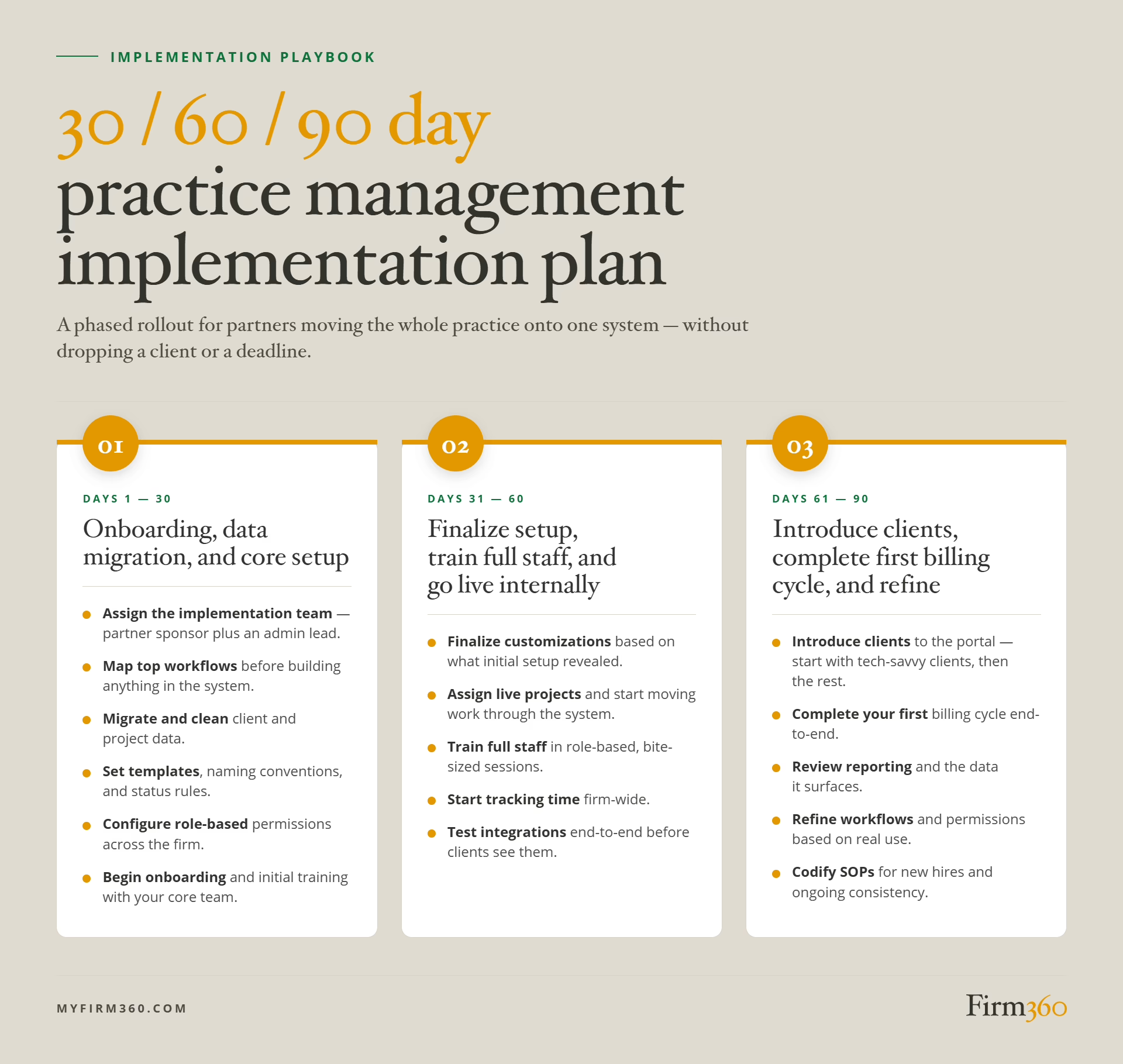
30/60/90 Day Accounting Practice Management Rollout Plan
Days 1–30: Onboarding, Data Migration, and Core Setup
The first 30 days are about getting the system properly built before anyone uses it in earnest. That means working directly with your implementation team, migrating your data, and configuring the platform to match how your firm actually operates — not a generic template.
Specifically:
- Assign the implementation team. At minimum: a partner sponsor, an admin lead to drive the setup, and someone to own data cleanup before import.
- Map your top workflows. Document how a tax engagement, a bookkeeping service, and a payroll cycle will look in the new system before you build anything.
- Migrate your client and project data. Clean the master client list, merge duplicates, retire archived records, and import real data during this window — not later. Starting with accurate data means you’re training against what’s real from day one.
- Set templates and rules. Build the project templates, recurring job rules, naming conventions, and status workflows your team agreed to.
- Configure permissions. Decide who sees and edits what. Role-based access, not name-based.
- Begin onboarding and initial training with your core team. Firm360’s implementation team works alongside you throughout this phase — most firms complete the foundational setup in a handful of focused sessions.
Days 31–60: Finalize Setup, Train Full Staff, and Start Working in the System
With your data in and the core configuration in place, the next 30 days are about finishing any remaining customizations and getting your whole team working inside your new practice management solution — not alongside it.
- Finalize customizations based on what the initial setup surfaced. Early configuration always reveals assumptions that need adjusting. Fix them now.
- Assign live projects and start moving work through the system. This is the phase where the platform goes from configured to active. Projects get assigned, statuses update, and workflows run.
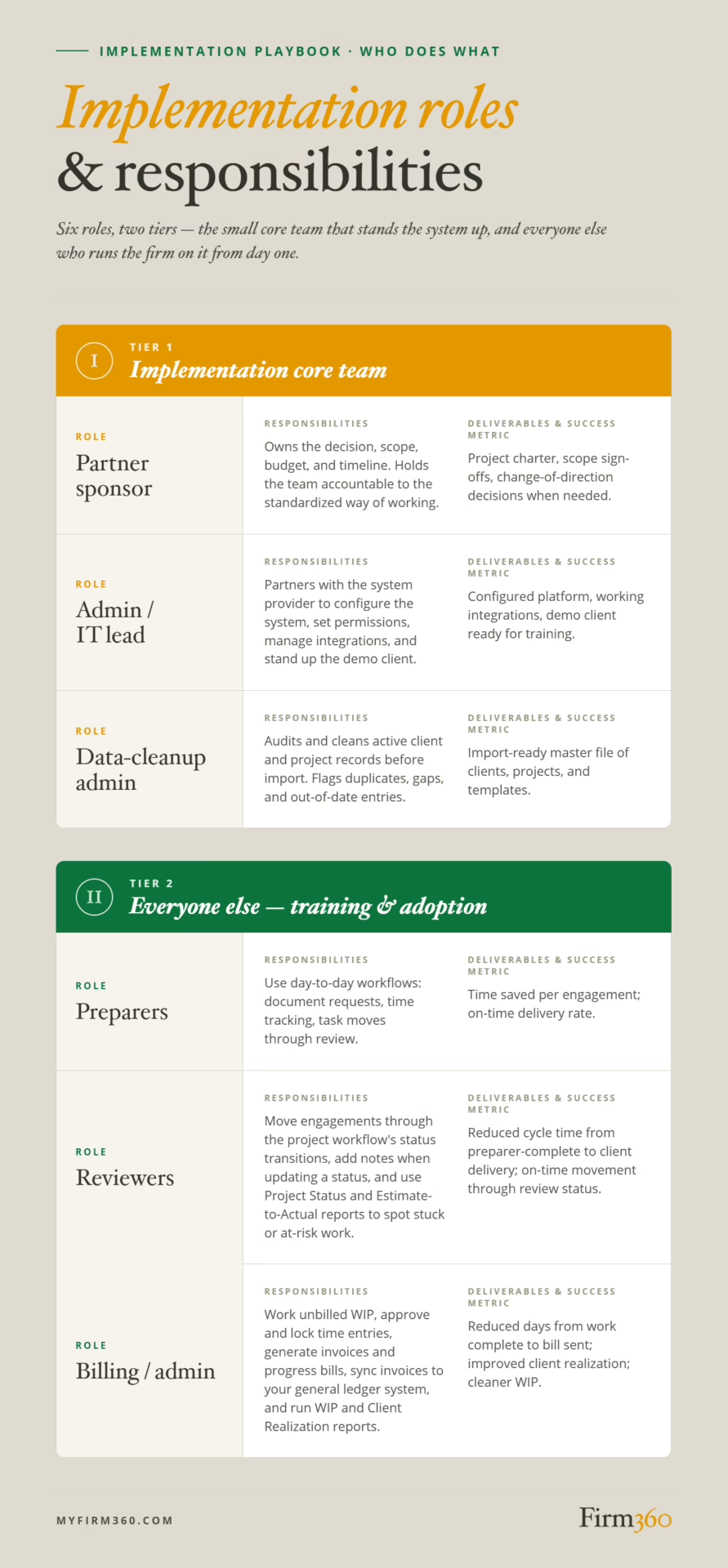
- Train your full staff. Schedule role-based sessions — preparers, reviewers, billing, and admin each need different things. Bite-sized focused training works better than a single all-hands walkthrough.
- Start tracking time. Time entry is often the first habit that drives system-wide accountability. Getting this right in Days 31–60 means your reporting is meaningful by the time you need it.
- Test integrations. Verify that any connected tools — tax software, e-signature, document management, payment processing — are handing off data correctly with realistic inputs.
By the end of Day 60, your team should be running their day-to-day work inside the system. The system should already be showing you where projects stand and who’s carrying what.
Days 61–90: Introduce Clients to the Portal, Complete Your First Billing Cycle, and Refine
The final 30 days extend the system outward — to your clients — and turn active use into established process.
- With your internal workflows stable, now is the right time to bring clients in. Send clear, plain-language communications that explain what’s changed, what they’ll find in the portal, and why it’s better for them. Most clients adapt quickly when the “why” is obvious. It can be helpful to begin with tech-savvy clients, followed by those clients who will probably need a bit of hand-holding.
- Complete your first billing cycle. Running billing end-to-end in the new system — time review, invoice generation, payment collection — is the clearest proof that the platform is working. It’s also where any remaining configuration gaps will surface.
- Become familiar with reporting to understand what work is in motion, who’s doing it, whether it’s on track, and how you’re billing for it.
- Refine processes based on what you’ve learned. Staff will have feedback. Some of it will be worth acting on. Adjust workflows, tighten or loosen permissions as real use demands, and resist over-customizing.
- Codify how the firm now operates. Write it down. New hires need this on day one.
By the end of Day 90, the platform should not feel new. It should feel like the way the firm runs.
Accounting Practice Data Migration Checklist
Migration discipline determines how much of your old chaos shows up in the new system. The goal is to bring forward what the firm actively needs and leave the rest where it is.
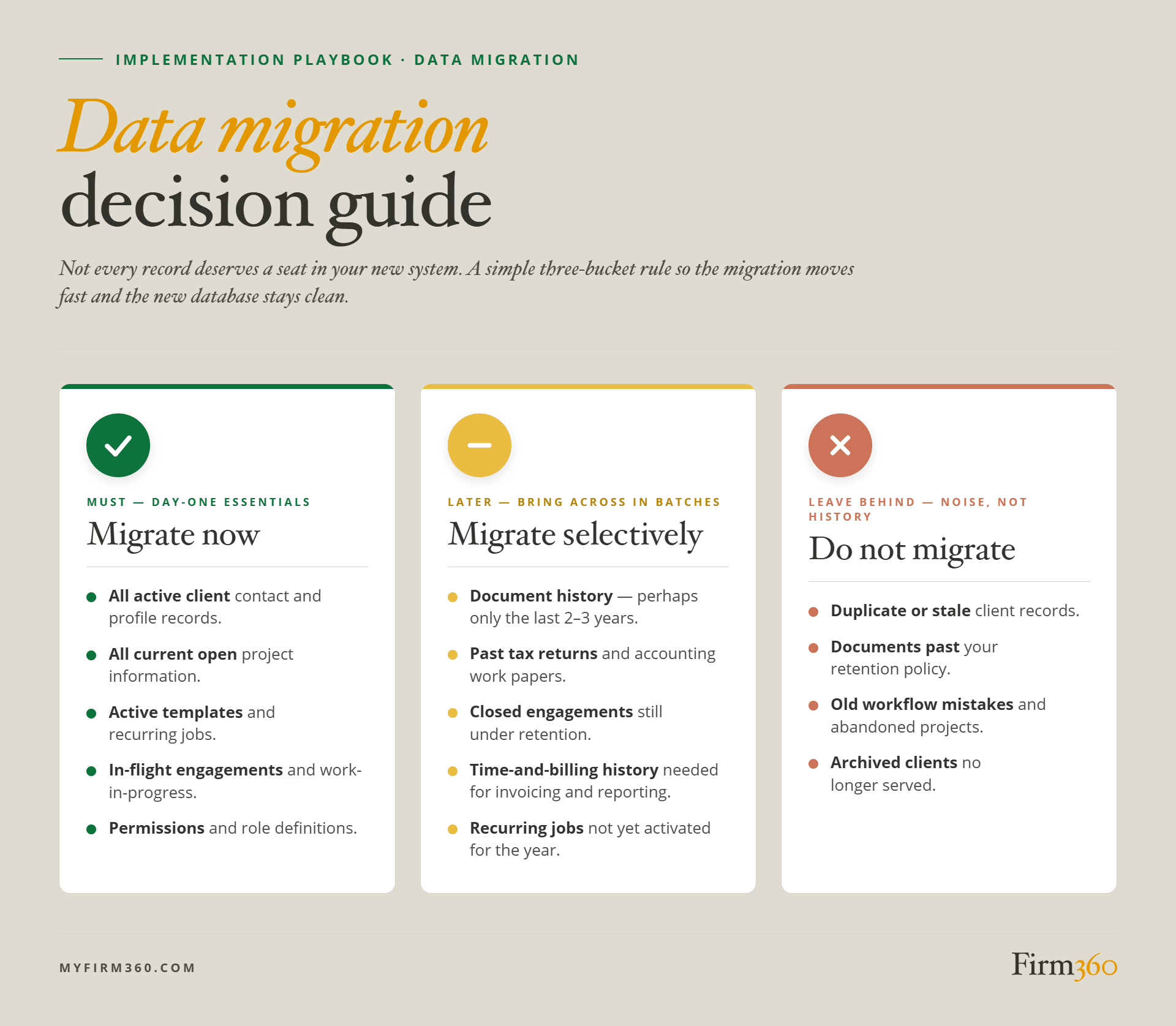
“All client information — contact and profile info — should come over to the new system, along with all project information that exists. You can delay bringing in documents if necessary, such as the clients’ history of tax returns or accounting work papers. And you may not need to bring in the entire history. Your firm might decide to bring just 2-3 years into the new system.”
A simple decision framework keeps migration scope honest. Three categories: must migrate now, migrate selectively (or later), do not migrate.
Two practical notes. First, document migration from a legacy locally hosted tool could be a manual, client-by-client export — plan a dedicated owner and realistic hours. Second, your retention policy is the right anchor for what comes forward.
Accounting Practice Management Software Adoption Strategy
When client adoption stalls, it’s usually for one of two reasons — the client portal is too difficult for clients to use, or staff isn’t leading by example. To prevent issues with client adoption, make sure the portal is user-friendly and intuitive.
When it comes to staff adoption, it’s important to be intentional about change management. The most common mistake is to issue an order rather than build buy-in. Josh’s preferred approach:
“It’s best to get staff together and explain the benefits of the practice management system — don’t just issue a directive.”
Here are four practices that consistently move adoption forward:
Handle resistance early and individually. A staff member quietly returning to email or spreadsheets is a signal, not noise. A short one-on-one is the right intervention; group memos rarely move the holdout.
An all-staff kickoff before training begins. Walk the team through the why, not just the what. What is breaking now, what the new platform does about it, and what each role gains. Surface concerns openly. Staff who feel imposed-upon route around the system.
Bite-size, role-based training. One large training session looks efficient but retains information poorly. Schedule one-hour blocks by audience instead.
Open office hours during the rollout. A standing weekly slot where any staff member can drop in with a question keeps small frustrations from turning into workarounds. The admin/IT lead is usually the right host.
Common Pitfalls and How to Avoid Them
Most failed implementations fail in predictable ways. Designing around these six is most of the work.
- A shaky understanding of how the system actually works. To mitigate, invest the upfront hours in vendor onboarding and platform documentation. Map your standardized workflows to the new platform’s objects before you configure anything.
“I’ve seen some struggles when there wasn’t a strong understanding of how the system works. Mistaken expectations complicate implementation and can cause delays.”
- Over-customizing in the first 30 days. Bending the platform to match every quirk of your prior process locks in old constraints. Configure for the standardized workflows you defined; let real use guide refinement later.
- Accumulating too many exceptions. A short list of explicit exceptions is workable; a long unwritten list is the failure mode. Document allowed exceptions and review them quarterly.
- No clear ownership of the implementation. Name a partner sponsor and an admin or IT lead, and give them the authority to make calls.
- No training plan, or one stuffed into a single session. The bite-size, role-based pattern will outperform one big launch session.
- Implementing during peak deadlines. Tax season (January through April) and extension season (August through October 15) both pull the team in too many directions to learn a new platform well. The best time for implementation is May through July, with October through December being the next best time.
Phased Progress, Not a Perfect Cutover
A clean implementation is not measured by the day you go live. It is measured 60 days after, when staff are running real work through the system and clients are using the portal without prompting. Motivated firms can reach that point in 30 days. Some take 60 to 90 — and that is a reasonable trade for getting the data clean, the workflows right, and the habits locked in from the start.
To see how practice management software fits into your firm’s broader operations, explore the full accounting practice management guide. Or, if you are evaluating platforms, take a closer look at how Firm360 handles workflow, time tracking, document management, and client communication in a single platform.
Frequently Asked Questions
How long does it take to implement practice management software in an accounting firm?
For motivated firms, the core system can be up and running in as little as 30 days. A 60-day or 90-day implementation provides more breathing room if needed: Days 1 to 30 cover onboarding, data migration, and core configuration; Days 31 to 60 focus on finalizing setup, training full staff, and going live internally; Days 61 to 90 introduce clients to the portal, complete the first billing cycle, and lock in refined processes.
Should we implement before or after busy season?
The best time for implementation is May through July, with October through December being the next best time. The summer window is cleanest because it sits between tax season and extension season. The fall window works if you can complete the rollout by year-end.
What data should we migrate first?
Active client contact and profile records, along with all current open project information, should come over first. Active templates and recurring jobs should follow. WIP, AR and invoices should also be brought in early. Document history can be migrated selectively — sometimes only the last two to three years — or delayed entirely if access to the old system continues during the transition. Duplicate or stale records and archived clients no longer served should not be migrated at all.
How do we get staff to adopt new practice management software?
Lead with a group conversation about why the firm is making the change and what each role gets out of it — not a directive. Run training in bite-size, role-based blocks. Address resistance individually and early, before workarounds harden into habit.
What workflows should we standardize first?
The highest-volume engagements your firm runs — such as tax preparation and monthly bookkeeping. Document the canonical version of each: every step, who owns it, what its input is, what its output is, and what makes it “done.” Naming conventions and client communication standards should be settled at the same time. Configure the platform around the standardized version, not the inherited one.
What is the best way to roll out software to clients?
Roll out to staff all at once and to clients in two distinct phases. Staff need to be fluent before any client sees the portal. Invite tech-savvy clients first — they will surface friction quickly while you can still adjust. Then extend the portal to the rest of your roster, who benefit from the smoother experience the early adopters helped you build.
Expert Bio
Joshua Stats is a partner at Foresight CPA Group in Salt Lake City, Utah. With more than 20 years of experience — including four years as a Tax Examiner at the IRS — Joshua brings a uniquely informed perspective to tax preparation and compliance. His experience managing numerous staff and working with several different practice management platforms gives him a practical, firsthand view of what it takes to run an efficient CPA firm.