The firms that run a clean tax season aren’t necessarily working harder than everyone else. They’re running a better system.
Walk back through any difficult March — the kind where phones don’t stop, where returns sit in review for days, where clients call to check in before anyone on the team realizes their file hasn’t moved — and you’ll often find a workflow that was never fully defined.
When the stages of a workflow are defined, owned, and followed, it becomes a repeatable production system that holds through peak season. When it isn’t, firm capacity gets quietly consumed by triage.
Stacy Jones, a manager at Anchor Point Advisory Group with 20 years of experience in accounting firm administration, points out that the difference is visible inside the operation well before it shows up in a turnaround report.

“When workflows run poorly there’s no consistent ‘right way’ to do a task. Things get missed, and time management suffers.”
— Stacy Jones, Manager, Anchor Point Advisory Group
This guide walks through the operational aspects of the tax preparation workflow — seven stages from intake through acceptance tracking — with the handoff logic, ownership decisions, and escalation examples that most workflow guides leave out. It’s built for firm owners, operations leaders, and managers who want a process they can map this week.
What a Tax Preparation Workflow Actually Is
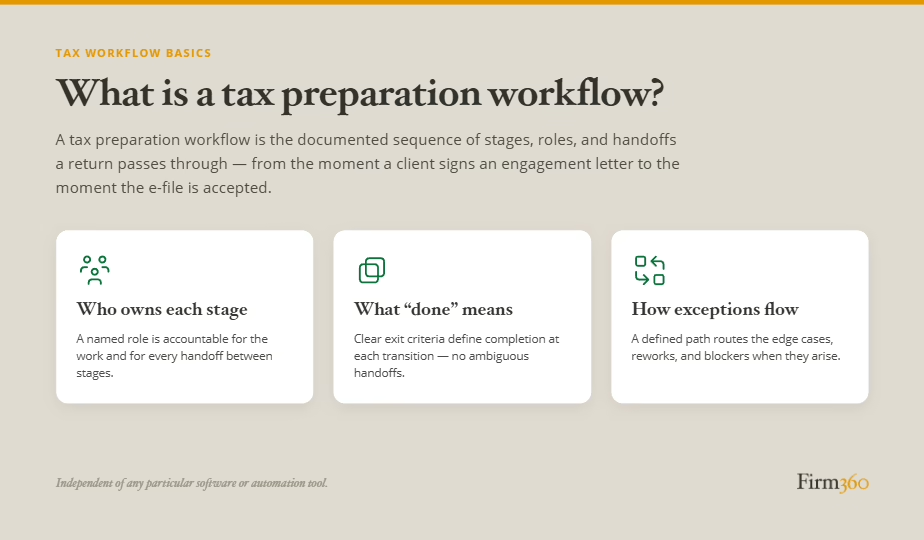
A tax preparation workflow is the documented sequence of stages, handoffs, and decisions that govern how a return moves through a firm from client engagement to filing acceptance. It specifies the operational layer of tax preparation — who owns each stage, what “done” means at every handoff, and what happens when something doesn’t fit the standard path.
Tax workflow automation, on the other hand — the use of operational software and defined rules to systematically route a tax return through each stage of preparation — is a topic on its own, worthy of a more detailed exploration, which you can find in this related article.
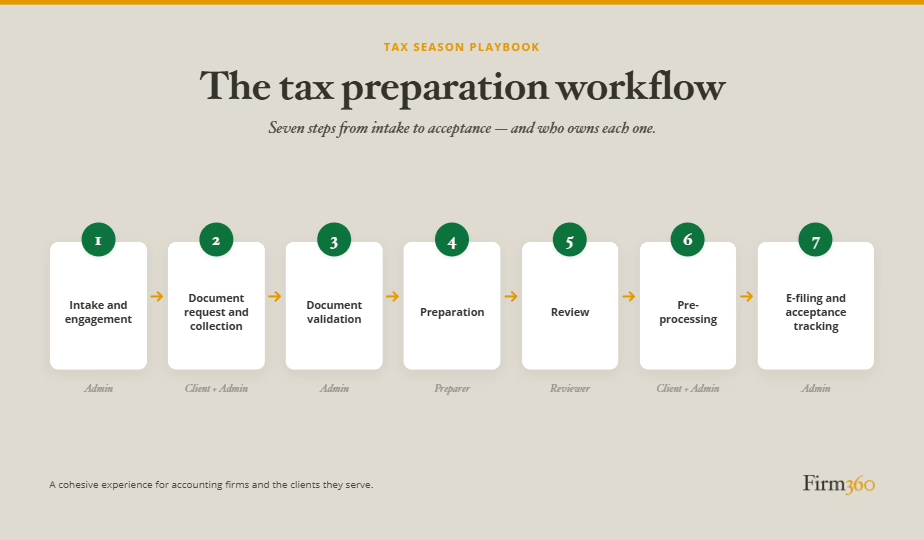
The 7 Stages of a Tax Preparation Workflow
Each stage below outlines what ownership looks like in an example firm and what “done” means before a return can move forward. The ownership decisions and definitions of done are illustrative, however, not universal; how your firm assigns ownership and defines “done” will depend on its size and structure.
Stage 1: Intake and Engagement Confirmation
What it is: The return enters the production pipeline only after the engagement is formally confirmed.
What ownership looks like: Admins often own this stage. Their job is to verify that the engagement letter is signed, the return type and filing year are confirmed, and any material changes from the prior year are documented.
What “done” means: The return has a “Ready for Organizer” or “Ready for Document Checklist” status in the system. The engagement letter is on file. Prior-year notes are documented. Nothing moves forward until those boxes are checked.
Where it breaks: A new client brings in documents at the first appointment but takes the engagement letter home to sign. The admin logs the documents and opens a file. Weeks pass — the client, assuming the firm already started the return, never sends the letter back. By the time anyone notices, the prep window has already shortened considerably.
Stage 2: Document Request and Collection
What it is: The organizer goes out, the deadline is set, and follow-up runs on a defined cadence.
What ownership looks like: An admin sends the organizer with a specific due date and a client communication script that doesn’t leave timing ambiguous. Reminders are sent on a pre-set cadence. Documents are placed in a single named location with enforced naming conventions.
What “done” means: All requested documents are received and stored correctly, or the file has an active, documented decision about how to handle the gap.
Where it breaks: The document request becomes a passive waiting period with no enforcement mechanism. The organizer goes out and staff check in manually, if at all. There’s no defined moment at which incomplete documents trigger a formal decision.
↳ Optional Branch: Extension Filing
Extensions can be triggered at any point after Stage 1. Common triggers include client unresponsiveness past the defined follow-up window, material document gaps that make preparation inadvisable, capacity constraints discovered during planning, or complexity uncovered during early prep work.
When an extension is filed: the confirmation is retained in the client file, the return status is updated in the system, the client is notified, and once the constraint is resolved, the return re-enters the main workflow at whichever stage was interrupted.
Stage 3: Document Validation
What it is: A defined checkpoint — before prep begins — to confirm that the documents in hand are complete and legible.
What ownership looks like: An admin runs the completeness check against a checklist. If documents are missing or illegible, the request goes back to the client immediately and through a formal channel — not a side conversation that leaves no record.
What “done” means: Every item on the document checklist is confirmed, or where applicable — cleared by a tax professional as unnecessary. The return carries a “Ready for Prep” status before it touches a preparer’s queue.
Where it breaks: Firms that skip the gate at this stage absorb the cost later — in the preparation stage, when a preparer has to stop mid-return to chase critical missing information. Interrupting the preparer costs more time and more headache than the admin staff’s upfront check would have.
Stage 4: Preparation
What it is: The return is assigned to a preparer, worked in full, and handed off to review with a complete file and documented answers to questions posed during the preparation stage.
What ownership looks like: The preparer owns this stage, following their training and the professional standards that apply. Questions for clients go through channels with written documentation.
What “done” means: The return is complete as far as the preparer can take it. Any open items that need to be resolved by a more senior team member are documented. Notes are written for the reviewer — not just for the preparer’s own reference. The file is assembled correctly before it moves.
Where it breaks: The phantom ready. A preparer marks a return ready for review when it’s 85% done — not out of negligence, but because the definition of “ready” was never written down. Reviewers inherit incomplete returns and have to decide whether to send them back or complete them. Either way, the pipeline slows.
Stage 5: Review
What it is: A structured review process with defined criteria for what qualifies as “ready to sign.”
What ownership looks like: The reviewer owns this stage. A first review (preparer to senior) addresses the return itself; a second review (senior to partner) typically applies when complexity or exposure warrants it. Tax software alerts are reviewed and resolved, not dismissed. Corrections go back to the preparer with specific notes — not “look at this again.”
What “done” means: All reviewer checklist items are complete. All preparer questions are resolved. The file is assembled correctly.
Where it breaks: Returns land in review before they’re truly ready, turning the reviewer into a triage station instead of a quality check. Add late client changes and minor open items, and a backlog builds quietly as deadlines close in. And in firms that don’t have a way to easily track statuses, managers can’t see which returns are stuck or which reviewers are overloaded until it’s a problem.
Stage 6: Pre-Processing
What it is: The return goes to the client for review and signature, billing is triggered, and payment is collected.
What ownership looks like: Typically an admin manages the tax return delivery and follow-up sequence. The client receives the draft return with summary. E-signature authorizations via Form 8879 and the state equivalents are requested from the client. Billing is triggered once the client has reviewed and approved the return.
What “done” means: The return is signed. Payment is received. The file has documentation of both. Nothing moves to e-file without it.
Where it breaks: A client opens the draft and sees a balance due they weren’t expecting, or a preparation invoice that’s higher than last year. They have questions, which triggers a back-and-forth that stalls the return in a nearly final state.
Stage 7: E-File and Acceptance Tracking
What it is: The return is submitted, the submission is documented, and acceptance status is actively tracked.
What ownership looks like: An admin often owns submission and tracking. The submission is documented and proof is retained in the file. Monitoring for e-file rejection alerts happens daily. A rejection scenario protocol exists in advance: who gets notified, within what timeframe, and who owns resolution.
What “done” means: The IRS and state agency have accepted the return. The acceptance confirmations are in the file. The client has been notified.
Where it breaks: Without a clear process for monitoring the acknowledgment queue, a rejection can sit unresolved during peak season. State filings add a second blind spot, since federal acceptance doesn’t guarantee state acceptance, and an unwatched state queue can hide a rejection for days longer than it should. And if a material correction necessitates a new 8879, the time to deadline narrows further.
Roles and Ownership at Each Stage
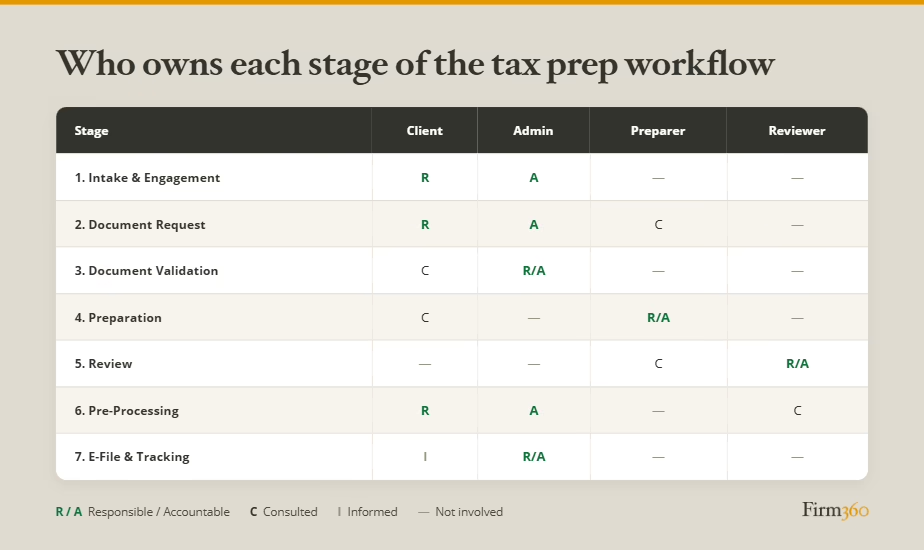
Return preparation typically involves four primary roles: Client, Admin, Preparer, and Reviewer.
Role structures vary significantly by firm size. A solo practitioner may carry all four roles. A firm with 10 to 30 staff typically has dedicated admins, preparers, and a partner review layer. The specific structure matters less than the principle: every stage needs a named owner to execute and move the return forward.
The trap firms fall into is neglecting to assign a role to every stage. Any stage without an owner becomes the firm’s bottleneck, because work stalls at the point where nobody is waiting for it.
The table below presents one example ownership framework across the seven stages.
Where Tax Prep Workflows Most Commonly Break
Even with a named owner at every stage, certain breakdowns show up often enough to have a recognizable shape. Here’s where they tend to start.
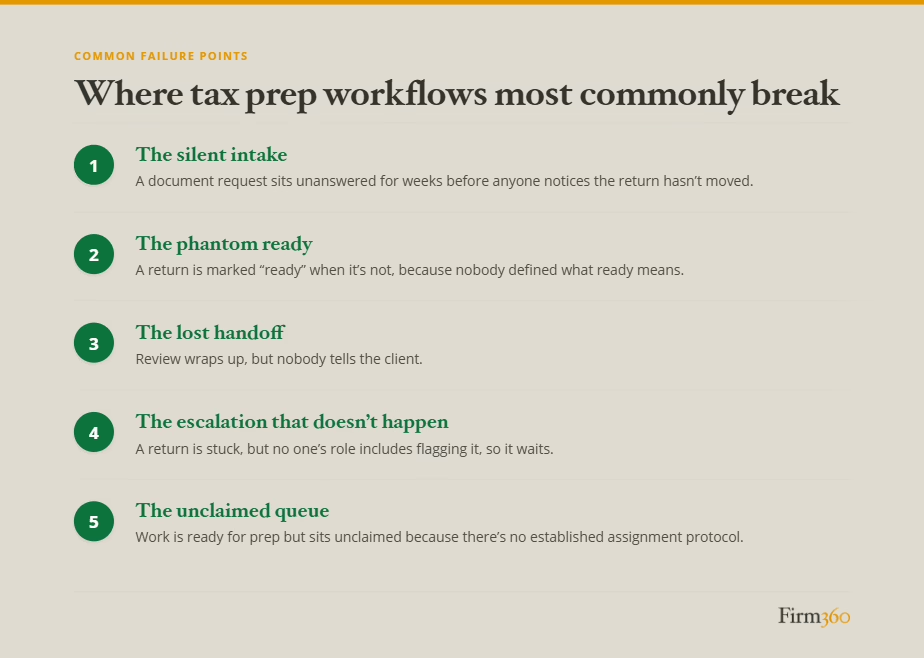
The Silent Intake
The client signs the engagement letter and considers the handoff complete. An admin emails a document request to the client who misses the original email. It sits for weeks before anyone notices the return hasn’t entered the production queue. By the time prep begins, the return is already behind.
The Phantom Ready
A preparer marks a return ready for review when it’s 85% done — not because they’re cutting corners, but because nobody defined what “ready” means. The reviewer opens the file, finds open items, and has to decide whether to complete them or send the return back. Neither option is clean.
The Lost Handoff
Internal review is complete. Nobody tells the client. Signed returns accumulate on the internal side while clients follow up by phone and email, wondering where things stand.
The Escalation That Doesn’t Happen
A return sits stuck. The preparer is waiting on a client response that isn’t coming. The reviewer is waiting on the preparer. Admin doesn’t know the return is stuck because nobody’s role includes flagging it. A week passes. Then another.
The firms that avoid this are keeping an eye on how long returns spend in each stage. When triggered, someone steps in to resolve the issue. The trigger doesn’t have to be complicated, but it has to exist, and someone has to own watching for it.
“Our system tracks days-in-status, and the partner-in-charge, more often than the manager, monitors it. When a status looks stale, they step in to push it forward.”
— Stacy Jones, Manager, Anchor Point Advisory Group
The Unclaimed Queue
Not every breakdown traces back to a missing definition. Some firms have clearly defined stages and still lose returns at the handoff within a role — when work is ready but nobody on that team has claimed it.
“Our workflows are well-designed, so when we do see a breakdown it’s usually in queued returns — work not assigned to a specific preparer. These are sitting unclaimed.”
— Stacy Jones, Manager, Anchor Point Advisory Group
A defined workflow only moves work forward if someone is actively pulling from the queue. Without a routing rule — first available preparer, capacity-based assignment, or a manager actively staffing the queue — returns wait in a status that looks like progress but isn’t.
How Workflow Software Supports the Workflow
Software does not create your workflow. It enforces the workflow you already have. A practice management platform handles the operational mechanics that make a well-designed workflow faster and more consistent:
- Task assignment and status tracking across the team
- Automated document request reminders on a defined cadence
- Document audit trail and secure, centralized storage
- Real-time pipeline visibility — who has what, and for how long
- Automated client-facing communications triggered by defined workflow events
What software cannot do:
- Resolve ambiguous ownership — if two people think they own a stage, software won’t pick one
- Create escalation logic that doesn’t exist yet — the triggers have to be defined first
- Document exception handling that was never written down
The principle that holds here: standardize first, automate second. Before a tool can enforce your document request cadence, you need a document request cadence. Before automation routes corrections back with specific notes, someone has to define what those notes should include.
Software is most valuable when the workflow it’s supporting is already defined at the handoff level — when every stage has an owner, “done” is written down, and exceptions have documented handling. At that point, a platform can translate that architecture into a production system that runs without manual coordination.
How to Build a Tax Preparation Workflow at Your Firm
If your firm’s current process is more habit than system, the off-season is the right time to address that. Here’s a practical six-step process for designing or redesigning your workflow before next tax season.
- Map your current state. What is going well with your current process? Where are things getting stalled? Are there duplicated efforts or inefficiencies? Look for opportunities to reduce uncertainty and eliminate unnecessary steps.
- Name an owner for every stage. Go through the seven stages and assign a role — not a person’s name, a role — to each one. If a stage currently has no owner, that’s the most important problem to solve. Unowned stages are a bottleneck waiting to happen.
- Decide how returns will be assigned to preparers. While some preparers may bring clients with them, others will need returns assigned to them from the firm’s queue. Will managing partners assign those returns based on preparer experience and level of complexity? Will the practice manager assign returns to the first available preparer?
- Define “done” at every handoff. Write down what a return needs before it can move to the next stage. For example, more than likely, “done” for intake is more than ‘met with the client.’ It might include ‘engagement letter signed, return type confirmed, and intake checklist / organizer sent.’ That specificity is what makes the workflow hold under pressure.
- Identify your top exceptions and document how to handle each. You don’t need to document every edge case — start with three to five that showed up last season. Write down the handling logic. That documentation protects the firm when the person who carries that knowledge is at capacity in March.
- Build one workflow at a time. There’s no need to boil the ocean. After you finish the first workflow, allow some time to work within it, review how it’s going, and make refinements where necessary. Once you feel it’s as close to perfect as possible, tackle the next one.
“When Anchor Point redesigned our 1040 workflow, we took a lean approach. We dissected everything that we did, how we did it, and the timing. Our goal was to take out redundant activities and time wasters, gaining efficiency. After using a lean process to redesign that, we did the same with the workflow for onboarding new clients. Now, on a yearly basis we go back to review the workflows in case we need to make updates.”
— Stacy Jones, Manager, Anchor Point Advisory Group
Frequently Asked Questions
What is a tax preparation workflow?
A tax preparation workflow is the documented sequence of stages, roles, and handoffs that govern how a return moves through a firm from client engagement to e-file acceptance. It specifies who owns each stage, what “done” means at each transition, and how exceptions are handled — independent of any particular software or automation tool.
What’s the difference between a tax preparation workflow and tax workflow automation?
A workflow is the structured process — the sequence of stages, owners, and handoffs. Automation is a software capability that systematically routes a tax return through each stage of preparation. Automated document reminders, e-signature follow-up, and billing triggers are all examples of features that may be automated. But automation requires a defined workflow to enforce. It cannot create that structure on its own.
Who should own each stage of the tax prep workflow at a small firm?
There’s no one-size-fits-all best practice. At the smallest firms, ownership tends to be more consolidated — an admin may handle all the workflow stages up until the review. At larger firms there’s more specialization. Commonly, admins own intake, collection, validation, pre-processing, billing, and e-filing; tax professionals own preparation; and partners own review.
Do I need software to run a good tax prep workflow?
No. The underlying workflow — stages, owners, handoff criteria, escalation logic — can be documented and run without a dedicated platform. Many firms operate disciplined workflows using shared spreadsheets, checklists, and folder structures. Software makes a well-designed workflow more scalable, more consistent, and less dependent on individual memory. But the workflow has to exist first.
How do I know if my firm’s tax prep workflow is working?
Three indicators. First: can everyone on the team describe the workflow without consulting anyone else? If the answer varies by person, it isn’t documented well enough to hold. Second: do you know, at any given moment, where every active return is and what it needs to move forward? If that requires asking around, you don’t have pipeline visibility. Third: when a return stalls, does the right person find out automatically — or only after someone notices? If escalation depends on someone noticing, that’s a gap.
Conclusion
Regardless of what workflow automation software you use (or don’t use), a well-designed tax preparation workflow is a key operational element for firms that move through peak season smoothly. Those firms are running processes where every return has an owner, every stage has a finish line, and anticipated exceptions have escalation protocols.
The workflow described here — seven stages from intake to acceptance tracking, with explicit handoffs and defined escalation logic — is a starting architecture, not a final answer. Every firm’s production environment is different, and the best workflow is the one that reflects your specific return mix, your team structure, and your client base.
The off-season is the time to close that gap. Map what you have. Name the owners. Write down what “done” means. The goal isn’t a perfect system before the season starts — it’s one clear enough for the team to run, and specific enough that you’ll know when it isn’t working.
Once your workflow architecture is designed, platforms such as Firm360 can help take care of the automation.
Expert Bio
Stacy Jones is a manager at Anchor Point Advisory Group, where she leads the firm’s admin team and oversees high-level project management, recurring internal billing, and new client onboarding. She brings 20 years of experience in accounting firm administration — including the past eight years at Anchor Point — and recently led the firm’s transition to a new practice management platform.