This post was originally published in 2024 and has been updated to reflect current guidance.
The return is done. Internal review is signed off. The preparer has moved on to the next file. The client is notified. And then nothing happens for two weeks.
Delivery is the stage where a well-run tax season either finishes clean or turns into delayed payments and unwanted extensions. While the firm largely controls the preparation and review stages of the tax preparation workflow, delivery — like document collection — depends largely on client responsiveness. The return package sits with a client who has to open it, read it, understand it, pay for it and sign it, in that order, before it can be filed.
Firms that get returns back quickly have designed the delivery stage so that each of those steps has a prompt attached to it, an owner watching it, and a deadline the client heard about in advance.
What follows is a delivery workflow you can adapt: six stages from client review through archive, the mechanics of getting Form 8879 signed and verified, a reminder cadence for the signatures that don’t come back, and how to keep a payment voucher from turning into a June notice from the IRS. Whether you’re working through a portal, an e-signature platform or a password-protected file share, the sequence is the same.
The workflow below draws on the approach of Brandon Gray, CPA, co-founder of Firm360 and founding member of Banks, Gray & Crumpler, PLLC. His firm handles delivery for both individual and business clients, which means running the same payment-before-signature sequence and portal verification standard across every return, regardless of size.

Why the Delivery Stage Runs the Whole Tax Season Home
What is a tax return delivery workflow?
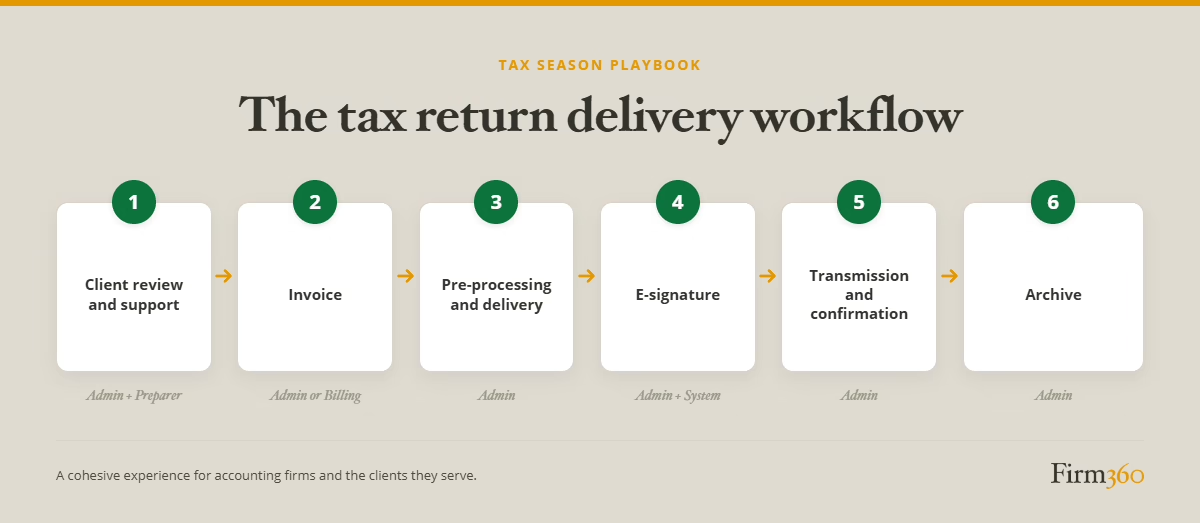
A tax return delivery workflow is the documented sequence a completed return follows from final review to archive: client review, invoicing, assembly and delivery of the package, e-signature on Form 8879, transmission, acceptance confirmation and record retention. It defines who owns each step and what has to be true before the return moves forward.
Delivery is where the firm’s work becomes real to the client — the first time they see the number, the invoice and the thing they’re being asked to sign. Trust or confusion can both accumulate here.
It’s also the gate on filing. An ERO cannot transmit a return until the taxpayer has signed Form 8879 — Publication 1345 requires the taxpayer to sign and date the form before the ERO originates the electronic submission. No signature, no filing. If the signature doesn’t arrive before the deadline, the return moves into the extension workflow whether the client and firm wanted that or not.
The 6 Stages of a Tax Return Delivery Workflow
How your firm assigns these depends on size and structure, but every stage needs a named owner. The example owners below are illustrative.
Stage 1: Client review and review support
What it is: The client receives the completed return and a summary for review before anything is signed, plus the support that helps them understand it — a named person to call and an answer ready for the question most clients ask.
Ownership: Admin sends; the preparer stays available for questions.
When it’s done: The client has confirmed the return looks right, or has raised questions that are documented and resolved. Ideally they can explain, in their own words, what they owe and why.
We asked Brandon Gray, a CPA firm owner and co-founder of Firm360, what his firm gives clients at this stage. Gray’s firm sends the complete client copy of the return along with a summary, with the terms stated up front: sign and we file, or raise changes and we work them out before filing.
Where it breaks: The client finds a number they weren’t expecting, or delivers new, unexpected information that kicks the return back for additional preparation work.
Stage 2: Invoice
What it is: Once review is complete and questions are addressed, the invoice goes out.
Ownership: Admin or billing.
When it’s done: Payment received and recorded.
Where it breaks: The client is unhappy with the invoiced amount, or has difficulty submitting payment.
Stage 3: Pre-processing and delivery
What it is: The signing package goes out as one deliverable — final return, summary, Form 8879 and any state equivalents, and payment vouchers.
Ownership: Admin.
When it’s done: The package is delivered through a secure channel with a clear ask, a clear timeline and a clear next step.
Where it breaks: The package goes out with the federal 8879 and nothing else. A signed federal 8879 doesn’t authorize a state filing — numerous states require their own electronic authorizations, and some require companion documents too.
Stage 4: E-signature
What it is: The taxpayer signs Form 8879, with identity verification and a tamper-proof record.
Ownership: Admin monitors; the system captures.
When it’s done: A completed, dated signature is on file for every required signer.
Where it breaks: Joint returns where only one spouse signs. Both taxpayers have to sign before the ERO originates the submission, and the e-signature process has to identify and authenticate each of them separately — so a half-signed return isn’t a filed return.
Stage 5: Transmission and confirmation
What it is: The return is transmitted, and federal and state acceptances are tracked to confirmation.
Ownership: Admin.
When it’s done: Acceptance confirmations are in the file and the client has been notified.
Where it breaks: Nobody watches the acknowledgment queue. The clock is short too — Publication 1345 treats waiting more than three calendar days to submit, once the ERO has everything needed, as stockpiling.
Stage 6: Archive
What it is: The signed 8879, final return and working papers are stored where they can be retrieved.
Ownership: Admin.
When it’s done: Everything is filed in the client record in a system that controls access.
Where it breaks: Retention gets treated casually. EROs must keep Form 8879 for three years from the return due date or the IRS received date, whichever is later, in a tamper-proof, access-controlled system, and must be able to reproduce legible copies on request.
The 8879 Family and Which Form to Use When
Which variant applies depends on the return type, and your tax software almost certainly generates the right one. That part isn’t a workflow problem.
What is a workflow problem: the form has to be signed before a return is transmitted electronically. EROs retain Form 8879 and send it to the IRS only on request. The discipline is capture and retention, not form selection.
E-Signature and the Identity Verification Question
The IRS sets operational requirements that apply to every e-signature on Form 8879.
- Identity has to be verified every time. One exception applies: a taxpayer who signs in the physical presence of the ERO and has a multi-year business relationship with the firm. That means the firm prepared a prior-year return for them and verified their identity through the standard process — a long-time client alone doesn’t qualify.
- The record has to capture a defined set of data: a digital image of the signed form, the date and time, the identity verification result, the method used to sign, and — for remote signings — the taxpayer’s IP address and login username.
The verification standard is NIST 800-63 Level 2 assurance using knowledge-based authentication (KBA) or a higher assurance level. What changes between in-person and remote signing is how you meet it. In person, the ERO inspects a government photo ID. Remotely, identity is confirmed through record checks, typically against credit bureau data.
In practice, KBA usually means multiple-choice questions a credit reporting company generates from the taxpayer’s credit report — the name of a mortgage lender, a former address, the type of car financed.
Two operational details are worth planning for. KBA may create a soft inquiry on the client’s credit report, which clients occasionally call about. And if a taxpayer fails the questions three times, the ERO has to obtain a handwritten signature instead — so your workflow needs a fallback path, not just a retry.
When none of this applies
A handwritten signature on a printed 8879 isn’t an e-signature, so none of the verification rules above reach it. The IRS is explicit that a wet signature on a 8879 returned by hand delivery, mail, private delivery service, fax, email or a website is not a remote e-signature transaction. Firms collecting wet signatures never touch KBA.
The good news is that you’ve got options
The practical upside is that e-signature tools built for tax practice are designed around these requirements — though the obligation to meet them sits with the firm as ERO, not with the vendor, which makes it a fair question to ask during any software evaluation.
And where KBA is a poor fit for a particular client, there’s a way around it. A client who prints the 8879, signs it by hand and returns it through your portal, by email, by fax or by mail has given you a handwritten signature, and none of the e-signature verification requirements apply.
The Missing Client Signature Problem
Some clients don’t sign. Maybe there’s a balance due they weren’t expecting, or they disagree with a judgment call the firm had to make. At times, the problem is simply that they’re buried with work and having trouble making time for personal business.
Two workflow design choices reduce the pile:
- Collect payment before the signing package goes out, since a client who has already paid has a reason to finish — that’s why Stage 2 sits ahead of Stage 3.
- And state the consequence in every delivery notification template — the signed 8879 has to be in hand before the firm can file, and returns without one by the stated date get extended. A specific date attached to a specific outcome lands differently than a general request.
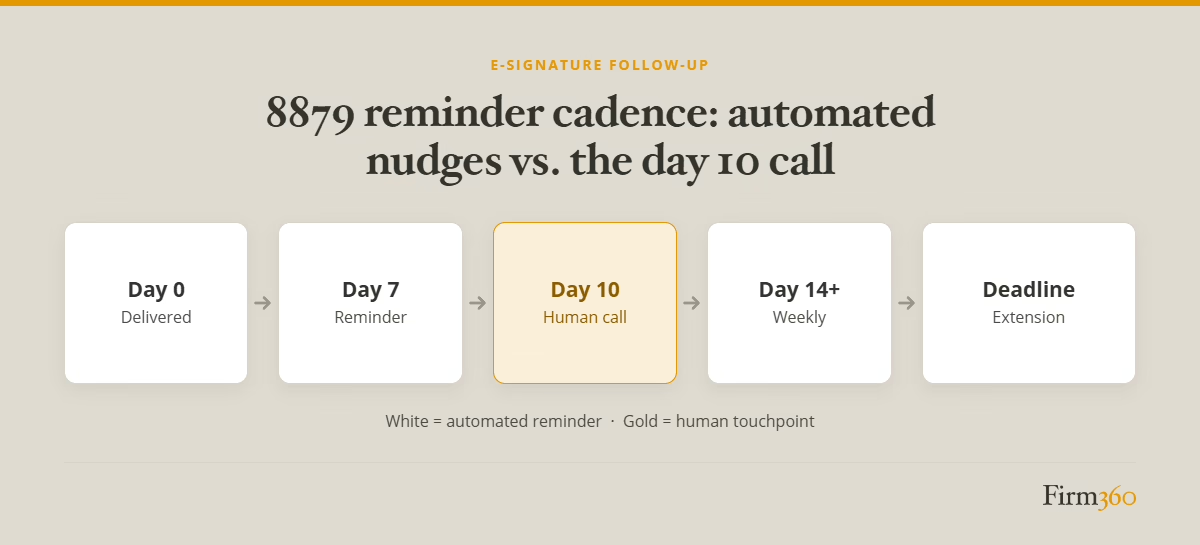
Reminder Cadence for Unsigned 8879s
This is the same discipline that fixes document collection, applied at the other end of the workflow.
Day 0: The return is delivered with the request to sign, through the portal or a secure file share.
Day 7: Automated reminder, same channel.
Day 10: Human outreach. A phone call from an admin, office manager or the preparer, depending on how your firm is staffed. The purpose isn’t to chase — it’s to find out whether something in the return is unclear, and to remind the client that an unsigned 8879 by your stated deadline means an extension.
Day 14 onward: Automated reminders continue weekly until the firm’s signature deadline.
The signature deadline: A date the firm sets ahead of the filing deadline, communicated at delivery. Past it, the return shifts to the extension workflow.
Payment Vouchers
The June call: a client got a voucher for a balance due in April, set it aside, and now has a notice. Delivery is a key opportunity to prevent this.
Say explicitly in the delivery package: what’s owed, when it’s due, how to pay it. Then offer a path. Gray’s firm runs the same two protocols whether the payment accompanies a return or an extension:
“For payments due, there are a couple of different protocols we follow, depending upon what the client is comfortable with. Some are comfortable using the payment function in our software. For those who aren’t, we…instruct them how to go online to make the payment themselves.”
— Brandon Gray, CPA firm owner and co-founder of Firm360
How Workflow Software Supports Delivery
Software enforces the delivery workflow a firm designs. Assembly automation pulls the appropriate instructions, forms and vouchers into a single package, ensuring nothing is left out.
Portal delivery gets the package to the client securely and puts the signature request where they already log in.
Access control matters here, and Gray sets a practical bar:
“The portal should have 2-3 data points to validate a client’s login. For example, Firm360 requires the email address, the last four of their Social Security number, and multifactor authentication.”
— Brandon Gray, CPA firm owner and co-founder of Firm360
Real-time signature status answers what otherwise requires asking around — which returns are delivered, awaiting signature, signed or transmitted.
Reminder automation runs the cadence instead of someone’s memory. And the audit trail captures every reminder, signature attempt and verification result, aligning to record retention requirements.
For a visual of where this sits in the wider process, see the tax workflow automation process map.
How to Build a Delivery Workflow at Your Firm This Off-Season
- Standardize the delivery package. Write down what goes in it. Every time, no exceptions. If you have software that can automate the package assembly process, take advantage of that.
- Write the delivery email. Plain English, one screen. What’s attached, what you need, by when, and what happens if it doesn’t arrive.
- Set the cadence and the signature deadline. Day 0, day 7, day 10 call, weekly after that, and a firm date that triggers an extension.
- Name the escalation owner. Decide now who makes the day 10 call, so it isn’t a question anyone has to answer in March.
FAQs
What is a tax return delivery workflow?
It’s the defined sequence a completed return follows from final review to archive — client review, invoicing, delivery of the signing package, e-signature on Form 8879, transmission, acceptance confirmation and retention — with a named owner and a definition of “done” at each step.
What’s the difference between Form 8879 and the tax return itself?
The return is the filing. Form 8879 is the signature authorization that permits your firm, as the ERO, to enter the taxpayer’s PIN and transmit it. It stays in your files rather than going to the IRS.
Can a client e-sign Form 8879, or does it need a wet signature?
Either. Taxpayers may e-sign where the software supports identity verification, or return a handwritten signature by hand delivery, mail, private delivery service, fax, email or a website.
How long does the IRS require Form 8879 to be retained?
Three years from the return due date or the IRS received date, whichever is later, in a secure, access-controlled system, with the ability to reproduce legible copies.
What happens if the client doesn’t sign the 8879 before the filing deadline?
The return can’t be transmitted. The ERO needs the signed form before originating the submission, so an unsigned return goes on extension.
Do payment vouchers need to be signed?
No. A voucher accompanies a payment; it isn’t an authorization.
Where Delivery Gets Decided
Once the package is with the client, timely filing depends largely on their responsiveness. A client who’s confused, unhappy, or simply forgetful can drag this final stage of the tax preparation workflow out unnecessarily.
A well-designed delivery workflow reduces delays by making the ask clear up front — what the client is looking at, what they owe, what they need to do, and by when — and by ensuring a reminder cadence keeps the required actions in front of them.
For more on how delivery connects to the stages ahead of it, review the step-by-step tax preparation workflow that feeds it.
If you’re evaluating the platform behind the workflow, design the sequence first — then choose the tool that will hold you to it.
*It’s important to note that the IRS requirements highlighted in this article are not meant to be an exhaustive list. For full, up-to-date details, visit irs.gov.
Brandon Gray
Brandon Gray is a CPA, founding member of Banks, Gray & Crumpler, PLLC in Goldsboro, NC, and a Master of Science in Accounting graduate of East Carolina University. After years of battling clunky legacy systems in his own practice, he co-founded Firm360, a cloud-based practice management platform — giving him a front-row seat to hundreds of firms streamlining their operations. He was named one of CPA Practice Advisor’s “20 Under 40” Top Influencers in 2022. Brandon also facilitates C12 Christian CEO coaching groups in Eastern NC, serves as Assistant Chief for the New Hope Volunteer Fire Department, is a private pilot, and an avid outdoorsman with his children.