The third reminder email is the tell. By the time you’re writing it, you’ve stopped preparing a return and started managing a client who hasn’t responded — and behind that email is a file that can’t move until something arrives.
Tax document collection causes unnecessary delays when it goes off the rails. Firms that handle it well have a workflow in place: a defined trigger, a structured request, a reminder cadence someone owns, an escalation point where a person takes over from the system, and a cutoff date past which the return goes on extension.
What follows is that workflow stage by stage — what starts it, what goes out, who checks what comes back, when someone picks up the phone, and what happens to the client who still hasn’t responded as the deadline approaches. It also covers the exceptions that complicate it: the client with half the documents, the joint return where only one spouse is responsive, and the client who is certain they already sent everything.
None of it requires a specific tool. The logic holds whether documents arrive through a client portal, a secure upload link or a shared folder. Software makes the cadence easier to run, but the workflow comes first.
Why Document Collection Is the Stage That Breaks First
Why is tax document collection so hard for accounting firms?
Tax document collection is hard because it’s the only stage of the tax preparation workflow where the firm depends on someone outside the firm — until it’s time for the client to sign the return. A firm controls staffing, review standards and turnaround time. It doesn’t control when a client locates a 1099 or whether an amended K-1 is delivered to the client late in the season.
That dependency is structural, not a client-service problem. Preparation and review move at a pace the firm sets. Document collection doesn’t. The request goes out, and the file sits in a queue governed by a client’s schedule, a brokerage’s mailing date or, sometimes, a spouse’s willingness to go through a drawer.
The second problem is visibility. Most firms don’t know in real time which clients are behind. The record lives in an admin’s inbox, in a preparer’s memory and in a spreadsheet someone updates on Fridays, so the answer exists but isn’t in front of anyone. It surfaces when a deadline forces the question, which is the point at which there are the fewest options left.
The Anatomy of a Tax Document Collection Workflow
A collection workflow has six moving parts. Your firm either designs each one deliberately or inherits it by default.
The trigger
Something has to start the request, and it shouldn’t be a person’s memory. For most firms the trigger is one of two events: a signed engagement letter comes back, or the client sits down for an intake appointment. Either works. What matters is that the event is defined, so there’s a clear signal for when it’s time to send the document request.
The request
Two formats can do the job. A tax organizer walks the client through their full tax picture in a structured questionnaire. A checklist names the specific documents the firm expects from that client. Complex returns tend to warrant the organizer; straightforward repeat clients are often served better by a short list they can work through in one sitting.
Channel follows capability. If your firm runs a client portal, the request goes through it so the response lands where it belongs. If not, an emailed organizer or checklist with a specific due date works, as long as someone owns the tracking. Either way, personalization earns its keep — a request that reflects what the firm already knows about the client narrows what they have to think about.
The intake
Documents arriving is not the same as documents being complete, and that distinction is easy to lose. Someone has to review each submission against the checklist and mark the file one of three ways: complete, received but incomplete, or nothing received.
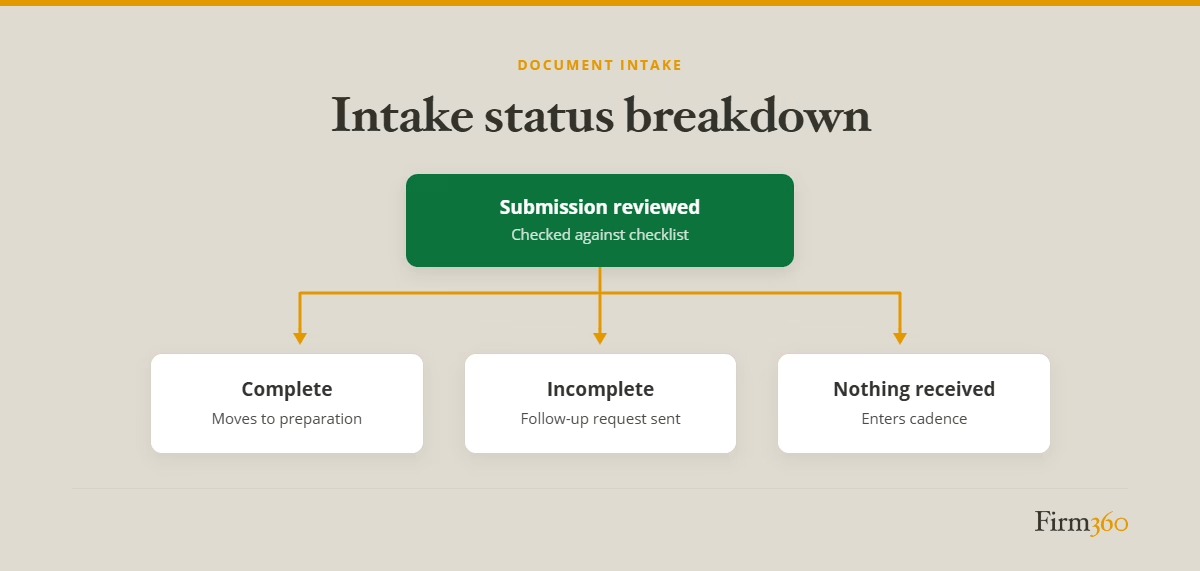
The follow-up, the escalation and the cutoff
These three carry the most weight, and the next section covers them in detail. One point belongs here: the cadence isn’t only for clients who never responded. It also applies when the intake review turns up a gap, and when preparation stops because a question surfaced that only the client can answer. Those follow-up requests need the same weekly rhythm and the same ownership as the original, or they become the informal reminders that never quite get sent.
Reminder Cadence and Escalation
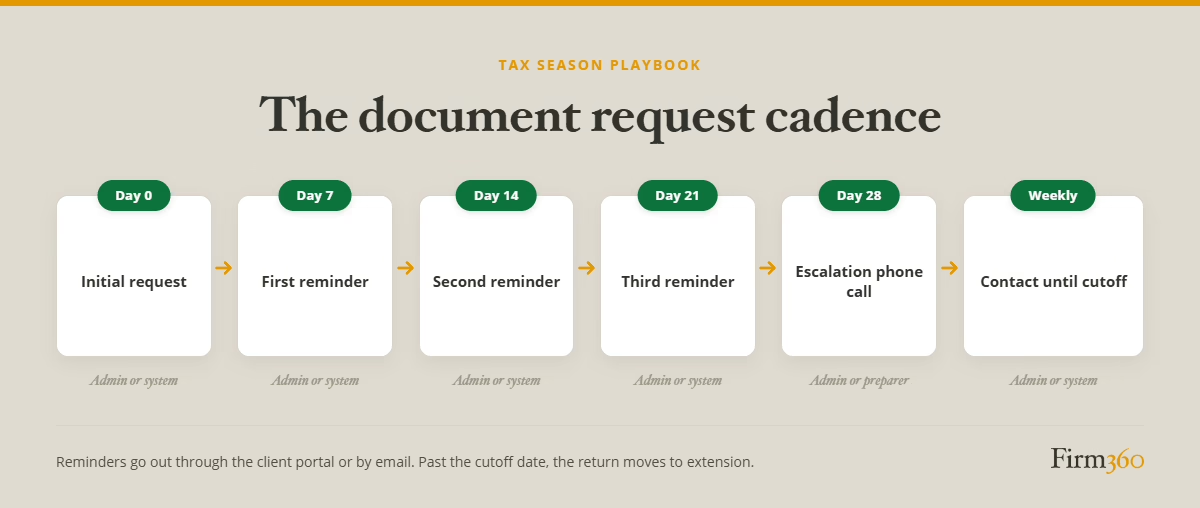
A cadence is a written schedule with an owner at each step.
Day 0: the initial request. The organizer or checklist is triggered and sent through the client portal if the firm has one, by email if it doesn’t. The due date and the extension cutoff are both stated here, not introduced later. This is most often owned by an admin.
Days 7, 14, 21: weekly reminders. Reminders should be sent weekly — ideally through automation. If your firm doesn’t have automation capabilities, an admin should be designated for the weekly outreach.
Day 28: human escalation. A phone call from an admin or from the preparer if one has been assigned. The tone shifts from reminder to advocacy: we want to keep you out of extension, here’s specifically what we still need.
What a call establishes is which of several situations you’re in: the client needs help understanding what to provide or how to get what they need, the client has decided not to proceed, or the return should go on extension.
If the call resolves the situation, the file re-enters the normal flow. If it doesn’t, weekly contact continues until the cutoff.
The delivery date incentive
We asked Brandon Gray, a CPA firm owner and co-founder of Firm360, how his firm keeps document collection from stalling.
One of several ways Gray’s firm encourages clients to provide their documents in a timely fashion is by prescheduling a tax return delivery date that’s conditional upon a fixed deadline for receiving client documents.
We pre-schedule return delivery so clients know if they get all their documents to us by “X” date, we’ll deliver by a particular date.
— Brandon Gray, CPA & Firm360 Founder
For clients whose delay isn’t driven by something outside their control, a firm deadline attached to a delivery date they want gives them a reason to move.
Example reminder cadence & escalation
Gray’s firm takes a multipronged approach to follow-ups:
First, we use Firm360 to send weekly automated document request reminders… for returns that have already been started, the preparer takes responsibility for pinging the client about missing information. They know which clients to follow-up with each week based on their Firm360 dashboard, and we ask that they document their outreach in the Activities tab. If this drags out longer than it should, they escalate to a partner. For returns that haven’t been started, our office manager reaches out personally to those clients who haven’t responded to the automated reminders.
— Brandon Gray, CPA & Firm360 Founder
The cutoff
The cutoff is the date past which a client goes on extension. It protects capacity, and it works best if it’s pre-defined and communicated upfront — in the engagement letter, and again in the day 0 request.
Anchoring the cutoff to batch extension filing makes it concrete. Gray’s firm files roughly two weeks ahead of each deadline, around March 1 for corporate returns and April 1 for individual returns.
Exception Handling
The client with half the documents
Waiting for a complete file before starting is one approach. Gray’s firm takes another.
Realistically, even if you were to wait until all documents come in, there will inevitably be follow-up questions and sometimes additional documents are needed. That’s why in my firm, we begin preparing returns as soon as the information starts flowing in. Once we hit a point that we’ve worked through all we have and are waiting on additional information, we pause until the remainder of the docs come in.
— Brandon Gray, CPA & Firm360 Founder
A complete file is partly a fiction — preparation itself generates document requests — so waiting for completeness only pushes the second round of gaps later. Working a file until it’s genuinely blocked, then pausing with a documented list of what’s outstanding, consolidates those questions into one follow-up.
The unresponsive spouse
On joint returns, reminders might reach only the responsive party, which doesn’t help when the outstanding documents belong to the other. Address both taxpayers on the request, keep both on the reminder thread, and on the day 28 call, ask which of them holds the missing items so the follow-up goes to the right person.
The client who says they already sent it
Sometimes they did. Documents get uploaded to the wrong folder, emailed to a staff member who is out, or attached to a message that never sent. Treat the claim as accurate and search first. Then respond with what you have rather than what you don’t — “I’m showing your W-2 and two 1099-INTs received on the 12th; I don’t see the partnership K-1.” That gives the client something specific to look for and keeps a filing question from becoming a dispute.
How Workflow Software Helps
Automated follow-ups
Practice management software makes it more efficient to remind clients when documents are missing. With request and reminder automation features, the system follows up on schedule without having to rely on a busy team member’s memory. Gray’s firm uses that automation as the base layer year-round:
We use Firm360 to send automated document request reminders weekly. Those reminders go out to all clients with missing documents.
— Brandon Gray, CPA & Firm360 Founder
Visibility into who’s behind
Reporting addresses the visibility problem: a standing list of every client with an open request is a work queue rather than something a partner has to assemble. And portal integration lands uploads in the correct client file rather than an admin’s inbox, eliminating a filing step and a category of “we never received it” problems.
One 50-person firm eliminated that patchwork entirely and now saves 200 hours a week firm-wide.
How to Implement This at Your Firm This Off-Season
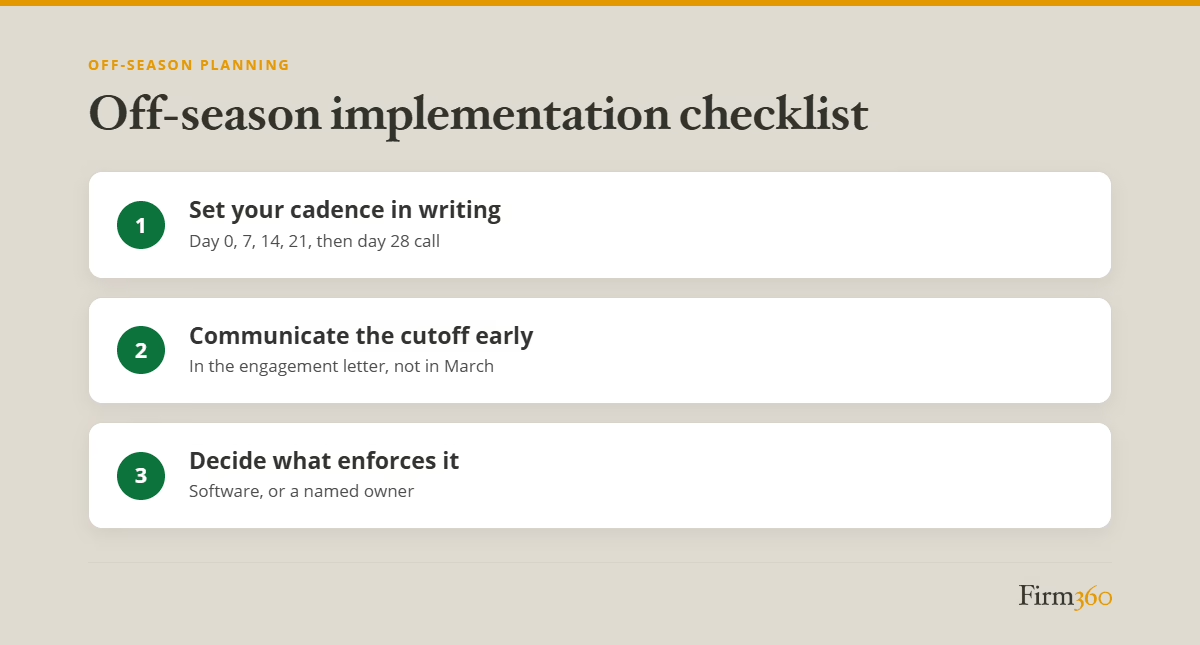
Set your cadence in writing. Day 0, day 7, day 14, day 21, then the day 28 call and weekly contact to the cutoff. Name the owner at each step — an admin, assigned preparer, your workflow software, or some combination thereof — because a cadence without an owner is one that’s likely to fail.
Communicate the cutoff date in the engagement letter, not after the client is already late. A date set there is one the client agreed to; a date introduced in March is one they’re hearing too late. State the date, what happens after it, and that an extension to file isn’t an extension to pay.
Then decide what enforces it. Either choose a tool that runs the reminders and surfaces who’s behind, or commit to a manual cadence and put a specific team member in charge of running it as a defined weekly responsibility.
FAQs
What is tax document collection?
Tax document collection is the stage of the tax preparation workflow that runs from the trigger event — a signed engagement letter or an intake appointment — through receipt and validation of every document required to prepare a return. It includes the organizer or checklist, the intake completeness check, follow-up reminders, escalation and the extension cutoff.
How do you get tax documents from clients faster?
Reduce client effort and remove ambiguity. Send a request that reflects what the firm already knows about the client, state a specific due date and the extension cutoff in the first message, and run reminders on a fixed schedule rather than when someone notices.
How often should you remind clients about missing tax documents?
Weekly is a workable standard. One cadence: automated reminders at day 7, day 14 and day 21, a phone call at day 28, then weekly contact until the cutoff date. After three or four unanswered automated messages, a human call does more than another email.
What’s the difference between a tax organizer and a document request?
A tax organizer is a comprehensive, structured questionnaire that walks a client through their full tax picture and is typically pre-populated with prior-year information for repeat clients. A document request is narrower — a targeted follow-up for specific items, usually sent after the first round of documents comes in and a gap turns up.
Do I need a client portal for tax document collection?
No, but you need a single channel and a way to see who’s behind. A portal handles both by keeping uploads in the client file and making outstanding requests visible. Firms without one can run the same workflow through email and a tracked checklist, provided someone owns it.
Where This Leaves You
There will always be clients who delay in sending their documents. But for many, the problem goes away when the firm makes it easier for them to remember and to deliver — regular reminders, a request that names exactly what’s outstanding, and a cutoff they heard about in December rather than in March.
For the ones who still delay, the workflow decides what happens next instead of leaving it to whoever notices first. Reminders go out weekly. A person picks up the phone at a known threshold and finds out what’s actually going on. The cutoff holds, and the return goes on extension rather than into a scramble.
Off-season is when that gets built. Write the cadence, name the owners, put the cutoff in the engagement letter and decide what will enforce it.
That last decision is the one that determines whether the first three hold up in March. Our client portal puts document requests, automated reminders and secure uploads in one place — which is what makes a weekly cadence sustainable in the weeks when nobody has time to run one by hand.
For more on mapping this stage against the ones around it, our tax preparation workflow article covers the operational aspects of how a return moves from intake through filing.
Expert Bio
Brandon Gray is a CPA, founding member of Banks, Gray & Crumpler, PLLC in Goldsboro, NC, and a Master of Science in Accounting graduate of East Carolina University. After years of battling clunky legacy systems in his own practice, he co-founded Firm360, a cloud-based practice management platform — giving him a front-row seat to hundreds of firms streamlining their operations. He was named one of CPA Practice Advisor’s “20 Under 40” Top Influencers in 2022. Brandon also facilitates C12 Christian CEO coaching groups in Eastern NC, serves as Assistant Chief for the New Hope Volunteer Fire Department, is a private pilot, and an avid outdoorsman with his children.