Busy season rarely creates workflow problems — it reveals them. A return waiting weeks for review, a monthly close stalled on one unreconciled account, or a delayed signature may seem isolated. Often, each points to a process in need of improvement. Firms that finish with fewer surprises have put in effort to make workflows easier to manage: stages are defined, owners are clear, handoffs have standards, and exceptions have a route back into production.
Workflow improvement is sometimes treated as a software decision. But a workflow defines the operating architecture: what starts work, who owns each stage, what qualifies it to move forward, and how exceptions are handled. Software can reinforce that design; it cannot create it.
As firms grow, informal processes become harder to sustain. Knowledge held by one experienced team member does not automatically transfer to new staff, and it does not stretch to cover a growing client base. Well-designed workflows make work repeatable while preserving professional judgment. This guide covers the building blocks of a well-designed workflow, the workflows many firms run, how tax season tests them end to end and a practical improvement method.
What Are Accounting Workflows?
An accounting workflow is the documented sequence of stages, owners, handoffs and decisions that governs how a type of work moves through a firm, from the trigger that starts it to the point it is complete.
While professional standards, rules, and regulations govern your professional work, the workflow is the operating layer around it. That layer is easy to underestimate because it’s administrative. But a technically sound return can still miss a deadline if intake was not properly completed, the reviewer was not alerted or the signature request sat unsent.
Workflows vs. Checklists vs. Automation
A checklist helps one person remember the steps in a task. It might confirm that a preparer reviewed source documents or that an administrator verified a signed engagement letter. A workflow connects those tasks across the firm. It defines what starts the work, who owns it now, what must be completed before the next person receives it, and what happens if the work stalls.
Automation is different again. It is the capability to execute defined rules through software: route a task when a status changes, remind a client about missing information, or alert a manager when work has been in review too long. Those functions are useful when the firm has already decided what the rules should be.
| Comparison | Checklist | Workflow | Automation |
|---|---|---|---|
| What it is | A list that helps one person remember the steps in a task. | The documented sequence of stages, owners, handoffs and decisions that moves a type of work through the firm. | Software that executes rules the firm has already defined. |
| Scope | One person, one task. | Work across people, teams and stages, from trigger to completion. | Repetitive coordination steps inside a defined workflow. |
| Example | Confirming a preparer reviewed source documents. | Moving a return from preparation to review only once it meets the firm’s definition of done. | Reminding a client about missing documents, or alerting a manager when a return sits in review too long. |
| The question it answers | Did I complete every step? |
Who owns this now, and what has to be true before it moves forward? |
How do we run this rule consistently at volume? |
| When to build it | Within a workflow, for any task with steps someone could miss. | First, before choosing or configuring software. | After the workflow is defined and standardized. |
That is why workflow design should come before software configuration. For a closer look at the relationship between process design and technology, see how to automate accounting workflows. The central question is not simply which steps can be automated. It is which steps should happen, in what order, under whose ownership, and with what checks in place.
How Workflows and Automation Lead to a Scalable Firm
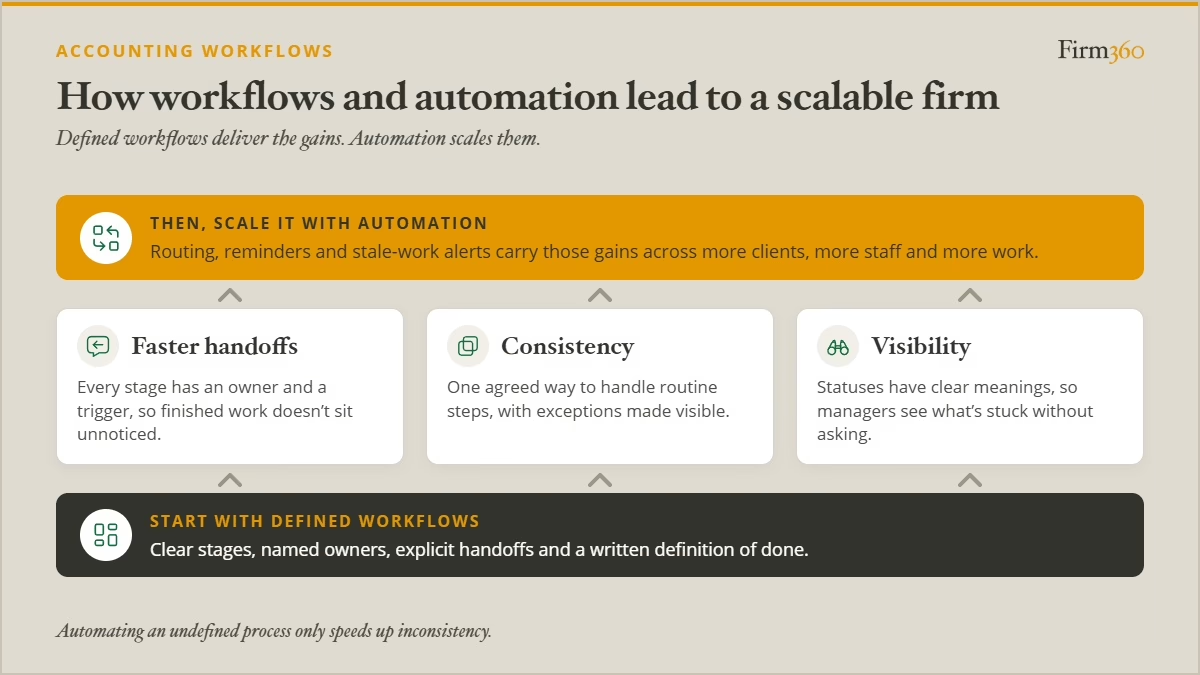
A firm can buy software without changing how its people coordinate work, and it can run a well-documented process without automating a single step. Neither one alone gets a firm to scale. That comes from getting work to move consistently through the firm, and then automating the repetitive steps so the system holds that consistency in place.
Workflows reduce time lost during handoffs
Preparation time is visible. Waiting time is easier to miss. A return may take a few hours to prepare but spend days in a queue because no one is responsible for assigning it to a reviewer. After review, it may sit again because no status change or person triggers the next step. Training preparers to work faster will not fix either delay.
These gaps are costly because the work is waiting, not moving, and every day it waits pushes the deadline closer and the invoice further out. The issue may be a missing routing rule or a queue that no one actively monitors. Trace the work across the whole process rather than examining each person’s task in isolation.
A structured workflow audit helps identify where elapsed time accumulates, which handoffs are unnecessary and where work is being repeated. That gives leaders a better starting point than asking individual staff members to move faster.
Workflows Ensure Consistency
A repeatable workflow means that routine steps are handled consistently and exceptions are visible. Without a shared process, staff can follow different habits for the same task, leaving colleagues to discover missing information, redo work or guess what the previous person intended.
Stacy Jones, manager at Anchor Point Advisory Group, describes the operational cost directly:
“When workflows run poorly there’s no consistent ‘right way’ to do a task. Things get missed, and time management suffers.”
The goal is not to replace professional judgment with rigid rules. It is to remove avoidable variation from the steps surrounding that judgment. The tax preparation workflow illustrates how stages, owners and explicit handoff criteria can create consistency.
The Structure of Workflows Creates Visibility
When statuses have clear meanings and each stage has an owner, managers can see where work stands without asking the team to reconstruct it. A status such as “ready for review” is useful only if the firm has agreed on what ready means and the reviewer can trust that the criteria have been met.
Without those definitions, dashboards can create the appearance of visibility while hiding the actual problem. A file may look active because it has a status, even though it has been waiting for a week. Useful visibility connects a status to an owner, an expected next action and a way to identify stale work.
That principle is especially important when the firm is waiting on clients. A defined tax document collection process makes missing information visible early enough for the team to respond before the deadline leaves few options.
Automation Scales What the Workflow Defines
Once stages, owners and handoff criteria are set, automation keeps them running at volume. A status change can route a return to the next reviewer, reminders can go out on schedule without anyone remembering to send them, and stale work can surface on its own instead of waiting for someone to ask. Without that definition, automation can only speed up an inconsistent process.
According to research from CPA.com and AICPA PCPS workflow automation is particularly common among high-performing client accounting services firms: 87% use these tools to monitor and evaluate engagements, a rate 10% higher than that of their peers. While this doesn’t prove automation drives better performance, it highlights how common workflow tracking is among top performers.
The Anatomy of a Well-Designed Accounting Workflow
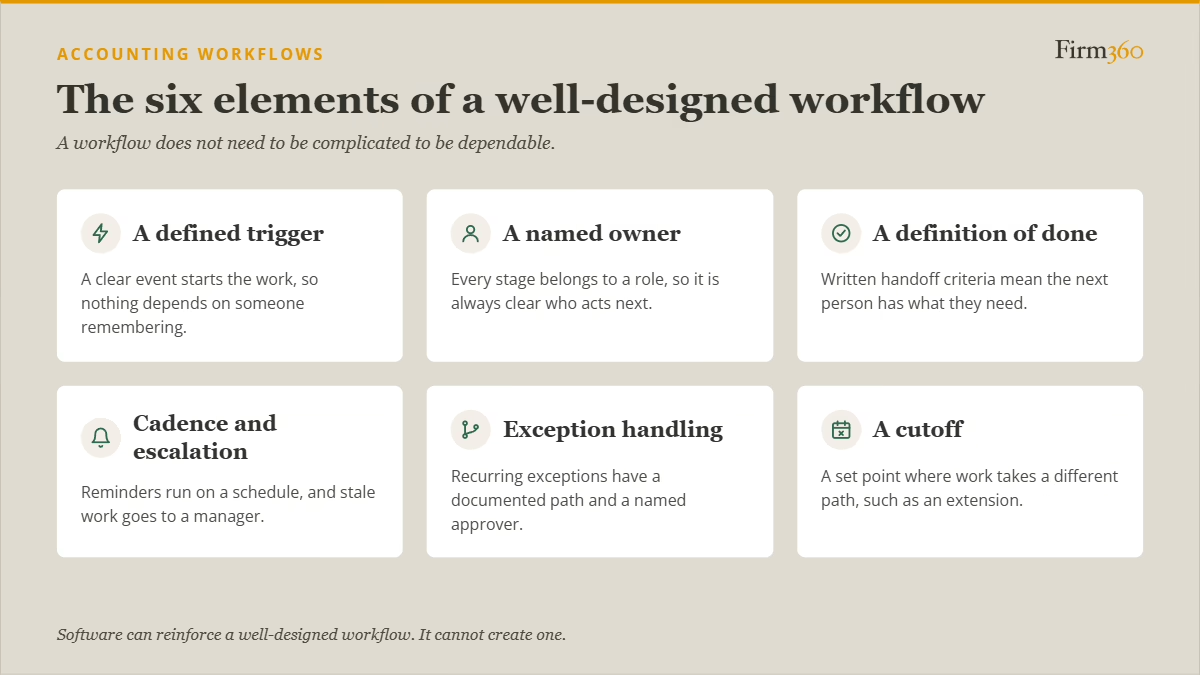
A workflow does not need to be complicated to be dependable. It does need a few elements that make the process understandable to everyone who touches it.
#1: A defined trigger
Every workflow needs a clear event that starts the work. A signed engagement letter might trigger client setup and the document request. A period-end date might trigger the monthly close. Without a trigger, work starts when someone remembers, making the process dependent on individual vigilance.
#2: A named owner for every stage
Assign ownership to a role rather than relying only on a person’s name. The person in the role may change, but the responsibility remains. Every stage should make clear who is expected to act next and who notices if that action does not happen.
#3: A written definition of “done” at each handoff
A handoff is not complete because someone changed a status. It is complete when the next person has what they need. A return may be ready for review only after required documents have been received, preparation is complete and open questions are documented. Defining “done” prevents reviewers from becoming triage coordinators.
#4: A cadence and escalation point
Some work needs a reminder schedule; other work needs a manager to intervene when a status becomes stale. Set the cadence, identify the person who monitors it and specify when a reminder becomes an escalation. Automated reminders can support this rule, but the firm must decide what happens when the reminders do not work.
#5: Documented exception handling
A useful workflow accounts for common exceptions without allowing every unusual case to rewrite the process. Document recurring exceptions, define how they should be handled and decide who can approve a departure from the standard path. Design for the rule while making acceptable exceptions explicit.
#6: A cutoff
A cutoff defines when work follows a different path. For tax returns for example, that decision should not be made for the first time under deadline pressure. State the document cutoff in the engagement letter, then connect it to a clear extension path when the return cannot reasonably be completed on time. A defined document collection process gives clients advance notice of the deadline and gives staff a consistent point for escalation; the tax extension workflow defines what happens after that point.
Common Accounting Workflows in a CPA Firm
Every firm’s workflows reflect its service mix, client base and staffing model. Still, most firms run the same kinds of recurring processes, from operational work like client onboarding to service-line work like tax and audit. Most move through similar stages: an event starts the engagement, information is gathered, work is completed and reviewed, and the result is delivered or recorded. Standardizing these processes does not mean forcing every service into the same template. It means giving each process enough structure that people can understand its status and responsibilities.
Client onboarding establishes the relationship before production begins. It may include engagement letter execution, client and entity setup, initial document requests, access permissions and an internal briefing on deadlines or special requirements. When onboarding is incomplete, the team may begin work without a clear scope or the information needed to deliver it.
The monthly close is a recurring sequence rather than a one-time project. Each step depends on the one before it: adjustments wait on reconciliations, financial statements wait on adjustments, and client reporting waits on the statements. A close workflow makes it clear whether a step is in progress or stuck, waiting on missing client information or an unexplained variance, so the blocker gets cleared before it delays reporting.
Tax preparation combines client-dependent steps with firm-controlled production. Intake and document collection determine whether a return is ready to enter production; preparation and review require clear ownership; filing and acceptance tracking close the loop. The workflow has to handle both the standard path and exceptions such as missing information or an extension.
Audit workflows coordinate planning, risk assessment, fieldwork, documentation, review and reporting. The workflow should make responsibilities and review points visible without attempting to replace professional standards or auditor judgment.
Bookkeeping workflows are often frequent and deadline-driven. Accounts payable, accounts receivable, reconciliations and recurring reporting each have their own triggers, required inputs, approval points and completion criteria. Small delays can repeat from period to period if the process depends on manual follow-up or informal knowledge.
The details differ, but the design questions are consistent: what starts the work, who owns each stage, what makes a handoff complete, and how does the firm identify a delay? For practical ways to apply these principles across core processes, see how to streamline your workflow. The goal is not to document every task at once; it is to create a dependable operating pattern for work that recurs.
The Tax Season Workflow, End to End
Tax season is a useful test of workflow design because multiple processes depend on one another and deadlines are fixed. Intake affects document collection. Document collection affects when preparation can begin. Review affects delivery, and delivery depends on signatures and filing confirmation. A delay early in the chain can surface much later, when the firm has fewer options.
A tax preparation workflow carries a return from confirmed engagement to filing acceptance. Its seven stages create a shared production path, but the list alone does not make the process reliable. The value comes from defining who owns each stage, what qualifies work to move forward, and who acts when it stalls.
The seven-stage backbone is:
- Intake and engagement confirmation
- Document request and collection
- Document validation
- Preparation
- Review
- Pre-processing
- E-file and acceptance tracking
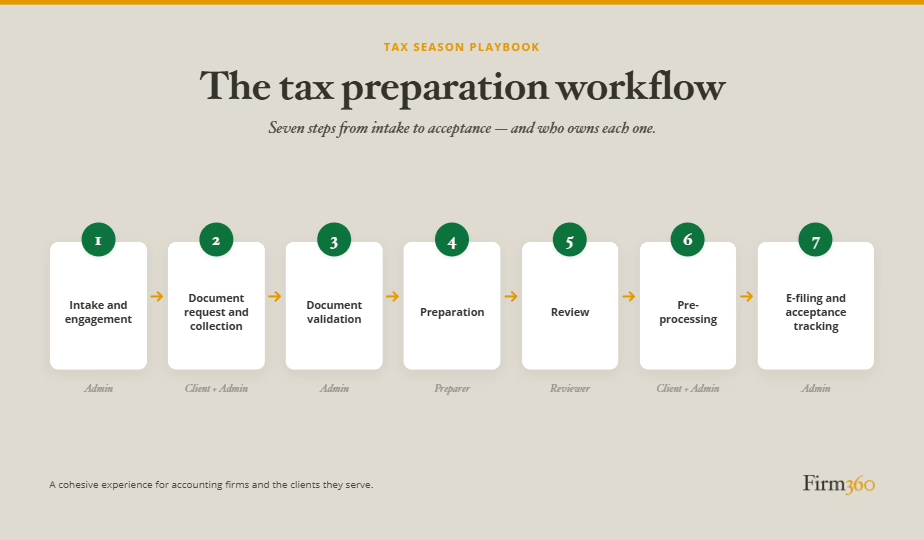
These stages make bottlenecks easier to diagnose. Silent intake means a return never formally enters production. An unclaimed queue means work is ready but no one has taken responsibility for it. A phantom-ready return reaches review before preparation is complete, turning the reviewer into a triage station. Each failure points to a missing trigger, owner or definition of done. A well-designed tax preparation workflow spells out the handoff criteria that prevent those delays and gives managers a clearer view of where a return needs attention.
The seven stages are the firm’s production path, but three points along it deserve special attention. Each one either depends on the client or sends the return off the standard path.
The first comes near the front of the chain. Document collection is where the firm waits on someone outside the firm, which is why it’s often the first stage to break. A written reminder cadence, a set point where a person takes over from automated reminders, and a cutoff stated in the engagement letter keep a late 1099 from becoming a deadline problem.
When that cutoff passes, the return takes a branch. An extension moves the deadline, but the firm still owns the filing, communicating any payment the client owes, and getting the return back into production before the final deadline. Batch filing ahead of the cutoff and a separate status for extended returns keep that work from disappearing until fall.
At the end of the chain, the return goes back to the client, who has to review it, pay the invoice and sign Form 8879 before the firm can file. Slow signatures usually trace back to sequencing, not the client. Collecting payment before the signing package goes out, and stating what happens if the signature date is missed, both help.
Taken together, tax season shows the building blocks working as one system. The cutoff in document collection triggers the extension branch, and the same cadence-and-escalation discipline that brings documents in at the start brings signatures back at the end. A gap anywhere in the chain shows up later, usually when the deadline leaves the fewest options.
How to Build Scalable Accounting Workflows
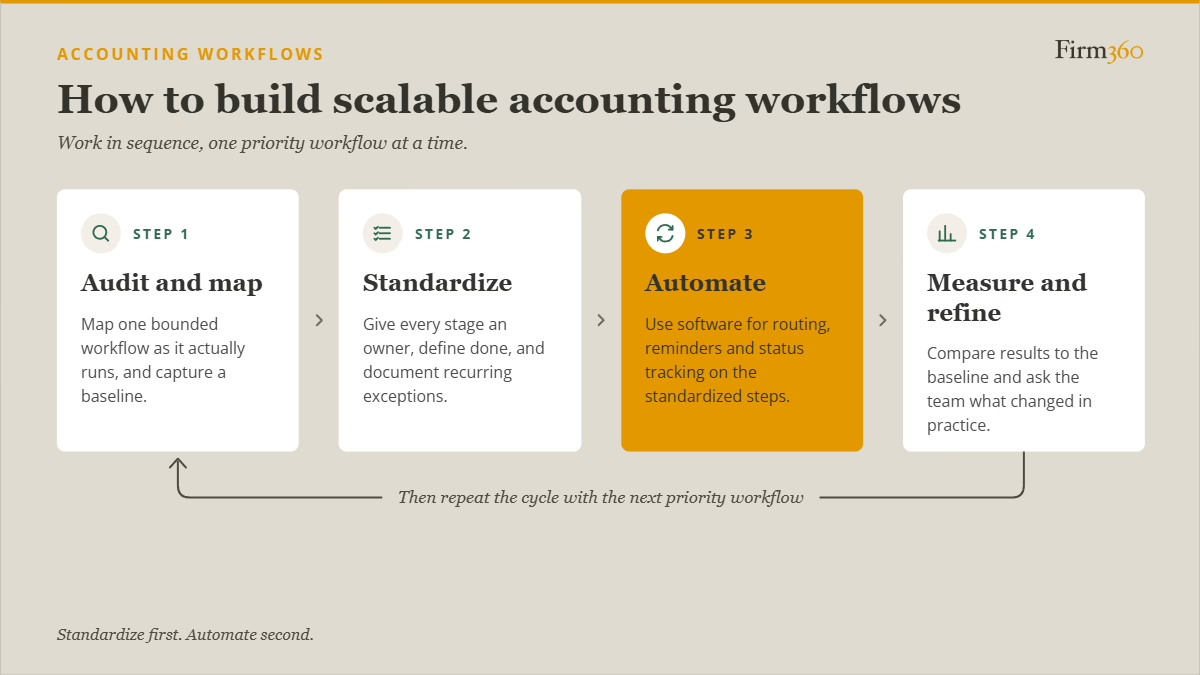
When every process seems to need attention, the challenge for firm leaders is choosing a fix the team can absorb and that will make a real difference. Work in sequence: audit one priority workflow, agree on the standard, automate the repeatable steps, then check the results.
Step 1: Audit and map the current state
Start with a workflow that has a specific beginning and end. “Tax season” is too broad to audit. “Individual returns, from organizer sent to return delivered” is bounded enough to map and measure.
Document the process as it actually runs. Interview the people doing the work, not only the people supervising it. Map the stages and every point where work changes hands, including between people, teams and systems. Capture a baseline before making changes, being sure to choose measures the firm can actually collect and use.
For a step-by-step method for choosing a priority process, mapping it and establishing a baseline, use the guide to auditing your firm’s accounting workflows before tax season. The audit is the diagnostic step; it helps the firm decide whether the right fix is standardization, automation or a larger redesign.
Free download: Accounting Workflow Audit Worksheet
Step 2: Standardize
Once the current state is visible, write the target process in operational terms. Assign a role to every stage. Define what must be true before work can move forward. Decide how items are assigned from shared queues and what happens when a task becomes stale. If the process depends on one experienced employee knowing when to intervene, document the decision so it can be repeated.
Start with exceptions that recur, not every imaginable edge case. Three to five common exceptions from the last season may be enough to expose decisions staff currently make from memory. Define how those exceptions are handled and who can approve a departure from the standard path.
For additional practical examples of reducing unnecessary steps across recurring firm processes, see how to streamline your workflow. Standardization should give staff a clear, workable process — not a manual so elaborate that nobody can follow it.
Step 3: Automate what’s been standardized
Once a workflow is clear, automation can reduce manual effort.
Software can support task assignment, reminders, status tracking, document requests, e-signatures and visibility into workflow progress. What software cannot do is decide who owns an unclear process or resolve exceptions that have never been defined.
For the implementation side of that decision, the guide to accounting workflow automation explores how to approach automation once the workflow itself is clear. The aim is to remove repetitive coordination while keeping professional judgment and exception decisions with the people qualified to make them.
Step 4: Measure and refine
After changes have been in place for a while, measure against the baseline and the problem that prompted the change. For example, if returns were sitting in review, track days-in-status before and after the change.
Also, ask the people doing the work what changed in practice. It’s important to check whether the change shifted the bottleneck elsewhere or created extra work at another stage.
FAQs
What are accounting workflows?
Accounting workflows are documented sequences of stages, owners, handoffs and decisions that define how work moves through a firm from a specific trigger to completion. They make responsibilities and next steps clear across the people involved.
What is the difference between an accounting workflow and workflow automation?
A workflow defines how work should move through the firm, including ownership, handoffs and exception handling. Automation uses software to execute defined parts of that process, such as routing tasks or sending reminders. Automation is most effective when the underlying workflow is clear.
What are examples of accounting workflows?
Common examples include client onboarding, monthly close, tax preparation, tax document collection, tax extension management, tax return delivery, audit procedures, accounts payable, accounts receivable and recurring bookkeeping.
Which workflows should a firm standardize first?
Start with workflows that show measurable problems, affect high-revenue work or involve a large share of the team. Write-offs and overbudget engagements can help identify candidates, but a workflow audit is needed to determine whether the cause is workflow design, pricing, scope or some combination.
Do you need software to run good accounting workflows?
No. A firm can define and improve workflows without automating every step. Software can make task routing, reminders and visibility easier to manage, but it cannot resolve unclear ownership or undocumented decisions on its own.
How often should CPA firms review workflows?
Review priority workflows at least annually and after significant process or technology changes. For tax processes, the period after the initial or extension season can be useful because the team can assess pain points while there is still time to make changes before the next cycle.
How do you know if workflows are working?
Measure the outcomes tied to the problem you set out to fix. Useful indicators may include elapsed time by stage, work sitting in a queue, rework, exceptions, escalations and engagements that exceed budget. Combine those measures with staff feedback to identify intended and unintended effects.
Conclusion
Scalable firms are not necessarily the firms with the most automation. They are the firms that understand how work should move, make ownership visible and keep improving the process as the firm changes. That foundation gives technology something clear to enforce.
Start with an accounting workflow audit to identify the constraint that matters most, then make at least one change you can measure. Our free Accounting Workflow Audit Worksheet gives you a ready-made structure for mapping the process, spotting bottlenecks and tracking results against your baseline. Standardize first, automate second, and give the firm a process it can grow on. When you are ready to see how practice management software can support clearer ownership, task tracking and client follow-up, request a Firm360 demo to explore how the platform could support your firm’s workflows.